Remote Desktop Printing - TSPrint

TSPrint is the RDP printing software for your Terminal Services/Remote Desktop/VDI or Citrix environment. The simplicity to use and implement, paired with an affordable licensing system, makes TSPrint one of the most popular remote desktop printing solutions on the market today. Avoid installing printer drivers on your terminal server, increasing the stability of all of your servers. Start offering your clients printing directly to their local printers from your terminal server without any additional time required on your side for implementation or configuration.


With all of our products you will receive a free 30 day trial. This will allow you to test our products in your environment.

TSPrint not only provides you with terminal services printing, but also includes additional tools which will make the day-to-day work on a remote desktop server much easier. You may enable or disable each of those features, so that you have total control over your terminal server.


Driverless Printing

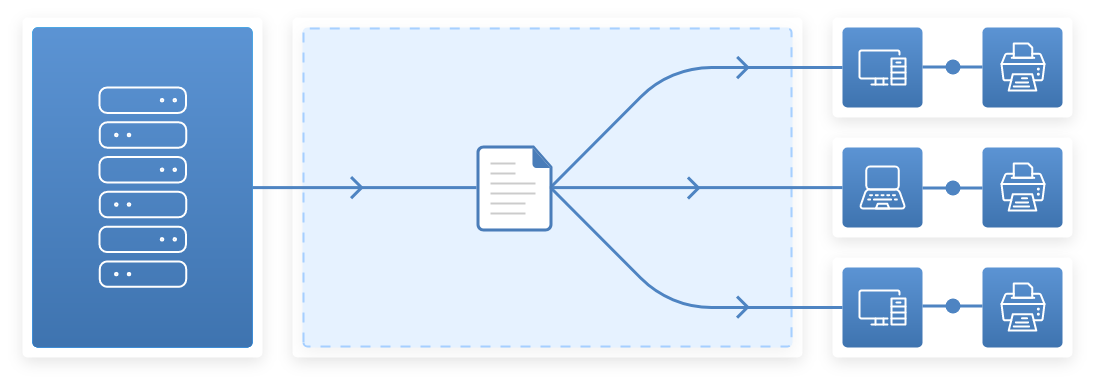
There's absolutely no need to install any printer drivers on your terminal server when you have TSPrint installed. TSPrint comes with its own virtual printer driver which will receive the print job, compress it, and send it to your local workstation.

Driverless Printing


Improved Printing Performance

When using Microsoft Printer Redirection, the print job is sent directly through the RDP connection, without any compression. This often results in long waiting times between each job. With TSPrint, you will receive extraordinary performance thanks to our print job compression technology.

Performance


Easy and Fast Deployment

The TSPrint installation is a plug and play solution, with no configuration required. Our installer comes with a 'silent install' option so you will be able to deploy them across your network. MSI packages are also available, so active directory deployment is simple to do.

Deployment And Installation


Works on Any Network

TSPrint uses the Microsoft Virtual Channel technology. By using VC, TSPrint can work as long as you can connect to the terminal server. There is no need for any additional network configuration.

Network


Open Files Locally

Right click on any document and select the TSPrint Open Locally option. Your document will be transferred to the local workstation and opened by the default application.

Open Files


Transfer Files

With a simple right-click, you can transfer your file to the local workstation. The standard save dialog will show up, and you can select where on the local workstation you wish to transfer the file.

Transfer Files


Print and E-mail

With the TSPrint PDF printer you can create PDF documents and automatically send them as e-mail attachments from either your server or your local workstation.

E-mail


Simple and Affordable Licensing

With no recurring and hidden fees and a lifetime free upgrade policy, the licensing system can't get any simpler. You just need to purchase one license for your terminal server. You can have any number of clients or printers - there are no limits.

Transfer Files


Download Free 30 Day Trial


The best way to see how TSPrint works and just how much it can help you is to try it out. We provide a 30 day trial period with each installation, so you will have enough time to make sure that TSPrint is the ideal solution.

Server Download

Download server installation :

Version: v1.9.8.6

File size: 13.2 MB

MD5 Checksum: 56467a5e4447a7de6103908217f9f3ca


Client Download

Download client installation :

Version: v1.9.8.6

Select Operating System:


Download Older Versions

How to install TSPrint?

Install Client

First, close all open RDP connections. Download the TSPrint_client.exe package and run it. After a few seconds, the installation will finish, and you can reconnect.

Install Server

Connect to your terminal server and download the TSPrint_Server.exe file. Start the installation and follow the instructions. Once the installation finishes you are ready to print.

Print

You can now print to one of the three virtual TSPrint Printers. Use TSPrint Default to print to your local default printer. TSPrint Printer allows you to choose a custom local printer. Use TSPrint PDF for PDF and e-mail utilities.

Release history

2/21/2013 V1.9.8.6 - Major Release

Release notes

1/31/2012 V1.9.7.5 - Client Release

Release notes

11/30/2012 V1.9.8.5 - Minor Release

Release notes

04/06/2012 V1.9.7.3 - Minor Release

Release notes

03/05/2012 V1.9.7.1 - Minor Release

Release notes

03/05/2012 V1.9.7.0 - Major Release

Release notes

03/02/2012 V1.9.6.0 - Minor Release

Release notes

TSPrint Licensing Options

Unlimited license : $299


*10 Users License : $199

*Single User License : $99

*IMPORTANT: The 10 user license and the single user license count the number of terminal server users, not the number of TSPrint users! If you exceed the number of allowed users, TSPrint will refuse to print. You can upgrade your license at a later time if you require more users than your license allows.

TSPrint Licensing

The price of the TSPrint license is a one-time payment without any recurring or hidden costs. TSPrint is licensed to terminal servers, so you do not need to purchase a separate license for each client installation. With each license you also receive a free lifetime upgrade. Limited licenses (both single user and 10 user licenses) limit the number of terminal server users simultaneously connected. For example, if you have a 10 user license but fourteen users are connected to the terminal server, TSPrint will refuse to print.

Single user license

A single user license is ideal for individual connections from your home desktop to your office workstation. It can also be used on the Windows server platforms, but it only allows one user connection at a time.

10 users license

This license is targeted at smaller companies or offices which have no more than ten users simultaneously connected to their terminal server.

Unlimited license

The unlimited license has no restrictions. You can use TSPrint on your terminal server no matter how many users are connected or how many printers each of them have.

License Expired?

Request a free trial license extension in case you need more time to evaluate our product. You will receive your new trial license shortly after you fill out the application.

Partner Program

Cloud services and managed services providers can benefit from our products. The TerminalWorks Partner Program will enable you to buy bulk license packages of TerminalWorks products and resell them further.

Contact Us

E-mail:

Phone:

+14077451844