Remote Desktop Scanning - TSScan

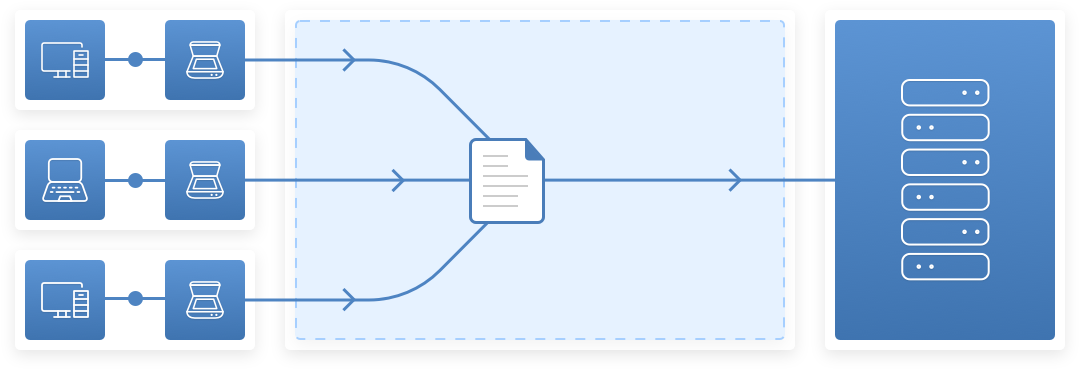
Fully TWAIN standard compliant scanner mapping for your remote desktop, terminal services, VDI or Citrix server. TSScan lists all your local imaging devices and makes the accessible on your remote desktop server. Through advanced compression methods and the Microsoft Virtual Channel technology TSScan can be used on any kind of network. There is no lose in image quality so that our solution is ideal even for enterprise environments.

TSScan has become the tool of choice by many managed service providers and enterprise software vendors. Try it out yourself with our free 30 day trial..

Instead of manually transferring scanned or otherwise captured images and documents you can use TSScan to map your local imaging devices to your terminal server. This way you can save not only time but utilize your applications scanning mechanism which is often more advanced then the image import functionality. TSScan comes with full TWAIN standard compliant scanning drivers which means that you will be able to use your applications on your terminal server just as you would on your local workstation. Instead of investing in a server client architecture just to enable scanning you can utilize TSScan which is far more cost effective solution.


Seamless Remote Desktop Scanning

Use your scanners on your terminal server as you would use them on your local workstation. The seamless scanner driver mapping enables you to scan directly to your scanners from any remote desktop server and on any network.

Driverless Printing


Standalone Scanning Application

Beside the TWAIN mapping which TSScan provides you can also use it as a standalone GUI application. No need to install other third party scanning applications as TSScan comes with all the functionality of such products.

Performance


Scan to TIFF, JPEG and BMP

Use the TSScan GUI application to scan documents from your local scanner to your terminal server into common image formats as JPEG, BMP or scan it directly into PDF documents. You save time and resources by avoiding other third party scanning solutions.

Deployment And Installation


Fast And Secure

TSScan is built on the Microsoft Virtual Channel technology. Because of VCT TSScan can work on any kind of network as long as you can connect via RDP. All communication that goes through the virtual channel is encrypted and compressed. This way you not only save time with fast image transfer you also have a secure scanning solutions as all data is highly encrypted.

Network


High Image Quality

With the default compression settings TSScan delivers the best of both world. You get fast transfers from your local scanner to your terminal server and a high quality of the resulting images. You can further tweak the internal settings of TSScan to get even faster transfers or better image quality.

Open Files


Ideal For Healthcare Providers

Scan all the patients documents to a central terminal server and make that data easily and securely available to other staff. After each scan the scanned document or image is encrypted and sent to the terminal server. There is no loss in image quality so even important medical charts, scans and documents will retain all the desired information.

Transfer Files


Simple and Affordable Licensing

With no recurring and hidden fees and a lifetime free upgrade policy the licensing system can't get any simpler. You just need to purchase a single license for your terminal server. The number of clients or scanners aren't limited.

Transfer Files


Download Free 30 Day Trial


The TSScan free 30 day trial comes with no restrictions in terms of functionality and will work like the full version during the trial period.


Server download

Download server installation :

Version: v2.7.5.0

File size: 3.69 MB

MD5 Checksum: 1284c0af0eb2efdb059d2ccce114e7c2


Client download

Download client installation :

Version: v2.7.0.0

File size: 1.20 MB

MD5 Checksum: 2e43c8e212323d7576e18068eb8b7d14

Download MSI Package

Download Older Versions

How to Install TSScan?

Install Client

First close all open RDP connections. Download the TSScan_client.exe package and start it. Once the installation finishes which should be in a few seconds you can reconnect.

Install Server

Connect to your terminal server and download the TSScan_Server.exe file. Start the installation and follow the instructions. Once the installation finishes you are ready to scan.

Scan

You should be now able to scan on your terminal server. Open the desired application and select the desired scanner or just use the TSScan GUI to directly scan documents to your desktop.

Release history

03/23/2012 V2.7.5.0 - Major Release

Release notes

03/06/2012 V2.7.1.0 - Minor Release

Release notes

02/15/2012 V2.7.1.0 - Minor Release

Release notes

12/22/2011 V2.7.0.0 - Minor Release

Release notes

11/17/2011 V2.6.0.0 - Major Release

Release notes

10/5/2011 V2.5.8.0 - Server Release

Release notes

7/26/2011 V2.5.3.0 - Major Release

Release notes

TSScan Licensing Options

Unlimited License : $380


*10 Users License : $180

*Single User License : $99

*IMPORTANT: The 10 user license and the single user license count the number of terminal server users and not TSScan users! If the number of allowed users is exceeded TSScan will refuse to scan. You can upgrade your license at a later time if you exceed the number of terminal server users for which you have purchase the license.

TSScan Licensing

The price of the TSScan license is a one time payment without any recurring or hidden costs. TSScan is only licensed per terminal server so you do not need to purchase a separate license for the client installation. With each license you also receive a free lifetime upgrade. Limited licenses (single user license and 10 users license) are limited by the number of terminal server users concurrently connected. For example if you have a 10 user license but 14 users are connected to the terminal server TSScan will refuse to scan.

Single user license

Ideal for one to one connections from your home desktop to your office workstation. Can also be used on the Windows server platforms but only if no more then one user is connected.

10 users license

This license is targeted at smaller companies or offices which have no more then 10 users simultaneously connected to their terminal server.

Unlimited license

The unlimited license has no restrictions what so ever. You are free to use TSScan on your terminal server no matter how many users are connected or how many scanner they use.

TSScan Usage Guide

The usage guide is always updated to reflect the latest release of TSScan. If you have an older versions of TSScan the information contained inside this document could not match the products functionality or behaviour.


License Expired?

Request a free trial license extension in case you need more time to evaluate our product. You will receive your new trial license in a few minutes after you fill out the application.

Partner Program

Cloud services and managed services providers can benefit from our products. The TerminalWorks Partner Program will enable you to buy bulk license packages of TerminalWorks products and resell them further.

Contact Us

E-mail:

Phone:

+14077451844