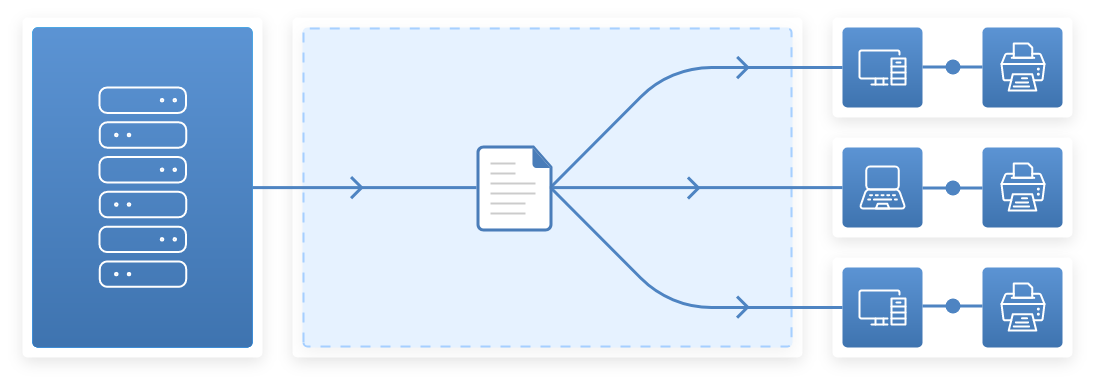
1
TSPrint Server installation creates its own virtual printers. Print job is converted to a file format which works smoothly on all printer types.
2
Print job is additionally compressed to reduce its size and tunneled through your remote desktop connection.
3
TSPrint Client installation receives the print job and prints the file on a local printer.
Windows printer redirection not working
Extra driver installations on your terminal server
Unnecessary network changes
Hundreds of different
mapped printers
Printer spoolers crashing and slow printing
There's absolutely no need to install printer drivers on the terminal server when you install TSPrint. TSPrint includes its own virtual printer driver, which will receive the print job, compress it, and send it to the local workstation.
You encounter long wait times between print jobs when using Microsoft Printer Redirection, which sends the job directly through the RDP connection, without compression. With TSPrint, our print compression technology delivers extraordinary performance.
The TSPrint installation uses plug-and-play technology, requiring no configuration. Our installer comes with a 'silent install' option so you can deploy across your network. MSI packages are also available, with simple active directory deployment.
Be able to send your print jobs on your colleagues printer. Just print to the TSPrint Network printer and you will be shown the currently logged in remote desktop users and their local available printers making it easy for you to utilize other printer devices besides the one connected to your local computer.
TSPrint uses the Microsoft Virtual Channel technology. By using VC, TSPrint can work as long as you can connect to the terminal server. There is no need for any additional network configuration.
Right click on any document and select the 'TSPrint Open Locally' option. TSPrint transfers documents to the local workstation and opens it with the default application.
With a simple right-click, you can transfer your file to the local workstation. The standard save dialog will show up, and you can select where on the local workstation you wish to transfer the file.
TSPrint supports most of the popular remote desktop services, for example: Citrix, Ericom, and PCoIP. Not just that, even various operating systems are supported, including OS X, Linux, and Android.
Yes. TSPrint is Citrix Ready certified and works seamlessly with Citrix Virtual Apps and Desktops, including older XenApp and XenDesktop versions.
Yes. TSPrint fully supports VDI platforms including VMware Horizon, Citrix, and Microsoft Azure Virtual Desktop.
Absolutely. TSPrint was built specifically for Windows Terminal Services and Remote Desktop Services environments.
TSPrint installs a virtual printer on the server. When you print, the job is compressed and sent through the RDP virtual channel directly to your local printer — no driver mapping needed.
TSPrint supports Windows Server 2003 through Windows Server 2025, including all R2 editions.
Yes. TSPrint works with cloud-hosted desktops including Azure Virtual Desktop, Amazon WorkSpaces, and other cloud RDP solutions.
Yes. TSPrint is designed for multi-user environments and supports unlimited concurrent users per server.
TSPrint bypasses Windows printer redirection entirely, eliminating driver conflicts, spooler crashes, and mapped printer issues common with native RDP printing.
Our products are a must-have for both small offices and big companies. Automate your workday and avoid installing any additional software; our applications are all you need. Download a free trial and see how it is easy to use our solutions! We are offering intuitive tools with simple and affordable licensing models.