Data is fundamental to your business operations. It's generated across multiple departments and often supplemented by third-party sources. As the volume and variety of data grow, so do the challenges, including managing security, controlling costs, and ensuring regulatory compliance, among others. Addressing these issues is essential to fully realizing the value of your data. But the role of data doesn't stop there. It powers your applications, generates insights, and informs critical business decisions. To support these outcomes effectively, your applications must be built on a robust and scalable data foundation.
Digital transformation and AWS cloud migration are ongoing journeys, not one-time events. Success begins with the proper infrastructure and a continuous focus on strengthening core fundamentals such as security, availability, and cost efficiency. It's also important to design a modern data and application architecture that supports agility and accelerates innovation through proven architectural patterns tailored to organizational goals. These foundational elements enable organizations to scale effectively and maximize results in the cloud.
Key Attributes of AWS Storage
When designing storage services, some foundational design patterns are built from the start, so organizations don't have to manage them independently or take on unnecessary operational burden. Security is a top priority of AWS and serves as the foundation for all storage services and infrastructure. These storage services are fully managed, allowing customers to redirect valuable resources toward innovation and business transformation. High availability and strong operational support to customers are essential to the service experience. AWS built its storage solutions to be global, scalable, and high-performing by default. Innovation doesn't stop at deployment; continuous improvements are made to meet evolving customer needs and deliver long-term value.
TCO Benefits
Cost efficiency remains a priority for many organizations, and AWS customers continually refine their strategies to optimize cost. Initial migrations typically deliver immediate savings thanks to the cloud's elasticity and the elimination of the need to over-provision infrastructure or storage. After the initial phase, further cost optimization is achieved through ongoing efforts such as right-sizing workloads, adopting managed services, and using built-in cost management features across AWS offerings. When these strategies are fully implemented, organizations report an average cost reduction of 31%, along with decreased downtime and improved productivity, enabling faster execution of key business initiatives.
Overview of AWS Storage Services Portfolio
This is a high-level overview of key storage offerings.
Data Storage
AWS provides a range of storage solutions to meet different workload requirements:
Amazon Elastic Block Store (EBS): High-performance block storage designed for use with Amazon EC2 instances.
Amazon S3: A scalable object storage service built for storing and retrieving any amount of data from anywhere.
Amazon EFS and Amazon FSx: Fully managed file storage services that support a variety of use cases and performance needs.
These services are designed to provide flexibility, performance, and scalability across a broad spectrum of data storage needs.
Data Motion
AWS offers a suite of services designed to simplify and accelerate data movement:
AWS Transfer Family: Enables secure, managed file transfers using protocols like SFTP, FTP, and FTPS. Ideal for exchanging data with external systems.
AWS Snowball: A physical device that facilitates fast, secure transfer of large datasets to and from AWS.
AWS Storage Gateway: Extends on-premises applications to AWS with access to virtually unlimited cloud storage.
AWS DataSync: Accelerates data transfers between on-premises systems and AWS, or between AWS storage services.
Data Protection
AWS provides several services to help ensure data protection:
AWS Backup: Enables centralized, automated management of data protection across AWS services and hybrid workloads.
AWS Elastic Disaster Recovery (AWS DRS): Offers a scalable, cost-efficient solution for recovering applications and minimizing downtime.
Snapshot Capabilities: Services like Amazon EBS Snapshots offer point-in-time recovery options, enabling the quick restoration of data to a specific state.
Data at Work
To turn data into actionable insights and support informed business decisions, AWS storage services are integrated with a broad set of AWS offerings. This integration provides access to data for various workloads, including analytics, machine learning, high-performance computing, data visualization, and real-time streaming.
AWS Storage Customer Journey
Organizations typically begin their cloud journey by migrating applications to AWS using a lift-and-shift approach. Once workloads are running in the cloud, the focus shifts to optimization, modernizing applications with additional AWS services and innovations. This is an ongoing process. As AWS continues to deliver new features and cost optimization capabilities, organizations further refine their environments.
How Organizations Are Leveraging Their Data?
AWS supports a wide range of customers, including startups, small and medium-sized businesses, digitally native companies, and enterprises across various sectors, such as finance and healthcare. These organizations are often at different stages of their cloud adoption journey, but several common patterns consistently emerge. Many customers begin by moving a copy of their data to AWS, either from on-premises environments or from other cloud platforms. Backup and restore workloads are often the first to migrate, as they are relatively non-disruptive. Most major backup vendors, such as Veritas and Commvault, offer native integrations with Amazon S3. Beyond backup, a growing number of organizations are consolidating fragmented data sources and building centralized data lakes on Amazon S3. Over 10,000 customers have built their data lakes on S3. One key reason is that data movement, often the most complex aspect of data lake architecture, is significantly simplified by using S3. With all data in one place, customers can easily tap into AWS's analytics, minimizing the need to move data across the cloud and accelerating insight generation.
Once data is consolidated into Amazon S3, it forms a strong foundation for advanced analytics, artificial intelligence, and machine learning. With a centralized data lake in place, organizations can extract meaningful insights and drive intelligent decision-making across the business. A common pattern across customer segments is the migration of business-critical applications to AWS. These include enterprise resource planning (ERP) systems, databases, and content management platforms that have typically run on-premises for years, if not decades. Most organizations start by migrating and scaling these applications to the cloud. AWS offers a suite of services to support this migration journey. As customers refactor and optimize these workloads in the cloud, they often realize significant cost savings.
Enterprise Applications
Organizations across a wide range of industries are migrating their applications to AWS every day. These often include business-critical workloads such as SAP systems, databases, and VMware. While each organization may prioritize different workloads at different times, their underlying goals are consistent: to reduce operational costs, drive innovation, enhance customer experiences, and scale more effectively using the cloud. In addition to these benefits, many organizations also report improvements in their overall security posture after migrating to AWS.
Examples of Running Structured Applications in the Cloud
In the cloud landscape, there are hundreds of applications and use cases, but a common focus area for many organizations is the migration of database and virtualized workloads to AWS. For performance-intensive use cases, Amazon EBS io2 Block Express is frequently chosen due to its low latency, high throughput, and high durability. For more general-purpose needs, many customers rely on EBS gp3 volumes, which offer a balance of performance and cost-efficiency. EBS also supports elastic volumes, allowing teams to dynamically modify volume type, size, IOPS, or throughput. Beyond EBS, AWS now offers a broad range of storage options tailored to different workloads. Let's explore a few real-world examples to understand how customers evaluate and select the most appropriate storage solutions for their workloads.
Database workloads: SQL Server
For Microsoft SQL Server on AWS, organizations can choose from multiple deployment options based on their application requirements:
Fully Managed with Amazon RDS for SQL Server: This option removes the operational burden of database management.
Self-Managed on Amazon EC2 with Amazon EBS: Enterprise customers who prefer complete control over their SQL Server configuration often lift and shift their existing environment to EC2 backed by EBS. This approach allows flexible scaling and supports traditional standalone server deployments.
Failover Clusters with Amazon EC2, Amazon EBS, and Amazon FSx: For customers requiring SQL Server failover clustering, this model combines EC2 with EBS for storage and Amazon FSx for a fully managed shared file system. FSx reduces cluster configuration complexity. In many cases, SQL Server Standard Edition is sufficient for these deployments.
Always-On Availability Groups Across Availability Zones: For mission-critical applications that require cross-AZ resilience, organizations can deploy SQL Server Enterprise Edition. This option provides the highest availability but requires more management overhead.
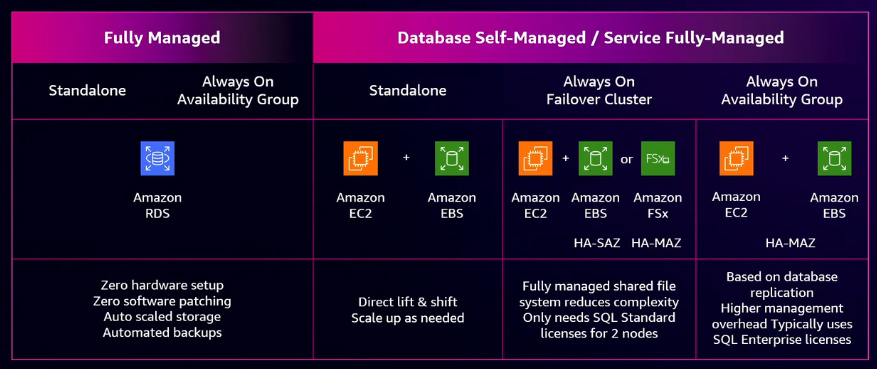
These deployment models allow organizations to align application criticality, availability requirements, and operational responsibilities with the TCO they are targeting.
VMware workloads on AWS
Another example of running structured applications in AWS involves VMware virtualized workloads. Many organizations are migrating these workloads from on-premises environments to the cloud, but they often want to preserve their existing operational model and maintain familiar cost structures. They also want to accelerate their cloud migration without rearchitecting applications.
When running VMware workloads on AWS, the transition from on-premises environments is designed to feel familiar to administrators. The components that organizations use every day in their data centers map directly to AWS services. For example, vCenter functionality is available through the AWS Management Console. Virtual machines in VMware translate directly to Amazon EC2 instances, enabling cloud scalability. Networking is also simplified through Amazon VPC, which serves as the cloud equivalent of the NSX Virtual Distributed Switch, providing a secure virtual network for launching and managing AWS resources. For storage, vSphere with vSAN maps to Amazon EBS for boot volumes, while data volumes can be configured with Amazon FSx to deliver the best TCO for virtualized applications.
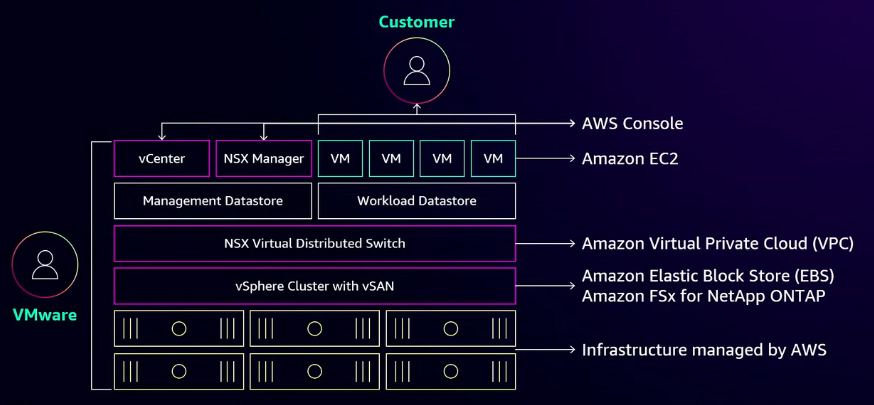
The major advantage of running VMware workloads on AWS is that AWS fully manages the entire underlying infrastructure.
Reference:
AWS Events


