Last updated: June 2026
By TerminalWorks — Remote Desktop Printing Solutions Since 2014
TSPrint runs natively on Windows on ARM as a native ARM64 client — to our knowledge one of the first mainstream remote desktop printing solutions to do so, rather than relying on x86/x64 emulation. This matters because the RDP print path, not local printing, is where the ARM transition actually breaks. TSPrint's driverless server and file-based virtual-channel transport make client architecture irrelevant, and one license covers x64, x86, and ARM64 clients together.
Why this matters now: the Copilot+ PC enterprise transition
If you manage an RDS, Citrix, or VDI estate, the question is no longer hypothetical. Copilot+ PCs built on Qualcomm Snapdragon X silicon have moved from pilot units to standard fleet refresh options, and a growing share of those refreshes are ARM64 machines rather than x86.
The hardware details matter less than one takeaway: these are ARM64 machines, and they are now arriving in business fleets as standard refresh options rather than experiments. Copilot+ certification requires a 40+ TOPS NPU, 16 GB of RAM, and Windows 11 24H2 or newer, and the qualifying Snapdragon X-series silicon (X Elite/Plus, and the 2026 X2 generation) now ships in business-class hardware from Surface, Lenovo ThinkPad, HP EliteBook, and Dell — with all-day battery life that makes it attractive for mobile and field roles.
That is the context, and it is the part most articles dwell on. We will not. From an infrastructure standpoint, only one fact about these machines matters: they are ARM64 devices, and your existing RDS hosts are almost certainly x64. The moment a Snapdragon laptop becomes an RDP client into your terminal server farm, the print path crosses an architecture boundary it never crossed before.
In our work with customers piloting Snapdragon devices in existing RDS environments, the recurring pattern we have observed is that teams plan carefully for application compatibility and battery management, then discover printing as an afterthought — usually when a pilot user cannot produce a label or a receipt. This post is about getting ahead of that.
What actually happens to RDP printing when an ARM client connects to an x64 RDS host
Standard RDP printer redirection was designed in an all-x86/x64 world. When a client connects, the redirection pipeline tries to make the client's local printers available inside the session on the host. There are two broad mechanisms, and both have ARM-specific wrinkles.
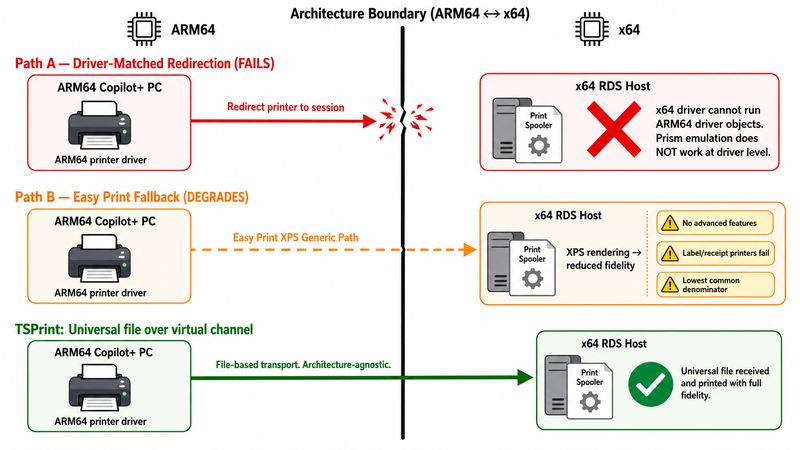
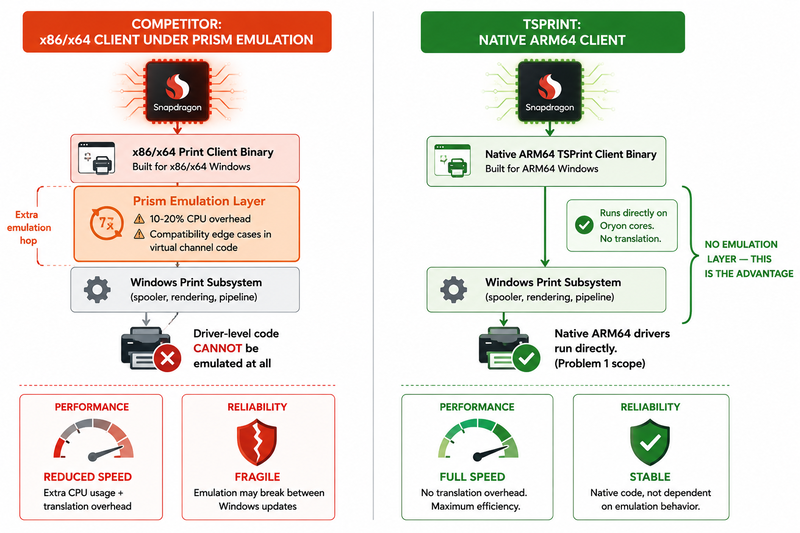
Driver-matched redirection. Historically, the host attempts to load a print driver that matches the client's redirected printer. On a same-architecture connection this is unremarkable. With an ARM64 client connecting to an x64 host, the architectures on each end of the channel differ, and the driver objects involved are architecture-specific — Windows will not hand an x64 print driver to an ARM64 spooler, or vice versa. Print drivers are kernel-adjacent components, and this is the single most important technical fact for ARM print planning: Microsoft's Prism emulation translates user-mode x86/x64 application code only. It does not emulate drivers. There is no emulation escape hatch at the driver level. An x64 print driver does not "run slower" on ARM — it does not run at all.
Easy Print (the XPS-based fallback). Microsoft's Remote Desktop Easy Print was built precisely to avoid the driver-matching problem by redirecting through a generic XPS path so the host does not need the matching vendor driver installed. It can work on an ARM-to-x64 connection, but it inherits the limitations it has always had: reduced fidelity for advanced device features, dependency on the .NET XPS stack and the client-side rendering path, and inconsistent behavior with specialty hardware (label, receipt, and check printers in particular). It is a lowest-common-denominator path, and for many fleets it is "prints, but not the way the business needs it to."
Where emulation enters. If any client-side component in the print path is an x86/x64 binary rather than native ARM64, it runs under Prism. For ordinary user-mode software that is usually fine, with a translation overhead in the 10–20% range and the occasional compatibility edge case. But two things make this worse in a printing context. First, anything driver-level cannot be emulated at all, as above. Second, emulation layers are a known source of subtle issues with virtual channels and low-level integrations — exactly the kind of plumbing an RDP print path relies on. A solution whose client touches the print path through emulated code is paying both a performance tax and a reliability risk that a native ARM64 client simply avoids.
The net effect: a Snapdragon client against an x64 RDS host using stock redirection tends to land on the Easy Print fallback for anything it can, with reduced fidelity, and fails outright wherever a real vendor driver was required.
The two separate problems IT teams need to distinguish
This is the part the rest of the web gets wrong, and it is worth slowing down for. "Printing doesn't work on our ARM laptops" is almost always two different problems wearing one sentence. Solve them separately or you will chase the wrong fix.
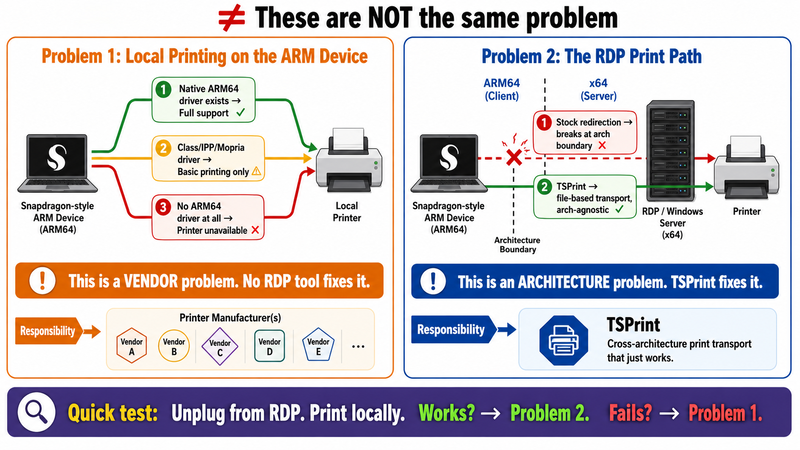
Problem 1: Local printing on the ARM device (a vendor-availability problem)
This is whether the Snapdragon laptop can print to a printer physically or directly attached to it, full stop, with no remote session involved. It depends entirely on driver availability:
- The printer vendor ships a native ARM64 driver — best case, full feature support.
- A Windows in-box class driver or the IPP / Mopria universal print path supports the device — works for basic printing, often without advanced features (finishing options, tray selection, vendor utilities, TWAIN/WIA scanning).
- Neither exists — the printer does not work locally on that machine, and no remote desktop printing tool can change that, because the problem lives on the local device, not in the session.
This is a hardware-vendor timeline problem. It will resolve printer-by-printer as manufacturers ship ARM64 drivers and Printer Support Apps, and you cannot software your way around a driver that does not exist.
Problem 2: The RDP print path (an architectural problem)
This is the entirely separate question of how a print job flows from inside an RDP session on your x64 RDS host, back across the connection, to the printer the ARM client can reach. Here the failure mode is not "no driver for the device" — it is "the cross-architecture transport between an ARM64 client and an x64 host mishandles the print pipeline." This is the problem that is architectural rather than vendor-dependent, and it is the problem a remote desktop printing solution is actually responsible for.
A quick test for which bucket you are in: unplug from the remote session and print to the printer locally. If that works and printing from inside the session does not, you have an RDP-path problem (Problem 2). If it fails locally too, you have a driver-availability problem (Problem 1) that no RDP tool addresses.
TSPrint solves Problem 2 and is honest that it does not solve Problem 1. Holding those apart is the whole game.
Planning a Copilot+ PC rollout?
Test TSPrint with one Snapdragon Windows on ARM client before the wider deployment. Confirm local printer driver availability first, then validate the RDP print path with TSPrint's native ARM64 client.
TSPrint product page · Download / free trial · Contact & support
How TSPrint's architecture removes the RDP path problem
TSPrint was built across more than a decade of producing native client implementations for every major Windows architecture, and the ARM64 client is a direct continuation of that. Here is specifically how each part of the architecture takes the RDP-path problem off the table — mechanism by mechanism, not in the abstract.
A native ARM64 client
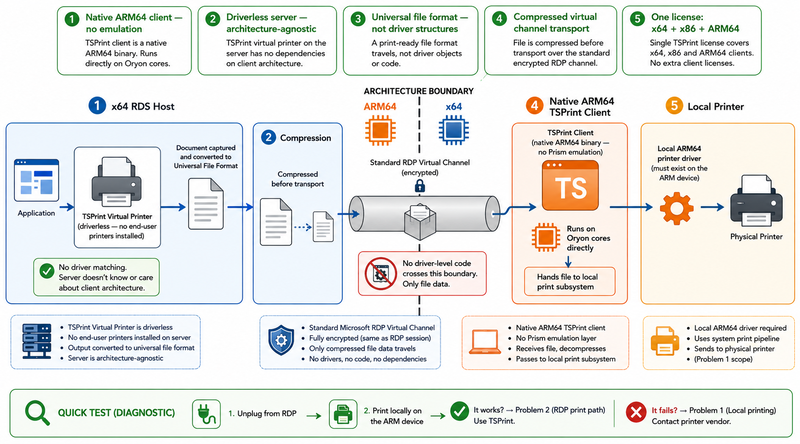
The TSPrint Client is compiled as a native ARM64 binary. On a Snapdragon Copilot+ PC running Windows 11 on ARM, it executes directly on the Oryon cores with no Prism translation. That removes the emulation CPU overhead, and — more importantly — it removes the emulated-code reliability risk in the part of the stack that talks to the RDP virtual channel and to the local print subsystem. The client is not "tolerated through emulation"; it is native to the architecture.
A driverless server
The TSPrint Server uses its own virtual printer driver on the RDS / Citrix host. End-user printers are not installed on the server at all. This is the design decision that makes client architecture a non-issue: because the server never tries to match or load a per-printer driver for the client's device, it does not care whether the client connecting is x64, x86, or ARM64. From the server's point of view those clients are identical. There is no driver-matching step to fail across the architecture boundary, because there is no driver matching at all.
Conversion to a universal file format
When a user prints inside the session, TSPrint captures the job through its virtual printer and converts it to a universal, device-independent file format on the server. The thing that travels across the connection is therefore file-based data, not driver-level structures. That is the crux of why architecture stops mattering: cross-architecture compatibility is hard at the driver level and trivial at the file level. A file is a file whether it was produced by an x64 host and consumed by an ARM64 client or the reverse.
Compression and Microsoft Virtual Channel transport
That universal file is compressed and tunneled to the client through the Microsoft Virtual Channel — the same standards-based RDP transport mechanism, used as designed. The ARM64 client receives the file and hands it to the local print driver for the local printer. The cross-architecture leg of the journey only ever moves compressed file data; the only place a real device driver is touched is locally on the client, against the client's own local printer, in its own native architecture.
One license across all architectures
A single TSPrint Server deployment serves x64, x86, and ARM64 clients simultaneously. There is no separate ARM SKU, no separate server-side installer, and no per-architecture licensing. The license model follows the architecture model: because the server is architecture-agnostic, so is the licensing.
Mixed-architecture workforce: what one TSPrint Server deployment handles in practice
The realistic 2026 environment is not "all ARM." It is mixed, and it will stay mixed for years. Consider a typical estate mid-transition:
- A few hundred existing x64 desktops that are not going anywhere this cycle.
- A first batch of new Snapdragon Copilot+ laptops (ARM64) for mobile and field staff.
- A handful of Mac clients in the design and marketing teams.
- A bank of thin clients in shared areas.
With stock redirection, that estate is a matrix of edge cases — different driver behaviors per client architecture, different fallback paths, and a support queue that grows with every new device type.
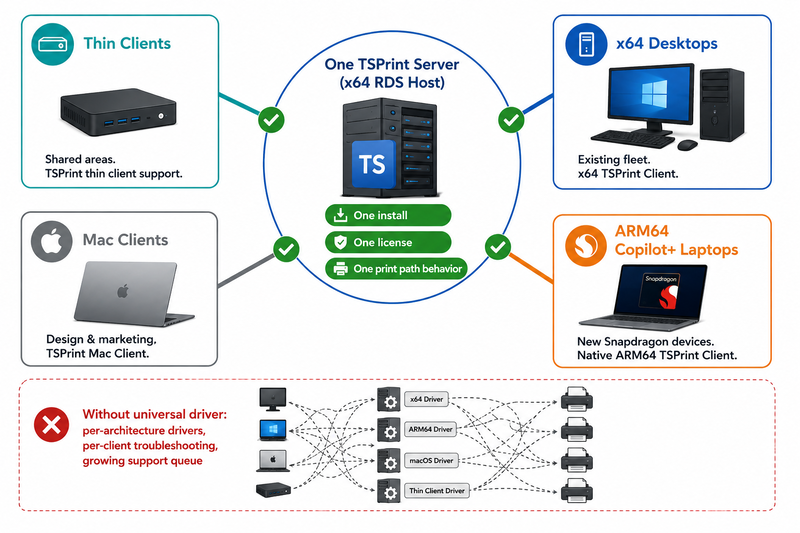
With TSPrint, it is one TSPrint Server install, one driverless virtual-printer architecture, one license model, serving all four client types at once. The x64 desktops, the ARM64 laptops, the Macs, and the thin clients all connect to the same server, which treats them identically because none of them install a printer on it. For the IT team this collapses three separate costs: deployment effort (no per-architecture server build), license management (no separate ARM entitlement to track), and — usually the biggest one — troubleshooting surface area, because the print path behaves the same regardless of which architecture the user happens to be on today.
A question we increasingly hear from IT teams planning Copilot+ rollouts is "do we need to stand up anything new on the server for the ARM clients?" The answer is no. If your existing TSPrint Server is current, the new Snapdragon clients connect to it as-is.
What still needs solving on the ARM client side (and what no RDP tool addresses)
This is the honest scoping, and it is deliberately not buried. TSPrint removes the RDP-path problem. It does not remove the local-driver problem, because that problem is not in the session — it is on the device, and it belongs to the printer vendor.
When the TSPrint Client hands the universal file to the local print driver, that local driver must exist and be ARM64-native (or be served by a Windows class driver / IPP / Mopria path). Where vendors have shipped ARM64 drivers, this is a non-event. Where they have not, the local printer is limited or unavailable on that machine — and again, that is true with or without any remote desktop printing software, because Prism cannot emulate the driver.
Concrete categories worth checking in a real fleet, because they are where the gaps cluster today:
- Zebra and other industrial label printers — frequently x64-only drivers, with ARM64 support trailing. A common pain point in logistics and retail.
- Dymo label printers — historically limited ARM support.
- Brother MFC multifunction devices — basic printing often works via class/IPP drivers; full feature sets and scanning utilities may not.
- Epson and other receipt/POS printers — driver and utility support varies widely by model.
- Specialty check printers and MICR devices — niche enough that ARM64 drivers are often late or absent.
Every one of these is a local-driver concern on the ARM device, not an RDP-path concern. Two practical mitigations help here: network printers exposed over IPP/Mopria tend to offer the most reliable cross-architecture behavior because they sidestep vendor-specific driver dependencies, and where a critical device simply has no ARM64 driver yet, that role may need to stay on x86 hardware until the vendor catches up. Before a Copilot+ rollout, inventory your printer fleet against ARM64 driver availability — that single step prevents the majority of "printing is broken on the new laptops" tickets.
Decision framework for IT teams planning a Copilot+ rollout
- Inventory local printers for ARM64 driver support
- Test one Snapdragon client printing locally
- Test printing from inside RDS / Citrix / VDI
- Install the native ARM64 TSPrint Client on the pilot device
- Confirm your existing TSPrint Server version is current
- Keep unsupported specialty printers on x86 devices until vendor support improves
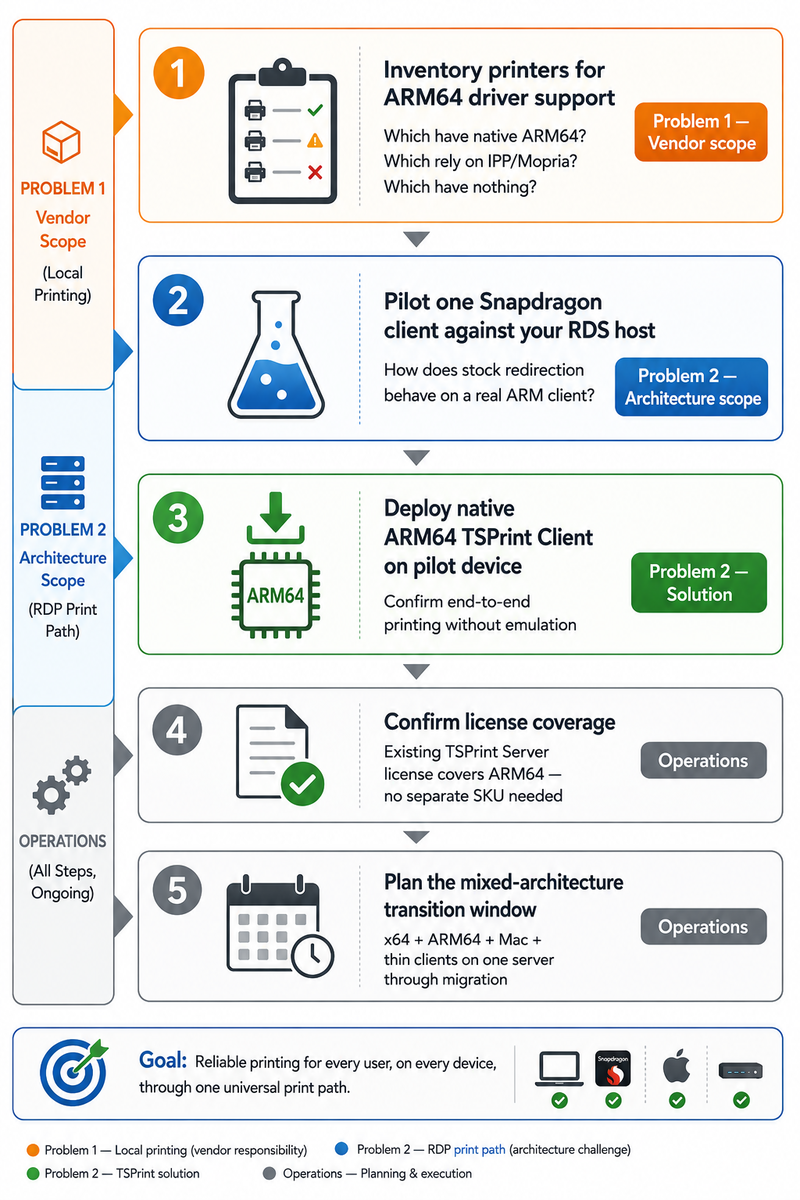
A concrete sequence we recommend, in order:
| Step | Action | What you are confirming |
|---|
| 1 | Inventory printers, check ARM64 driver status | Which devices have native ARM64 drivers, which rely on class/IPP/Mopria, which have nothing yet (Problem 1 scope) |
| 2 | Pilot the RDP print path with one ARM client | How printing behaves from a real Snapdragon laptop into your actual RDS/Citrix host (Problem 2 scope) |
| 3 | Deploy the native ARM64 TSPrint Client on the pilot device | That printing works end-to-end without emulation in the path |
| 4 | Confirm license model coverage | That your existing TSPrint Server license already covers the new ARM64 clients (it does — no separate SKU) |
| 5 | Plan the mixed-architecture transition window | That x64 desktops, ARM64 laptops, Macs, and thin clients all run on the one server through the migration |
The discipline that makes this framework work is keeping Problem 1 and Problem 2 in separate columns. Step 1 is vendor-driver reality; step 2 is RDP-path architecture. Conflating them is what turns a clean rollout into a guessing game.
How TSPrint compares to alternatives on ARM specifically
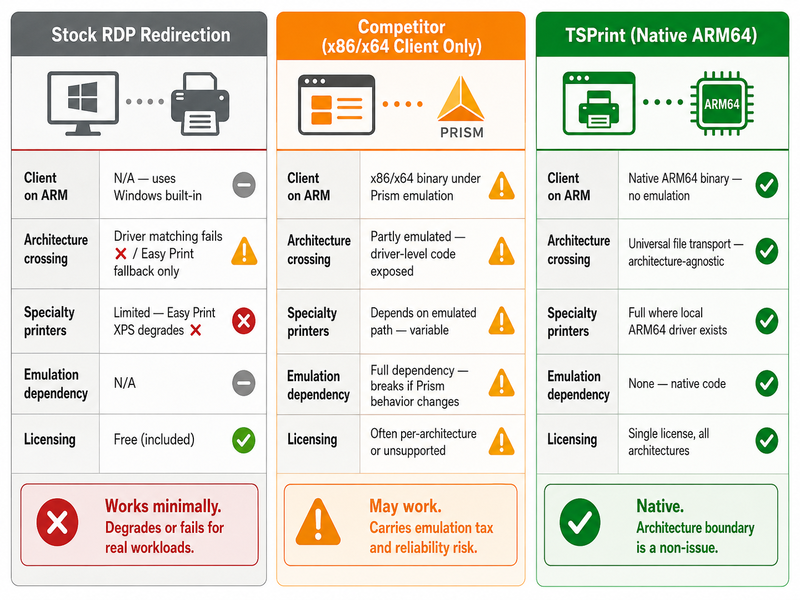
State of the market, factually: the RDP printing category was built for x86/x64, and most tools still ship only x64/x86 Windows clients. On a Snapdragon Copilot+ PC, those fall into two groups.
- No ARM client at all — the product has not released an ARM64 build. On Windows on ARM it either does not install or depends on stock RDP redirection for the ARM leg, with the Easy Print limitations described above.
- x86/x64 client running under Prism emulation — the product installs and may work, but its client-side components run through translation. That carries the emulation performance tax and, because driver-level code cannot be emulated, leaves any driver-dependent step exposed.
As of mid-2026, TSPrint stands out by shipping a native ARM64 client rather than relying on x86/x64 emulation — which is why it runs on Windows on ARM without the emulation tax described above, instead of being tolerated through translation.
| Aspect | Stock RDP redirection on ARM | RDP printing tool with x86/x64 client only | TSPrint on ARM |
|---|
| Client architecture on Snapdragon | N/A (uses Windows redirection) | x86/x64 under Prism emulation | Native ARM64, no emulation |
| Server-side driver dependency | Driver matching / Easy Print fallback | Varies; often driver-dependent | None — driverless virtual printer |
| Cross-architecture transport | Driver / XPS path | Driver-level, partly emulated | Universal file over Microsoft Virtual Channel |
| Specialty printer fidelity | Limited (Easy Print) | Depends on emulated path | Local driver dependent, full where ARM64 driver exists |
| Licensing for ARM clients | N/A | Often per-architecture or unsupported | Single license, all architectures |
The point is not that competitors are bad products. It is that the category was designed before Windows on ARM mattered, and most of it has not yet caught up architecturally. We state the facts and let the architecture position the result.
Frequently asked questions
Yes. The TSPrint Client is compiled as a native ARM64 binary and runs directly on Snapdragon X / X2 Copilot+ PCs under Windows 11 on ARM, without going through Prism x86/x64 emulation. That means no emulation CPU overhead and none of the reliability risk that emulated code can introduce in the print path. It is the same TSPrint product, built natively for the architecture rather than tolerated through translation.
No. A single TSPrint Server deployment and license covers x64, x86, and ARM64 clients simultaneously. There is no separate ARM SKU, no per-architecture entitlement, and nothing extra to purchase when you add Snapdragon laptops to a fleet that already runs TSPrint. The licensing follows the architecture-agnostic server design.
Yes, provided your TSPrint Server is current. Because the server uses its own virtual printer driver and never installs end-user printers, it does not care what architecture the client is — an ARM64 Copilot+ PC connects to the same server install as your x64 desktops. You do not need a separate server build or a reconfiguration for ARM clients.
No, and this is the honest boundary. If a printer attached to the ARM laptop has no ARM64 driver and is not covered by a Windows class driver or IPP/Mopria, that is a local hardware-vendor problem that no remote desktop printing tool can fix — Prism does not emulate drivers, so there is no software workaround for a missing one. TSPrint solves the RDP print path, not local driver availability. Inventory your printers against ARM64 driver status before rolling out.
Native RDP redirection on an ARM-to-x64 connection tends to fall back to Easy Print, with reduced fidelity and weak support for specialty printers, and fails wherever a matching vendor driver was required. TSPrint sidesteps the whole driver-matching problem with a driverless server that converts jobs to a universal file format and tunnels them over the Microsoft Virtual Channel. The cross-architecture leg moves file data, not driver structures, so it does not break on the architecture boundary the way driver-matched redirection does.
Yes — this is exactly the scenario TSPrint's architecture is built for. One TSPrint Server install serves x64 desktops, ARM64 Snapdragon laptops, Mac clients, and thin clients at the same time, treating them identically because none of them install a printer on the server. That is one license model and one print-path behavior to support across the entire mixed fleet during your transition.
If the printer is local to the ARM device and has no ARM64 driver (and no class/IPP/Mopria coverage), it will be limited or unavailable on that machine — independent of TSPrint, because the limitation is local. Practical options: use network printers exposed over IPP/Mopria, which tend to be the most reliable cross-architecture, or keep roles that depend on such a device on x86 hardware until the vendor ships an ARM64 driver. This is a Problem 1 (local-driver) situation, not a Problem 2 (RDP-path) one.
Because the TSPrint Client is native ARM64, it does not pay the Prism emulation overhead that emulated x86/x64 clients incur on Snapdragon hardware, so the client-side print path runs at native speed. The dominant factors in real-world print performance — job size, the universal-format conversion on the server, and compression before transport — are the same across architectures. In practice you should not expect ARM clients to be slower than x64 clients on the TSPrint path.
Yes. TSPrint supports RDS, Citrix, and VDI deployments, and the ARM64 client behaves the same in those environments as the x64 client does. The driverless server-side architecture and universal-file transport are independent of the broker in front of them, so a Snapdragon Copilot+ PC connecting through Citrix is handled the same way as one connecting to a plain RDS host.
TSPrint has shipped native client implementations across every major Windows architecture for over a decade, and the native ARM64 client follows that track. As newer Snapdragon X2-class devices and future Windows on ARM releases arrive, a native ARM64 client is positioned to run on them directly rather than depending on emulation behavior that could shift between Windows updates — which is one of the structural advantages of being native rather than emulated.
Summary
The move to Copilot+ PCs makes the RDP print path an architectural problem, not just a driver problem: a native ARM64 client connecting to an x64 RDS host crosses a boundary that stock redirection and emulated tools handle poorly. As of 2026, TSPrint is among the first mainstream remote desktop printing solutions designed natively for this transition — a native ARM64 client, a driverless server that does not care about client architecture, and universal-file transport over the Microsoft Virtual Channel. It is deployed and licensed as a single solution across x64, x86, and ARM64 clients at once, so a mixed fleet runs on one server with one license. The one thing it does not do — and no RDP tool can — is conjure a local ARM64 printer driver that the vendor has not shipped, which is why inventorying your fleet remains step one.
Find out more about TSPrint right here!


