
In recent years, the importance of digital privacy has increased in areas such as data breaches, the Right to be forgotten, and GDPR. Privacy management for Microsoft 365 marks a shift to modernizing the approach Microsoft takes to privacy. In fact, Microsoft applies the latest intelligence, innovation, and automation to operationalize privacy management for anyone who handles personal data in their day-to-day work.
Privacy requirements universally impact every organization as more and more privacy regulations are introduced around the globe. According to Gartner Inc., by 2023, 65% of the world’s population will have its data covered under modern privacy regulations, up from 10% in 2020. In the future, privacy will become a top priority, similar to security today. Microsoft supports building a privacy-resilient organization where everyone working with personal data is empowered to be part of the solution. For instance, on the admin side, Microsoft has tailored the experience to cater to areas in which privacy teams care about and proactively identify and protect against common privacy risks. Also, privacy managers are building automation for processing subject-right requests at scale and quality. Many of these processes include managing subject rights requests or shifting through logs that were manual before.
According to research, over 90 percent of privacy incidents are unintentional. Imagine you are a banker in the US who wants to share information with a peer in the UK using Microsoft Teams. It’s a cross-border transfer where each side is subject to different privacy regulations and laws. First, you type a chat message containing a name, address, and credit card number. When you go to share it, Teams understands the geography involved in this case. It understands what you are sharing, and based on the policies, it will automatically block the transfer.
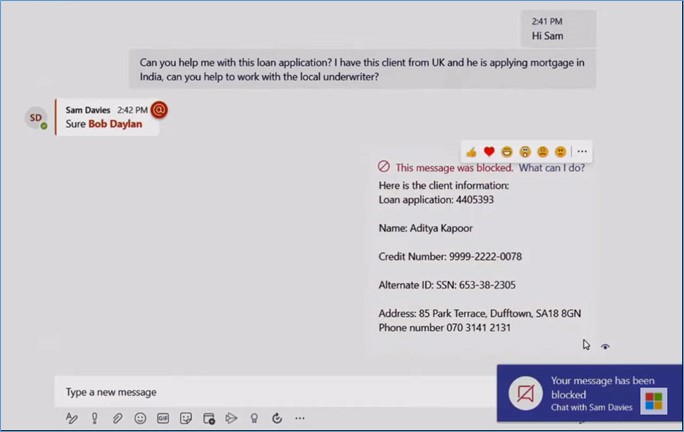
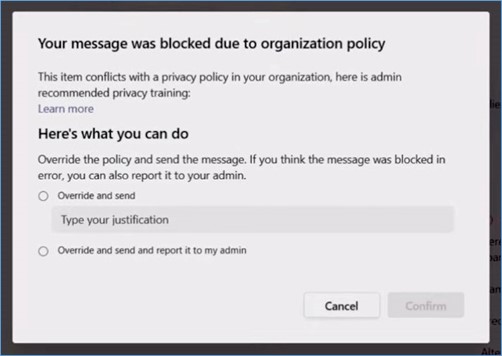
While this shows the effects of a geographic transfer, it could also apply to cross-department transfers. For instance, if the finance team tries to share personal information with the marketing team, Teams will notify you what the policy violation is. If you weren’t aware of the policy before sharing, Teams takes care of that. It also links you to valuable training and recommended actions to take in order to remain responsible from a data usage standpoint.
Beyond the experiences integrated into the apps you use every day, Microsoft informs you when the existing content may pose a potential risk, such as personal information that hasn’t been used in a while or content that’s been overshared or overexposed. For instance, in a personalized e-mail digest, it’s sent to the data owner of the content that includes personal information, so they can quickly take action.
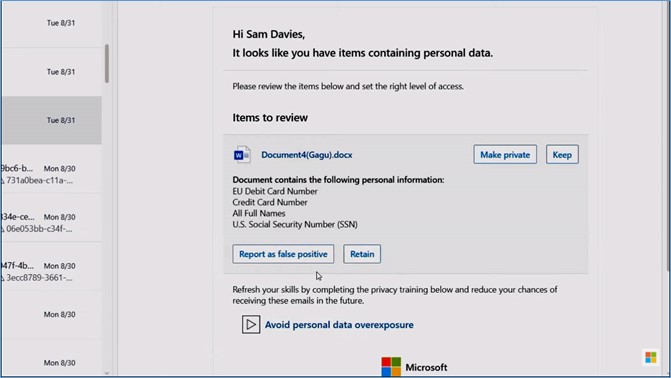
The goal is to take a data-first and a content-first approach to alert you of potential risks. In this example, it informs you of data that’s potentially overexposed with access beyond its necessary reach. These email digests are directly interactive in Outlook. In this case, you can reduce sharing permissions on this item by making it private or keep its permissions intact. You also can report the item as a false positive or hit retain and provide written feedback. There’s even a link to tailored training for this specific risk of data overexposure. It’s directly actionable in the email without linking you off to another site, and this whole experience is automated under the covers.
Admin experience
Here, as a privacy admin, you can see a dashboard that includes a comprehensive view of your organization’s risks. For example, here you can see a few recent insights including new items from the last week, such as the number of items with personal data, privacy risks flagged for the last seven days across three areas of data hoarding, overexposure and transfer, subject rights requests to take action on and overdue subject rights requests.
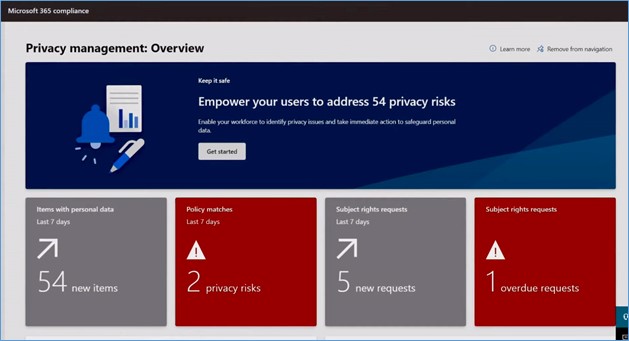
Below those top-level accounts, you can see alerts with recent trends for the content with the most personal data.
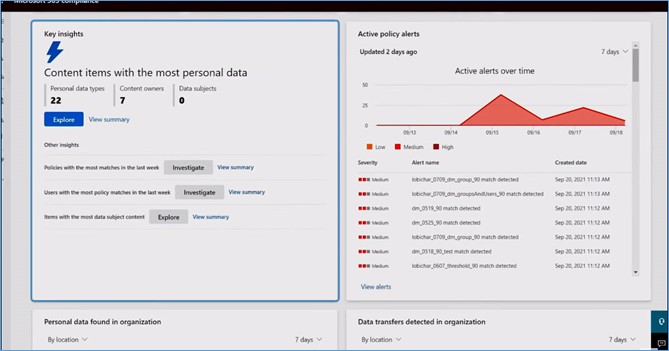
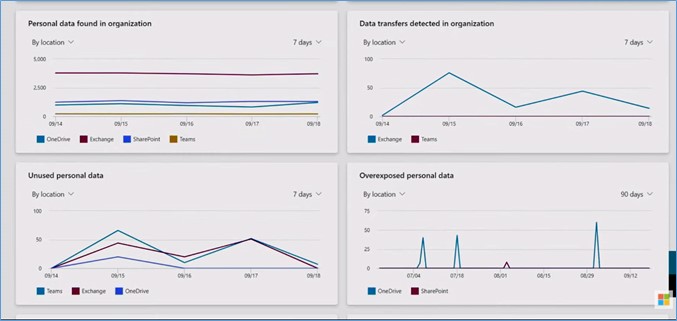
You can also see active policy alerts match to risk severity, personal data found in the organization, and unused or inactive personal data that could be an indication of data hoarding.
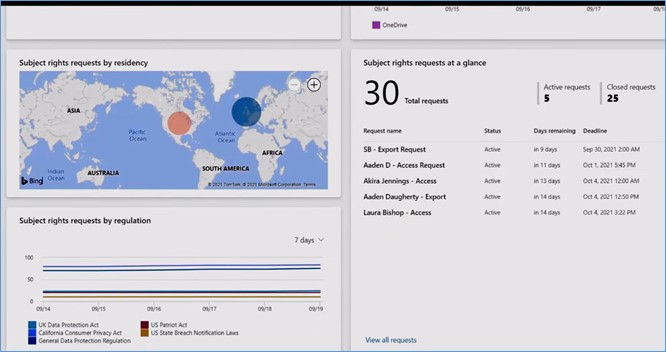
Below that, you can get an overview of the recent trends for subject rights requests.
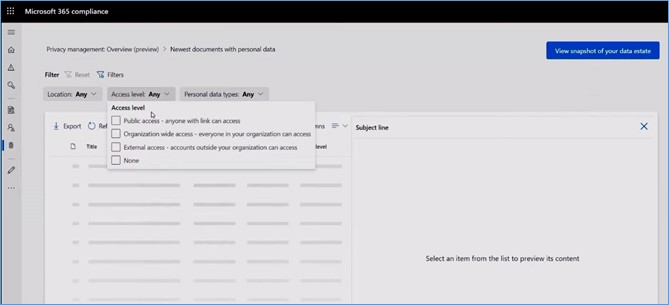
Let’s examine the new items discovered in the environment. On that page, you can filter the files.
When you switch to the data profile dashboard using the View snapshot of your data estate button, you can get a holistic snapshot of your data estate. For instance, you can see which Microsoft 365 locations had the most instances of personal data, total cumulative numbers, and the diversity of types across Exchange, SharePoint, OneDrive, and Teams.
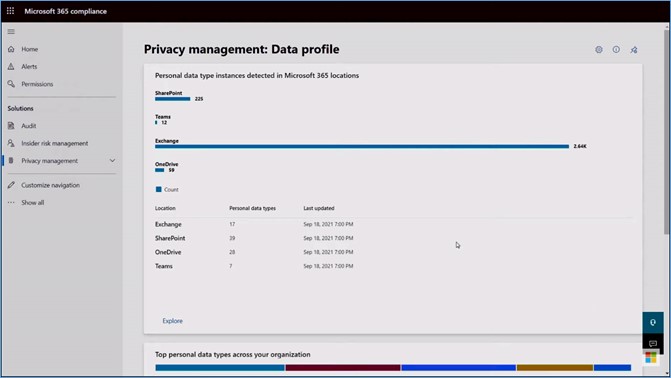
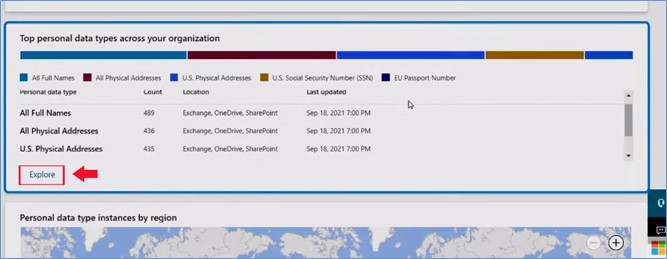
There’s also a view that shows the top data types found, such as credit cards and personal ID numbers, along with how it breaks down by geography. If you want to drill further or find specific data, you can use the content explorer to find exactly what you are looking for across sensitive information types and locations.
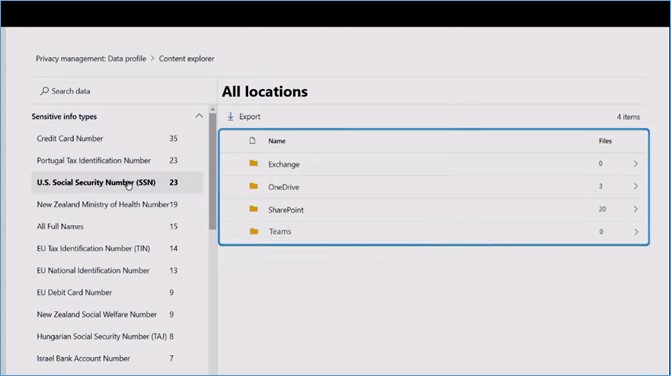
Let’s say you want to know which locations have the most social security card numbers. To do that, you can select that as an information type. Then you will get a breakdown of Exchange, OneDrive, SharePoint, and Teams.
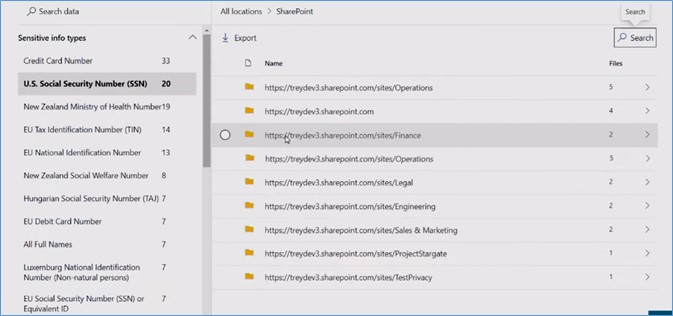
If you expand SharePoint, you can even see the number of files per site. You can use this to manage site permissions and policies to minimize risk.
Policies
It can be hard to get a handle on which policies are working. Microsoft has optimized how you drive better insights on policies you set and the ones running by default. It gives you visibility into the activities you care about. In the policies dashboard, there are alerts and active issues. It allows you to see what you need from one place. Below the top-level summary, there’s a detailed list of policies with their status, type, and the number of matches, which is the number of times a policy is triggered.
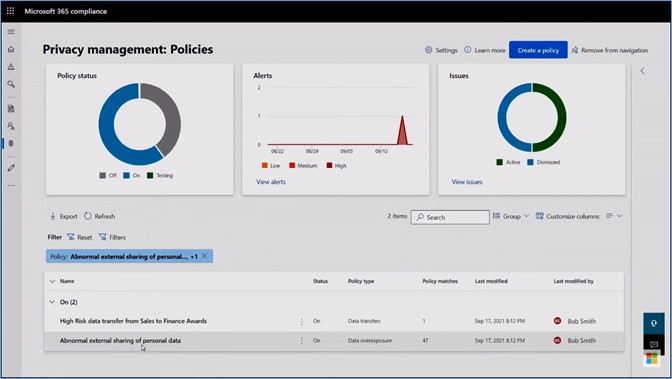
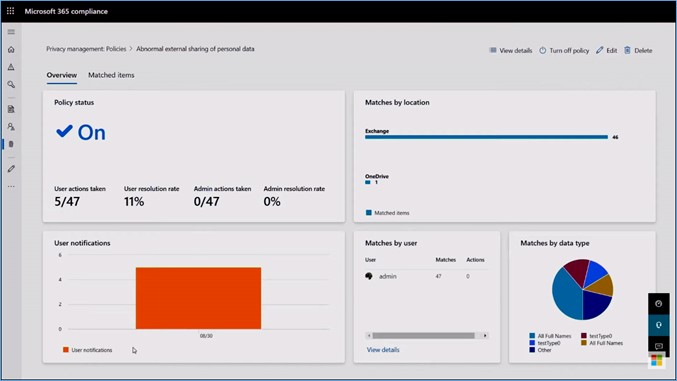
If you click on a policy, it gives you enough detail to take the next step of tuning that policy further. Additionally, you can see how many notifications are sent and whether people are taking action to mitigate risks.
What are the settings that you can leverage in privacy management?
There are hundreds of granular configurations to implement specific policies for user groups, locations, and data. To choose the best policy option, Microsoft has included out-of-the-box policy templates to get ahead of the most common privacy risks, including data overexposure, data transfers, and data minimization. Each policy can be created and enabled from these templates in a few clicks.
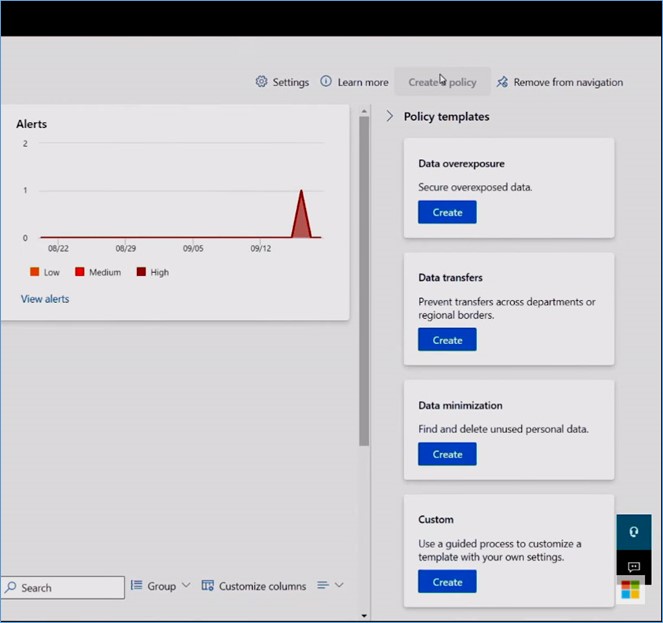
You can also create your own custom policies. For any policy, you can edit them to meet your specific conditions. Additionally, you can set the outcomes for how you inform users, such as policy tips in Teams or via emails. Each policy can have its own dedicated link to training specific to that single policy.
Subject right requests
Many people spend a lot of time on subject rights requests ever since the GDPR and similar regulations were introduced. Microsoft has made the process of responding to these requests much faster. You can keep track of all your existing requests and even create a new request.
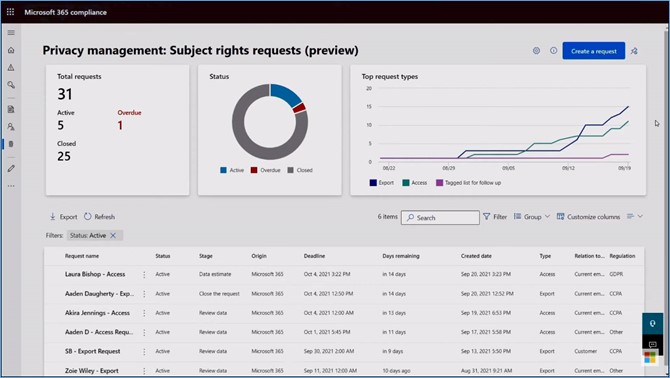
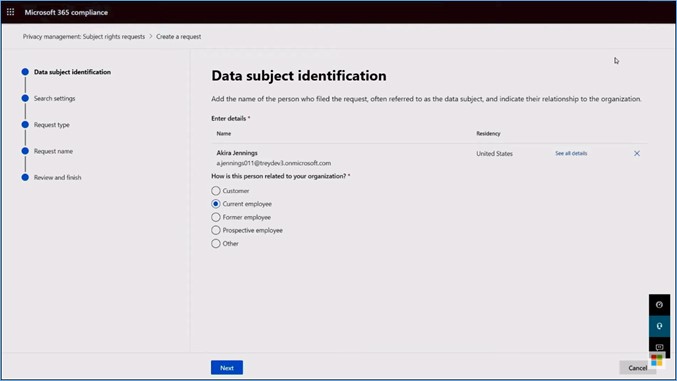
If you hit Create a request button, you need to add a name, email, and residency to help identify content and how the person is related to your organization.
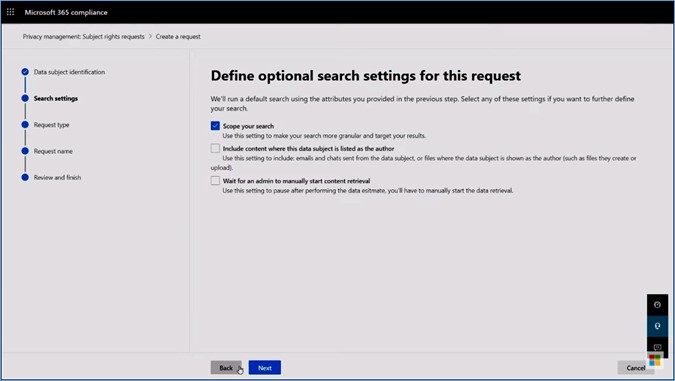
Next, you can scope this search to be more granular. You can add other personal attributes to make sure you find everything.
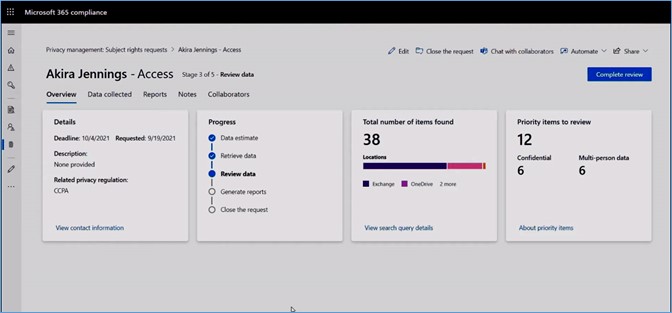
When it is done processing, you will get an overview of each subject's rights request.
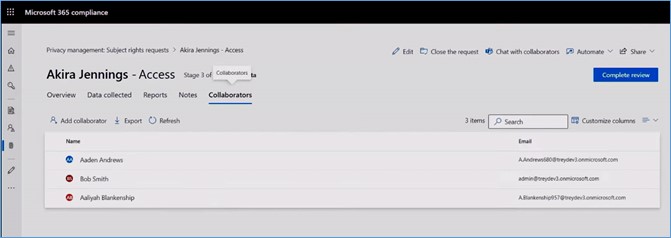
Using Add collaborator, you can easily add others to help with these requests and securely collaborate with them over Microsoft Teams with a private channel built around those requests.
In the Data collected tab, you can preview each item and choose whether or not to include it in the final report. You can see highlights where the personal information was found or take other actions against it, such as reductions for things you don’t want to share or even adding your own notes.
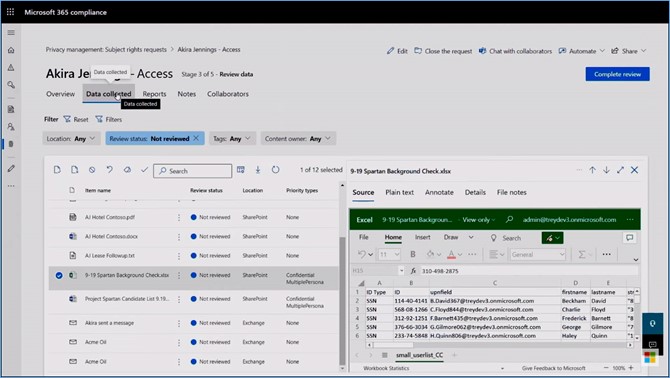
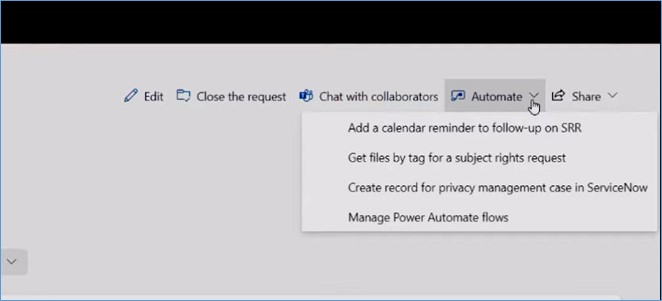
To integrate with your existing processes, Microsoft also adds three built-in power automation templates for actions, including performing custom actions for subject rights requests, adding calendar reminders for follow-up and creating records for requests in ServiceNow, allowing extensibility for automating privacy operations. It also enables programmatic access to create these requests. For instance, privacy ISV apps or your LOB apps can access the subject rights requests API to create requests directly in Microsoft 365 and export those results.
Microsoft provides an easy trial experience at aka.ms/tryprivacymanagement. To get started, you need an Office 365 or Microsoft 365 account. Also, they have published guidance geared towards admins, data officers, and data workers that you can check out at aka.ms/privacymanagementdocs to learn more.
Reference:
Microsoft Ignite Sessions


