The Role of AI in the Public Sector
Digital debt significantly delays innovation, particularly within government operations. It manifests through outdated processes, manual workflows, and excessive communication. The impact is clear: 64% of employees report lacking the time or energy to perform their jobs effectively. This challenge extends beyond inefficiency and represents a loss of potential. Employees are burdened with repetitive tasks instead of focusing on the high-impact work their communities need. Data shows that 57% of employee time is spent in meetings, email threads, and continuous messaging, while the remaining 43% is spent creating documents, spreadsheets, and presentations. As a result, there is little opportunity left for creativity, problem-solving, or policymaking, which are the activities that drive meaningful societal change.
How can organizations overcome this digital clutter and unlock innovation? The answer lies in artificial intelligence, not as a future concept, but as a practical, immediate solution. AI can automate routine communications, summarize meeting outcomes, and draft documents, relieving teams from time-consuming tasks. Addressing digital debt is urgent, and AI offers a pathway to unlock the untapped potential within your organization. By redirecting employees' energy from managing processes to delivering tangible outcomes, AI enables the full power of public sector innovation to emerge.
Microsoft 365 Copilot GCC
The transformative potential of AI to enhance public sector efficiency is widely recognized. By 2025, a growing number of workers are expected to use personal AI tools, making the deployment of compliant AI solutions essential. To support this AI journey, Microsoft has introduced Microsoft 365 Copilot GCC, an AI-powered work assistant. It integrates large language models with your data in Microsoft Graph and Microsoft 365 apps, with web access disabled by default to help protect sensitive government information.
Key Features of Microsoft 365 Copilot GCC
Microsoft 365 Copilot GCC was introduced in phases, integrating AI into the applications users already knew and relied on. Phase 1, which rolled out in Q4 2024, included several key features. Business Chat served as a productivity hub, bringing together data from Microsoft Graph, Microsoft 365 apps, and user context into a unified view. Copilot in Word, Excel, PowerPoint, and Outlook streamlined tasks such as drafting documents, creating reports, and summarizing email threads. Within Teams, Copilot helped manage conversations with contextual awareness, ensuring teams stayed aligned while reducing communication overload. Also, Teams Intelligent Meeting Recap automatically captures and summarizes key moments from meetings, turning discussions into clear, actionable insights.
In Phase 2, launched in Q1 2025, Microsoft introduced even more capabilities. Teams Meeting Copilot served as an intelligent meeting assistant, generating real-time summaries, identifying action items, and answering questions during meetings. Microsoft also delivered Copilot integration across OneNote, Stream, OneDrive, Loop, and Planner. With Microsoft 365 Copilot, the workforce gained AI-powered insights and automation, allowing for greater focus, efficiency, and impact. This transition from reactive to proactive workflows helped reimagine government operations, enabling more agile teams that deliver better services. Copilot leveraged advanced AI to extract insights from large datasets, automate routine tasks, and improve communication accuracy and efficiency.
Key Benefits of Microsoft 365 Copilot GCC
Procurement efficiency: Copilot streamlines procurement processes by helping government employees create standardized contract templates, ensuring greater consistency and compliance.
Communication and collaboration: Employees spend less time managing documents, emails, and reports, allowing them to focus on higher-value work.
Courtroom efficiency: Copilot automatically tracks courtroom usage, providing insights that enhance transparency, improve case management, and support effective resource allocation.
Smarter budgeting: Copilot helps decision-makers align spending with trends and performance targets.
Overall, Microsoft 365 Copilot empowers public agencies to enhance efficiency, strengthen public trust, and foster innovation, unlocking the full potential of AI to transform public services.
Responsible AI practices and Data privacy
It is essential to understand how Microsoft handles data responsibly. The most frequently discussed topics surrounding AI adoption are data protection, security, and privacy. Microsoft recognizes the transformative power of AI and its potential to reshape the world, which is why every product is developed with a long-term commitment to responsible AI.
To uphold this commitment, Microsoft evaluates and mitigates the risks associated with AI. This includes conducting comprehensive assessments of system performance, data grounding, similarity with input sources, and information integrity. The company also addresses potential threats, such as prompt injection attacks that could lead to unauthorized system behavior.
Microsoft's AI Principles
Microsoft's AI development is guided by the Responsible AI (RAI) Ethical Framework. This framework is built on six core principles: fairness, reliability and safety, privacy and security, inclusiveness, transparency, and accountability. These principles are directly embedded into Copilot's orchestration, ensuring responsible design and operation. Data ownership and control remain with the organization, and Microsoft does not use customer data to train large language models or Azure OpenAI Foundation models without explicit permission. All information is protected by comprehensive, enterprise-grade compliance and security controls. Microsoft's enterprise data protection policies further ensure that customer data is inaccessible to unauthorized parties, prompts are not saved, and data is never used to train AI models.
Microsoft's Approach to Privacy
Microsoft recognizes that the rapid rise of AI has raised many questions about how Microsoft 365 Copilot handles personal and organizational data. Microsoft's commitment to privacy remains unchanged for Microsoft 365 Copilot. The company has reaffirmed its dedication to four core privacy principles that guide all its operations. Microsoft permits organizations to have full control over their data, including how it is collected, used, shared, and stored. All data associated with Microsoft 365 Copilot is processed within the GCC tenant, inside the Microsoft 365 service boundary. To ensure protection, Microsoft secures your data both at rest and in transit using advanced encryption technologies. Also, the Microsoft Security Intelligence Graph plays an important role in maintaining both security and privacy. It analyzes more than 78 trillion signals every day, enabling Microsoft to detect and respond to potential threats in real time through advanced threat intelligence.
Microsoft Copilot serves as the user interface for AI, a trusted assistant built on the strong foundation of Microsoft 365's security, governance, compliance, and privacy capabilities. In addition, Microsoft applies its comprehensive Responsible AI framework.
Security
When it comes to security, a common question is whether Copilot grants users access to content they previously could not access. The answer is no. Copilot fully respects existing permission boundaries and role-based access controls, ensuring that sensitive data remains protected. When Copilot generates new content, the output automatically inherits the label of the source material, ensuring it remains protected under existing DLP policies. For more advanced security needs, such as blocking or restricting potentially risky access, organizations can leverage Microsoft's XDR platform, risk-based conditional access, and endpoint management tools. These capabilities help prevent access from unmanaged devices or unusual locations.
Governance and Compliance
Not every organization has a fully mature data governance program. To strengthen readiness for broader AI adoption, various tools within Microsoft SharePoint can be leveraged, such as data governance reports, which help assess current practices and plan for improved control using SharePoint's built-in governance features and the advanced capabilities of Microsoft Purview. Security teams can also use Microsoft Defender for Cloud Apps to identify and manage generative AI applications, taking proactive steps to mitigate the risks. Microsoft Purview further supports compliance by detecting instances of Copilot usage that may violate regulations, applying appropriate policies, and launching investigations to maintain adherence to AI governance standards.
Privacy
Microsoft Copilot operates entirely within the Microsoft 365 GCC compliance boundary, ensuring sensitive information remains protected and that all AI-driven processes operate in a secure, compliant environment.
Build a Foundation for Data Security and Compliance
Establishing a strong foundation for data security and compliance begins with understanding, labeling, and protecting your data through DLP policies.
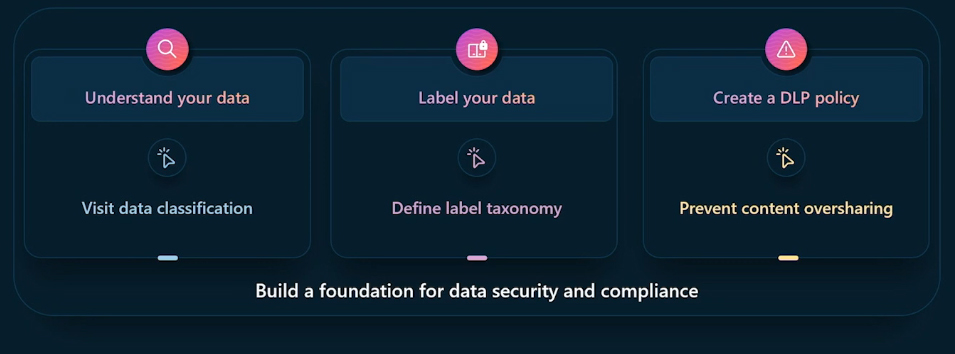
Understand your data: Start with the fundamentals by identifying and classifying data based on its sensitivity. Visit data classification and leverage both built-in and custom sensitive information types, such as trainable classifiers and labeled content.
Label your data: Establish a clear labeling taxonomy and apply labels consistently across your content. You can set default levels, configure manual labeling for greater control, or use auto-labeling to scale.
Create a DLP policy: Implement DLP policies to prevent unintentional data sharing across Microsoft 365 apps, devices, and browsers.
Developing AI Readiness and Workforce Skills
AI is a strategic enabler that unlocks new possibilities in the public sector. However, realizing its full potential requires careful planning and preparation. The following key questions can help public sector leaders successfully deploy AI and achieve measurable impact:
Goals: What specific challenges will AI address?
Pain points: Where do bottlenecks exist within current operations?
Current capabilities: Which processes are slow, inefficient, or prone to error? Identifying these areas helps target AI where it can deliver the greatest value.
Data strategy: Is the organization's data clean, accessible, and secure? AI's effectiveness depends on the quality of its data. A strong data strategy enables actionable insights while maintaining privacy and compliance.
Resource and adoption readiness: How prepared is the organization for AI integration? Successful implementation requires not only technology but also the right people, processes, and change management practices to support new ways of working.
Thoughtfully addressing these questions helps align operational priorities, data management, and workforce readiness, creating a foundation for sustainable AI-driven transformation in the public sector.
Identifying and Empowering Power Users
AI implementation goes beyond technology, and it centers on people. Success depends on empowering power users who are eager to embrace new tools, redefine workflows, and inspire others. Their engagement drives meaningful impact and accelerates adoption across the organization.
There are three key lessons from power users actively leveraging AI:
Integrate AI into daily routines: Power users begin and end their day with AI, using it to prioritize tasks in the morning and summarize progress at the end of the day. This habit enhances focus, time management, and decision-making.
Learn by doing: Experimentation leads to discovery. Through trial and error, users uncover new solutions and drive meaningful innovation.
Rethink processes, not just automate tasks: AI adoption requires persistence and curiosity, encouraging teams to explore new possibilities and continuously refine workflows.
AI transformation requires a fundamental shift in mindset. Empowering early adopters encourages collaboration, curiosity, and continuous improvement, laying the foundation for long-lasting success.
Microsoft Copilot exemplifies this transformation by combining the power of large language models with organizational data from Microsoft Graph, Microsoft 365 apps, and the Internet. Accessed through natural language, it serves as a powerful productivity and creativity assistant. By leveraging its advanced capabilities and adhering to responsible AI practices, public sector organizations can streamline operations, improve decision-making, and strengthen collaboration.
Reference:
Microsoft Events


