Last updated: May 2026 By TerminalWorks — Remote Desktop Printing Solutions Since 2011
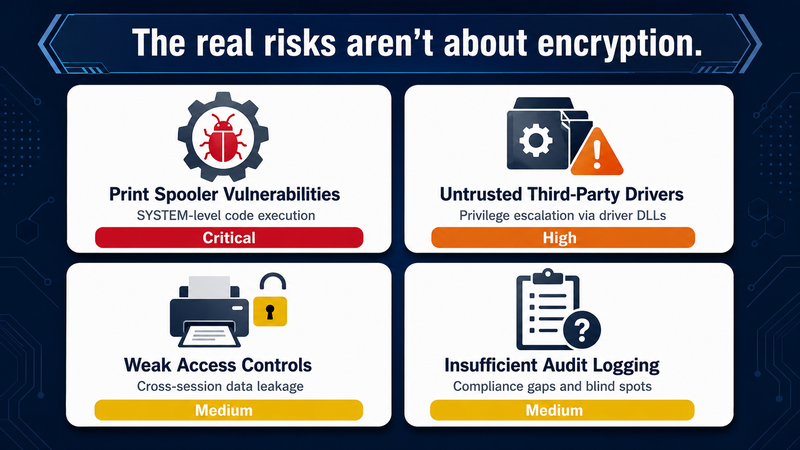
Remote desktop printing is secure when it is configured correctly. Print jobs travel inside the encrypted RDP session — protected by TLS 1.2 or 1.3 over the RDPDR virtual channel — so the transport itself is rarely the weak link. The real risks are print spooler vulnerabilities, untrusted third-party drivers loaded on the server, weak access controls on redirected printers, and incomplete audit trails that fail compliance reviews.
This post breaks down where remote desktop printing is genuinely secure, where it isn't, and what you need to do to close the gaps. We cover how print jobs flow through an RDP session, the most common attack surfaces (including PrintNightmare and its successors), what HIPAA, PCI DSS, GDPR, and SOC 2 actually expect from a printing pipeline, and when native Easy Print is good enough versus when a dedicated tool makes more sense.
How Print Jobs Actually Travel Through an RDP Session
To reason about security, you need to know what the data path looks like. When a user prints from a remote session, the print job does not bypass RDP — it rides inside it.
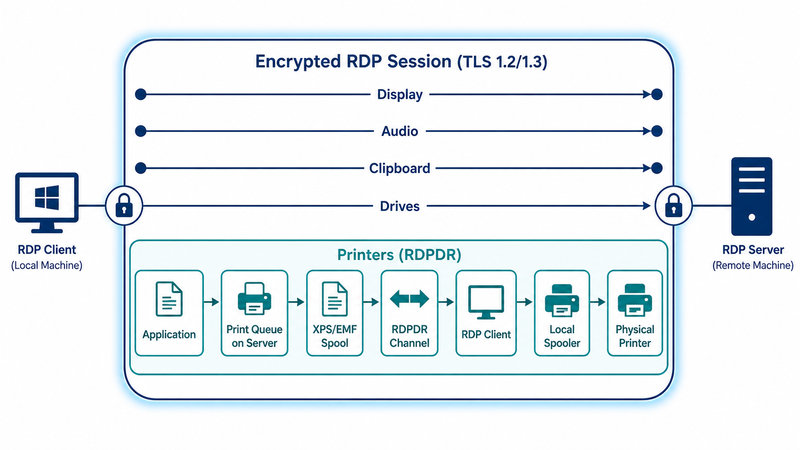
The Remote Desktop Protocol multiplexes all traffic over a single encrypted TCP/UDP stream using virtual channels. Display, audio, clipboard, drives, smart cards, and printers each get their own channel. Printing uses the RDPDR (device redirection) channel, with sub-protocols for the specific device class. When the user hits Print, the application on the remote server hands the job to the local print queue on that server. The queue spools it — usually as XPS through the Microsoft XPS Document Writer when Easy Print is in use, or as EMF on legacy setups — serializes it onto the RDPDR channel, and the RDP client on the user's workstation feeds the bytes into the local Windows spooler, which renders to the physical printer.
This matters for two reasons. First, the print data is encrypted in transit by RDP's TLS layer — there is no separate "printer-to-server" tunnel to configure. Second, the print data is fully reconstructed and processed by Windows print drivers on both ends, where most of the actual security weaknesses reside.
What Are the Real Security Risks of Remote Desktop Printing?
In our experience supporting more than 30,000 companies on RDS, Citrix, and Azure Virtual Desktop environments, almost every printing-related security incident traces back to one of four root causes — and none of them are about encryption.
Print Spooler Vulnerabilities
The Windows Print Spooler service (spoolsv.exe) runs as SYSTEM and is reachable both locally and, in some configurations, over the network via RPC. That combination has made it one of the most attacked components in Windows history. PrintNightmare (CVE-2021-34527) is the textbook example: an authenticated user could load an arbitrary DLL through the spooler's driver-install mechanism and gain SYSTEM-level code execution. Variants like CVE-2022-21999 (SpoolFool) and the 2024-2025 wave of point-and-print weaknesses followed the same pattern.
Microsoft's response was Windows Protected Print Mode (WPP), introduced in 2024 and now the default direction for Windows 11 and Windows Server 2025. WPP runs printing in a sandboxed user-mode service, restricts third-party drivers, and relies on the IPP-based Mopria driver framework. The catch: many enterprise printers — particularly Zebra label printers, Dymo, Epson receipt printers, and older HP PostScript devices — depend on vendor-specific drivers that don't yet have IPP-class equivalents. A pattern we see repeatedly is shops enabling WPP for compliance reasons, then disabling it a week later because half of their hardware stops working.
Untrusted Printer Drivers
In a traditional RDP printing setup, redirected printers prompt Windows to install the matching driver on the terminal server. If hundreds of users each redirect a different home printer, the server ends up with dozens of third-party drivers — each running with high privileges in the spooler process. One badly signed or vulnerable driver can compromise the entire server. This is also why a single misbehaving driver can blue-screen an RDS host serving 80 users.
Easy Print was Microsoft's mitigation: instead of installing the local driver on the server, it routes everything through a single generic driver that produces XPS and sends it to the client for rendering. That solves the driver-sprawl problem but introduces its own headaches with PostScript and label printers. Third-party tools like TSPrint, ThinPrint, and ScrewDrivers (Tricerat) take a similar driver-virtualization approach with different rendering pipelines.
Weak Access Controls on Redirected Printers
Redirected printers are usually visible to the user session that created them, but Windows access control for print queues is coarse and often left at the default. Without additional controls, any process running in a user's session can enumerate and send jobs to that user's printers. In multi-tenant or shared workstation scenarios, this becomes a data-leakage vector: a print job submitted from one session can sit in a queue that another user can later inspect via the printer properties.
Insufficient Audit Logging
Native Windows print logging is off by default and, even when enabled (Microsoft-Windows-PrintService/Operational), captures only limited metadata: who printed, when, the document name, and the page count. It does not retain job content. For HIPAA, PCI DSS, or SOX audits, this is often inadequate — auditors want to know not just that a 12-page document was printed, but whether it contained protected data and whether it reached the intended printer. One of the most common support tickets we receive after a SOC 2 readiness assessment is "how do we prove what was printed to whom, six months from now?"
Is RDP Printing Traffic Encrypted?
Yes. Since Windows Server 2012 R2, RDP defaults to TLS encryption with Network Level Authentication (NLA), and modern Windows Server (2019, 2022, 2025) supports TLS 1.2 and 1.3 with strong ciphers. Print data inside the RDPDR virtual channel inherits that encryption — there is no separate negotiation, no plaintext fallback for printing specifically.
That said, "encrypted" is not the same as "configured securely." We routinely see RDS environments with:
- TLS 1.0/1.1 still enabled at the OS level for legacy compatibility, leaving room for downgrade attacks.
- Self-signed RDP certificates that clients accept after a one-time warning, but provide no real identity verification.
- Standard RDP Security Layer (the old non-TLS mode) left enabled because someone copied an old GPO.
For any compliance-bound environment, force TLS 1.2 minimum, deploy proper certificates from your internal CA or a public CA, require NLA, and disable the legacy RDP security layer. This hardening is independent of which printing solution you use — the same controls apply to Easy Print, TSPrint, or anything else riding on RDP.
Remote Desktop Printing and Compliance: HIPAA, PCI DSS, GDPR, SOC 2
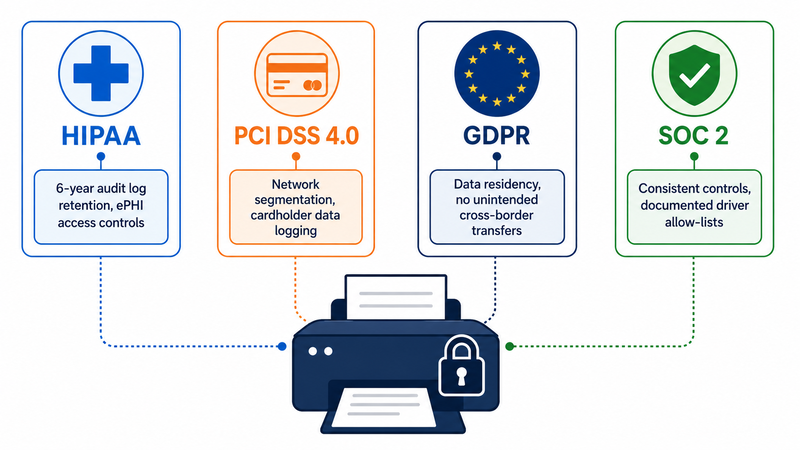
Compliance frameworks rarely mention printing explicitly, but they all impose requirements that affect how you must operate a remote desktop printing pipeline.
Healthcare (HIPAA and HITRUST)
HIPAA's Security Rule requires technical safeguards for ePHI in transit and at rest, as well as access and audit controls. For RDP printing, that translates to: TLS-encrypted RDP, role-based access to printers (especially in EMR systems like Epic, Cerner/Oracle Health, and Meditech, where label and wristband printing is common), and audit logs retained for at least six years. The wristband and specimen-label piece is the operational pain point — most hospitals run Zebra ZD500 or similar thermal printers, and getting them to work reliably through Easy Print is famously difficult. Many sites end up with a session-host-local printer connected over the network, which then needs its own access control review.
Financial Services (PCI DSS, SOX)
PCI DSS 4.0 (mandatory since March 2025) tightens requirements around logging, network segmentation, and authentication. If cardholder data could appear on a printed page from within an RDP session, both the session host and the printer fall within PCI scope. That has two practical consequences: the printer must be on a segmented network with restricted access, and you need a retained log of print activity that can be correlated with cardholder data events. SOX adds the requirement that printing of financial records be traceable.
GDPR and Data Residency
GDPR doesn't regulate printing directly, but it does regulate personal data processing, and a print job containing personal data is processing. For EU customers running RDS in a datacenter outside the EU, the print path may cross jurisdictions. Practical controls: ensure the RDP endpoint is hosted within the appropriate region, document the data flow in your record of processing activities, and use a printing pipeline that doesn't introduce a third intermediate service in another country. This is one place we explicitly warn prospects about cloud-relay printing services — if your print job is routed through a third-party cloud in a different region, you may have just created an unintended international transfer.
SOC 2
SOC 2 Type II audits focus heavily on the consistency of controls over time. For printing, that usually means demonstrating: documented driver allow-lists on the session hosts, monitored print spooler service status, restricted ability to install new printers, and centralized log retention. None of this is impossible with native tools, but it requires Group Policy work and a SIEM integration that most teams don't have on day one.
Native RDP Printing vs Third-Party Solutions: Security Trade-offs
There is no single "right" answer here. We've been honest about this since 2014 because pretending otherwise costs customers money and trust.
When Native Easy Print Is Secure Enough
Easy Print is genuinely fine for small-to-mid environments where:
- All printers are standard office laser or inkjet devices (HP, Brother, Canon) that work well with the XPS rendering pipeline.
- You have under roughly 50 concurrent users and don't need a granular print policy.
- Compliance scope is light (no PCI or HIPAA), or printing is explicitly excluded from scope by design.
- You're comfortable hardening the Windows Print Spooler via GPO and don't need a separate audit trail beyond what the Print Service event log provides.
If you fit that description, do not pay for a third-party tool. Spend the budget on tightening the RDP TLS configuration, deploying proper certificates, and getting your spooler patches up to date.
When You Need a Dedicated Solution Like TSPrint
The math changes when you hit one or more of these:
- Specialty printers: Zebra, Dymo, Epson TM-T88, Star receipt printers, OPOS-attached devices. Easy Print's XPS pipeline does not handle ZPL/EPL/ESC-POS commands well — you lose label sizing, barcode quality, and receipt-cutter control.
- PostScript printers: Easy Print's universal driver renders PostScript through XPS, which can break fonts, color profiles, and ICC-managed workflows. Print-shop environments routinely require a solution that preserves the PostScript stream end-to-end.
- Compliance audit pressure: You need per-user, per-printer, per-document logging with longer retention than the Windows Event Log provides by default.
- Driver sprawl: You can't have 80 different vendor drivers loading into spoolsv.exe across your RDS farm.
- Bandwidth constraints: Easy Print's XPS jobs are large. A 50-page document with embedded images can easily hit 30-60 MB over the wire and take several minutes over a 5 Mbps WAN link.
Third-party options in this space include TSPrint, ThinPrint, ScrewDrivers (Tricerat), UniPrint Infinity, FabulaTech Printer for Remote Desktop, and ezeep. They differ in pricing models, render formats, and feature depth — ezeep, for example, is cloud-mediated, which has implications for GDPR data residency that on-premises tools like TSPrint and ThinPrint don't share.
How TSPrint Approaches Remote Desktop Printing Security
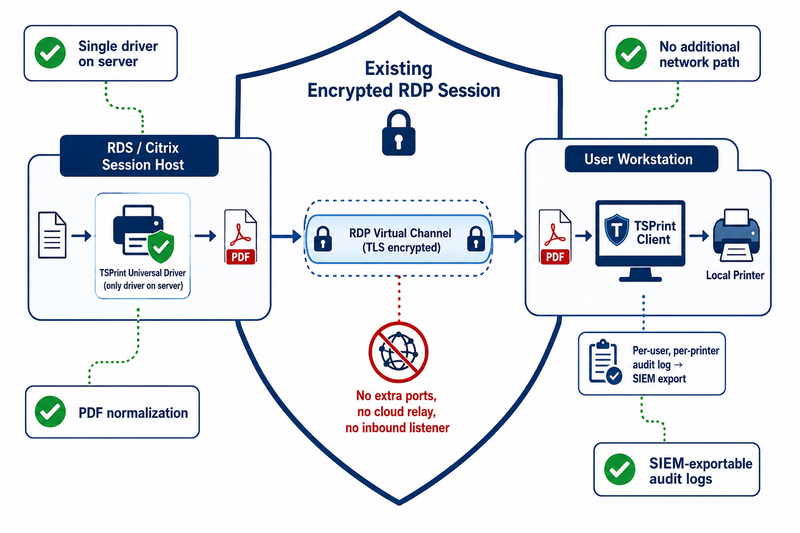
Since we make TSPrint, we'll be specific about what we do and don't claim.
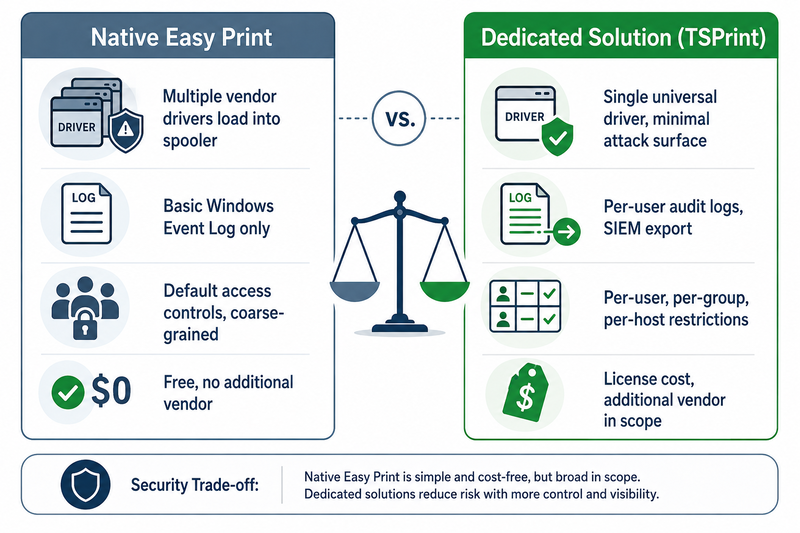
TSPrint installs a single universal driver on the RDS or Citrix session host. When a user prints, the job is rendered to PDF inside the user's session, sent down the existing RDP virtual channel to the TSPrint Client on the user's workstation, and printed there using the local printer's native driver. The relevant security characteristics:
- No additional network path: Everything rides inside the existing encrypted RDP/ICA session. There is no separate TCP port to open, no cloud relay, and no inbound listener on the client.
- Driver isolation on the server: Only the TSPrint universal driver runs on the session host. Vendor drivers stay on the client workstation, eliminating most of the spooler-driver attack surface on the multi-user server.
- PDF rendering: Job content is normalized to PDF, which is well-defined, widely supported, and avoids the XPS-to-EMF-to-PostScript conversion losses that Easy Print causes with specialty hardware.
- Granular access control: Through the TSPrint management console, administrators can restrict printer redirection on a per-user, per-group, or per-session-host basis.
- Audit logging: Per-user and per-printer logs with longer retention than Windows event logs, exportable to SIEM. This is the feature most often cited in our HIPAA and PCI deployments.
Where TSPrint is not the right fit: pure thin-client environments with no Windows-based endpoint, scenarios where you need browser-only printing without a local agent, and very small deployments where the license cost outweighs the convenience.
Security Hardening Checklist for RDP Printing Environments
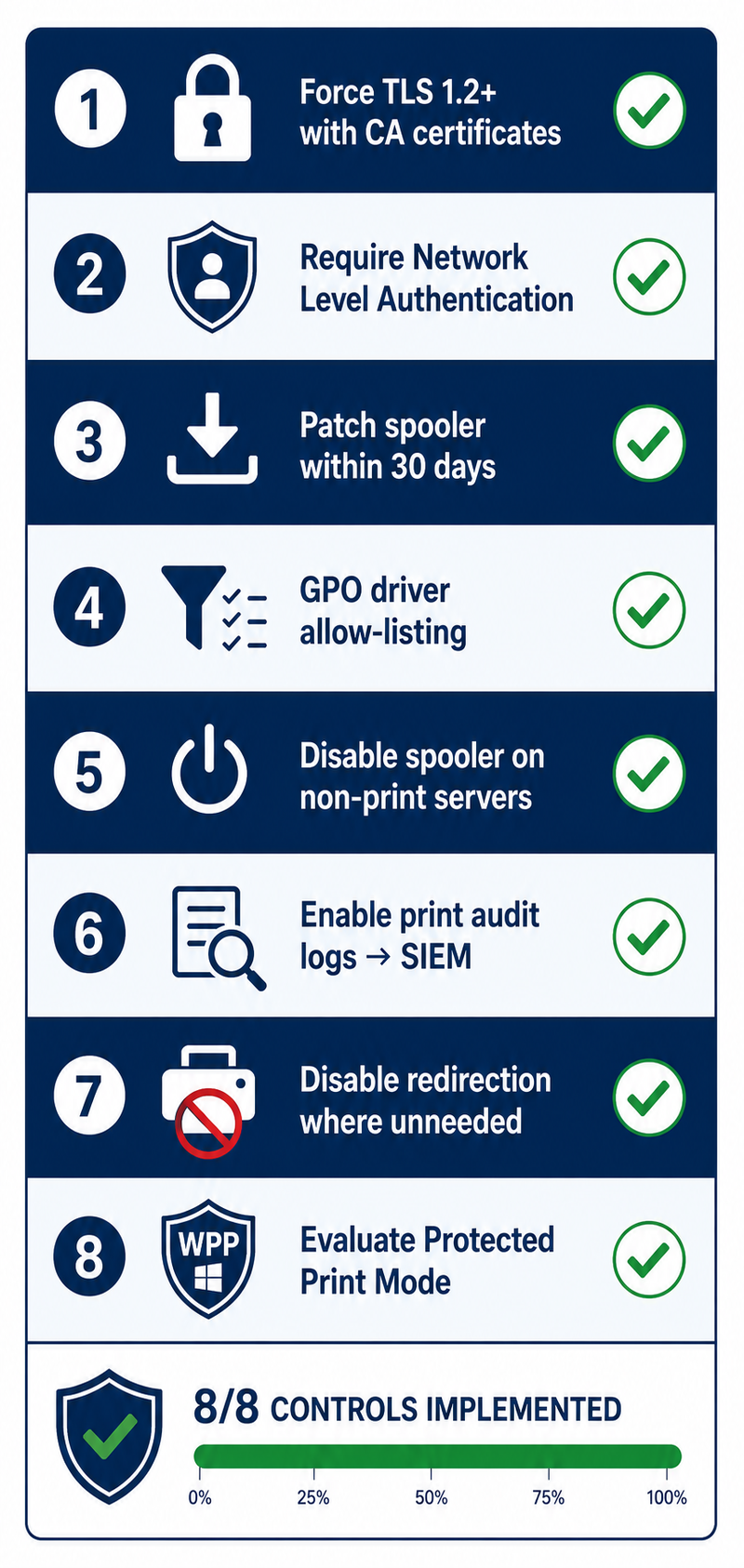
A condensed version of what we recommend to customers, regardless of which printing solution they use:
| Control | Action | Why It Matters |
|---|
| RDP encryption | Force TLS 1.2 minimum; deploy CA-issued certificates | Prevents downgrade and MITM on the print transport |
| Network Level Authentication | Require NLA on all RD Session Hosts | Blocks pre-auth attacks on the listener |
| Print spooler patching | Apply monthly cumulative updates within 30 days | PrintNightmare-class CVEs continue to surface |
| Driver allow-listing | Configure "Point and Print Restrictions" GPO | Prevents arbitrary driver installs by users |
| Spooler service scope | Disable spooler on servers that don't need it | Reduces attack surface on DCs and app servers |
| Audit logging | Enable Print Service operational log; forward to SIEM | Compliance evidence and incident investigation |
| Printer redirection policy | Disable redirection where not required | Reduces exposed driver surface and data egress paths |
| Windows Protected Print Mode | Evaluate on Windows 11 / Server 2025 | Sandboxes spooler — test hardware compatibility first |
FAQ
Yes. On any supported version of Windows Server (2016 and newer), RDP uses TLS encryption by default, and print jobs traveling through the RDPDR virtual channel inherit that encryption. You should still verify that the legacy RDP Security Layer is disabled, TLS 1.0 and 1.1 are turned off at the OS level, and your RDP certificate is issued by a trusted CA rather than the auto-generated self-signed one. Without those steps, "encrypted by default" does not mean "audit-ready."
Not under correct TLS configuration. The print job is encapsulated inside the encrypted RDP session, so an attacker on the network would need to break TLS to read it. The realistic attack vectors are at the endpoints, not in transit: a compromised user workstation with a keylogger or screen scraper, a malicious driver loaded into the print spooler on the server, or a session-hijacking attack against an unlocked workstation. Encrypting the wire doesn't help if either endpoint is compromised.
Yes, provided the standard HIPAA Security Rule safeguards are in place: encryption in transit through TLS-protected RDP, access controls on the EMR and on print destinations, audit logging retained for at least six years, and a Business Associate Agreement with any vendor that processes PHI on your behalf. The printer itself becomes part of your security boundary — devices in public-facing areas need physical safeguards against output theft, and label printers used for wristbands and specimens need access controls equivalent to the workstations driving them.
Not inherently. Easy Print's security profile depends mostly on how the underlying Windows print spooler is patched and configured. Third-party solutions like TSPrint, ThinPrint, or ScrewDrivers can reduce the attack surface by limiting the number of vendor drivers that load on the session host, and they typically offer richer audit logging — but a well-patched, properly locked-down Easy Print deployment is not an automatic compliance failure. The right comparison is feature-by-feature for your specific environment, not blanket security claims.
Use a solution that preserves the raw ZPL or EPL command stream end-to-end rather than rendering through XPS. Native Easy Print converts label data into XPS, which often corrupts barcode sharpness, label dimensions, and printer-side scripting. TSPrint, ScrewDrivers, and ThinPrint all handle this scenario. The security implications are the same as any other RDP printing — make sure the workstation driving the Zebra is on a trusted network segment, and that the device itself doesn't expose unauthenticated network printing on TCP 9100.
It can, depending on your hardware. WPP restricts third-party v3 drivers and relies on the Mopria/IPP-based driver framework, which many label printers, receipt printers, and older PostScript devices don't yet support. In our experience, fewer than 70% of typical RDS printer fleets are fully WPP-compatible as of mid-2026. We recommend testing WPP on a non-production session host with your actual hardware inventory before rolling it out, and keeping a fallback plan for printers that still require legacy drivers.
It depends on the framework. HIPAA requires retention of audit logs for at least six years. PCI DSS 4.0 requires a minimum of one year, with three months immediately available for analysis. SOX records typically need seven years. GDPR is purpose-bound rather than time-bound — retain logs only as long as needed for the documented purpose, but be prepared to demonstrate that the retention is justified. For multi-framework environments, the safest baseline is seven years of compressed, integrity-protected log storage in a SIEM or log archive.
Yes, and in some high-security environments it is preferred. Common patterns include: printing to a network printer reachable from the session host directly (no client-side redirection), printing to a PDF and routing it through a DLP-monitored email channel, or using a follow-me print service like PaperCut, where the user releases the job at a physical device after badge authentication. Disabling printer redirection entirely via Group Policy (Computer Configuration > Policies > Administrative Templates > Windows Components > Remote Desktop Services > Remote Desktop Session Host > Printer Redirection) is one of the strongest controls available and is the right default for environments handling classified or highly regulated data.
It's not inherently less secure, but it has a different trust and data-flow model. Cloud-mediated print services route metadata, and sometimes job content, through a third-party SaaS platform. That can be acceptable with proper BAAs, ISO 27001 and SOC 2 attestations, and data residency guarantees. Still, it adds a vendor to your compliance perimeter and introduces a potential cross-border data transfer. On-premises solutions like TSPrint, ThinPrint, or ScrewDrivers keep the print path within your existing RDP session and infrastructure, which is simpler from a compliance-mapping standpoint for many regulated industries.
Summary
Remote desktop printing is secure when the underlying RDP session is properly hardened, and the Windows print spooler is patched, configured, and monitored. The transport itself is encrypted by default — the real risks live in driver trust, access controls, and audit logging. For most environments, native Easy Print plus disciplined spooler hygiene is enough; for environments with specialty hardware, compliance pressure, or large user counts, a dedicated tool reduces both operational risk and audit overhead.
If you'd like to evaluate TSPrint in your environment, you can check it out here - TSPrint


