Last updated: July 2026
By TerminalWorks — Remote Desktop Printing Solutions Since 2014
Remote desktop printing for healthcare usually breaks because Windows printer redirection and Easy Print rename each local printer per session and rasterize jobs into XPS. That breaks EMR systems that target printers by exact name and label printers that need driver-level or raw output. The fix is a driverless redirection layer such as TSPrint, or direct network printing for fixed label stations.
That two-sentence answer hides a lot of moving parts, so the rest of this post explains why clinical printing fails over RDP, what specifically goes wrong with wristband and specimen-label printers, what HIPAA actually asks of your print path, and an honest breakdown of when Easy Print, direct network printing, or a third-party redirection tool is the right call. Everything below comes from over a decade of supporting printing in Remote Desktop, Citrix, and VDI environments across 30,000+ companies.
Why Does Remote Desktop Printing Break in Healthcare Environments?
Unlike scanning, printing over Remote Desktop does have native redirection — jobs travel back to the client over the RDPDR virtual channel. The problem is not the absence of redirection; it's the two native models that implement it, both of which have failure modes that healthcare workflows expose faster than almost any other industry.
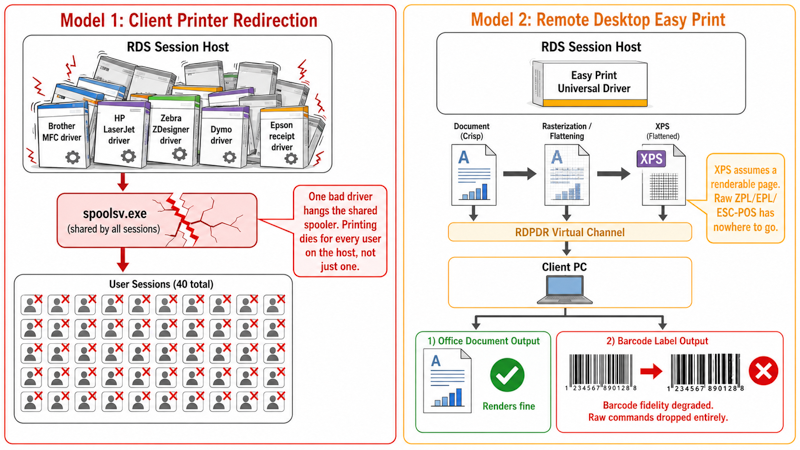
The first model is classic client printer redirection: the session host needs a matching print driver installed for every redirected printer. In a clinic estate with printer-heavy stations — Brother MFCs at the front desk, HP LaserJets in exam rooms, Zebra and Dymo label printers at the pharmacy and lab — that means dozens of OEM drivers on a shared session host. One badly written third-party driver can hang spoolsv.exe, and when the shared spooler stalls, printing dies for every user on that host, not just the one with the bad driver. A pattern we see repeatedly: a single Zebra or receipt-printer driver update takes down printing for a 40-user session host until the queue is cleared.
The second model is Remote Desktop Easy Print, introduced in Windows Server 2008. Easy Print sidesteps driver sprawl by using a universal driver: the server renders the job to XPS, ships it to the client, and the client's local driver renders the final output. It requires .NET and XPS support on the client, and it works acceptably for ordinary office documents. But the XPS rasterization step is exactly where clinical printing falls apart — margins, tray selection, duplex, custom label sizes, and color profiles are not always mapped faithfully, and anything that isn't a "renderable page" (raw device commands) has nowhere to go.
On top of both models sits the naming problem. Redirected printers are exposed inside the session as Zebra ZD420 (redirected 7), and that trailing number is not stable — it changes across reconnects, roaming, and session-host failover. One of the most common support tickets we receive is "printing worked yesterday and now the EMR says the printer isn't found." Nine times out of ten, the redirected suffix changed and the application's saved printer mapping no longer matches.
Why Won't My Label Printer Work Over Remote Desktop?
Label and wristband printers are the single largest category of healthcare RDP printing tickets in our experience. Zebra thermal units (ZD-series, GK420, GX430), Dymo LabelWriters, and Epson/Star receipt printers all behave differently from a page-oriented laser printer, and the redirection pipeline that "mostly works" for a visit summary tends to fail on a specimen label.
There are two reasons. First, thermal label output is dimensionally unforgiving: a barcode that gets anti-aliased, rescaled, or shifted a few millimeters during XPS rasterization can widen the bars enough that a handheld scanner at the bedside or lab bench simply won't read it. Second, clinical label printing is usually silent — an EMR fires a patient wristband on check-in or a specimen label on collection with no print dialog at all. Any redirection quirk that pops a dialog, loses window focus, or delays the job for a few seconds breaks a workflow that is supposed to be instant and hands-free.
Why redirected printer names break EMR and pharmacy workflows
EMR, practice-management, and pharmacy systems — Epic, Oracle Health (Cerner), MEDITECH, eClinicalWorks, athenahealth, and pharmacy label engines among them — frequently map a specific device to a specific document type: prescription labels to the Zebra at the pharmacy counter, wristbands to the bedside printer, and reports to the office laser. That mapping is stored as an exact printer name string.
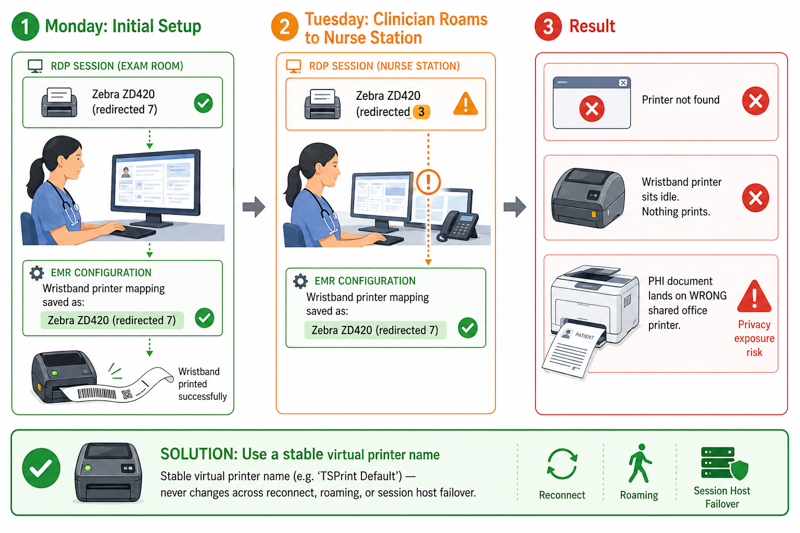
When the device is a redirected printer, the (redirected N) suffix makes that string non-deterministic. After a disconnect/reconnect, a clinician roaming from an exam-room thin client to a nurse-station PC, or a failover between session hosts, the name shifts and the mapping silently breaks. The symptom is a job that produces "printer not found," prints nothing, or lands on the wrong device — a serious problem when the wrong device is printing PHI on a shared tray.
Raw ZPL/EPL/ESC-POS printing and why the XPS pipeline drops it
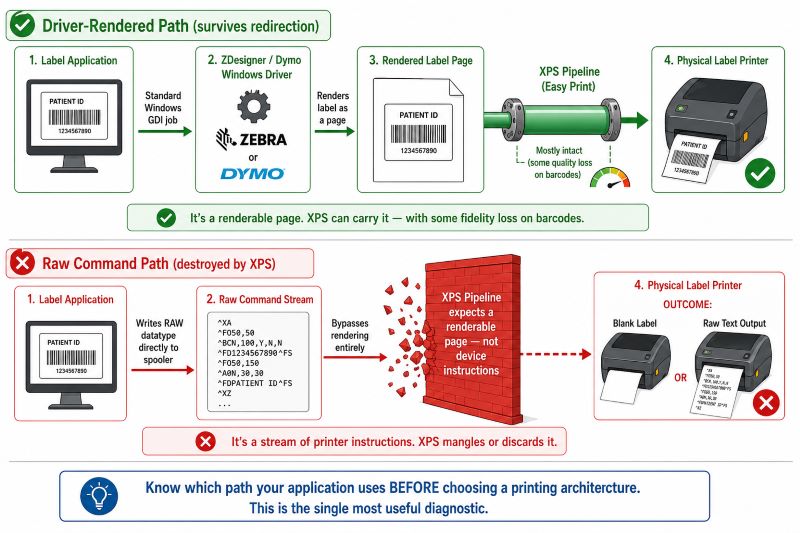
There are two ways label software drives a thermal printer. The driver-rendered path sends a normal Windows GDI job to the ZDesigner (or Dymo) driver, which produces the label. The raw path writes device commands — ZPL, EPL, or ESC/POS — directly to the spooler as a RAW datatype, bypassing rendering entirely.
Easy Print's universal driver assumes a renderable document. Raw ZPL is not a page to be drawn; it is a stream of printer instructions. When that stream is pushed through a rasterizing, XPS-based pipeline, it is mangled or discarded outright, which is why raw-command label workflows so often fail completely over native Easy Print while ordinary documents keep working. Knowing which path your application uses is the single most useful diagnostic before you choose a printing architecture.
Printing PHI: What HIPAA Actually Requires for Remote Desktop Print Jobs
HIPAA does not certify software, and no product can "make you HIPAA compliant" on its own — compliance is a property of your whole environment, including Business Associate Agreements, access controls, and workforce training. What HIPAA does require is that PHI in a print job — patient name, date of birth, MRN, medications, diagnoses — is protected in transit, at rest, and in access. Three parts of the print path matter here.
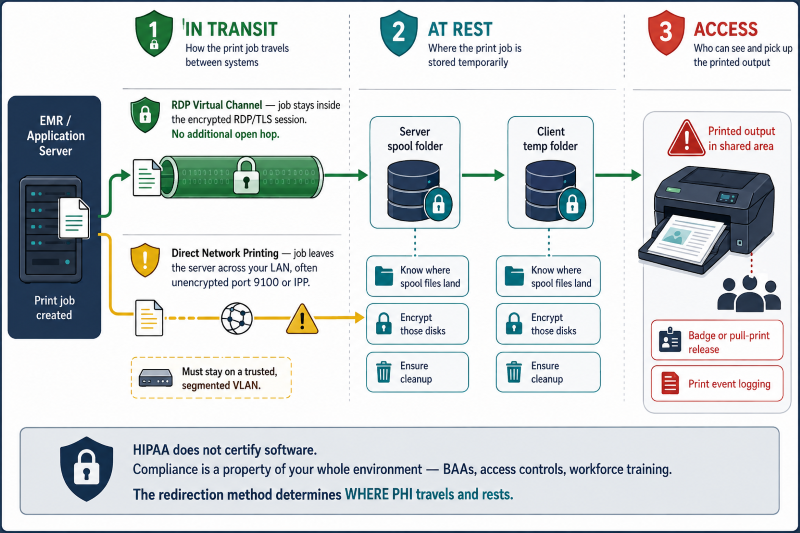
In transit, both native redirection and a virtual-channel tool like TSPrint carry the job inside the RDP session, which is already encrypted at the RDP/TLS layer, with no additional open network hop. Direct network printing to an IP-attached printer is different: the job leaves the server and crosses your LAN using whatever the printer speaks (often unencrypted port 9100 or IPP), so that traffic must stay on a trusted, segmented VLAN.
At rest, spooled jobs land somewhere — the server spool, a client temp folder — so know where those files are written, keep the disks encrypted, and ensure they're cleaned up. For access, the classic exposure is PHI sitting on a shared output tray; badge-release or pull-printing and print-event logging address that. The honest summary: the redirection method changes where PHI travels and rests, and that's the part you build your compliance controls around.
When to Use What: Easy Print vs. Direct Network Printing vs. TSPrint
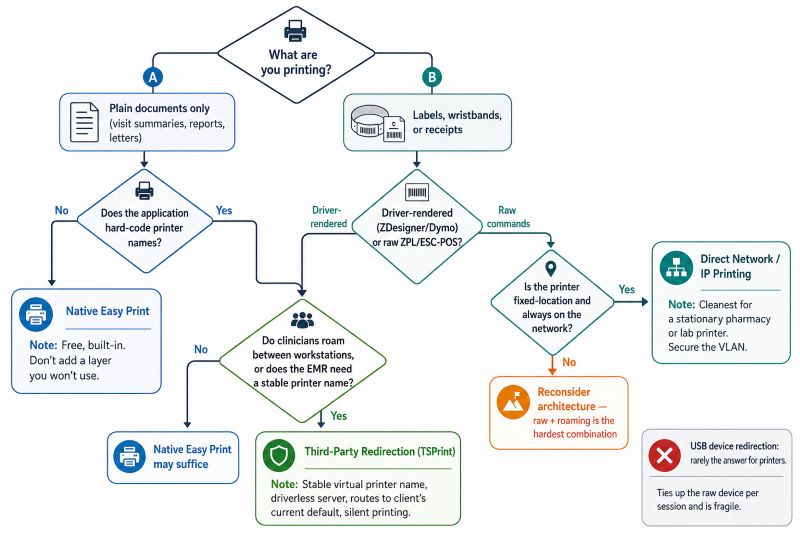
There is no single correct answer for remote desktop printing in healthcare — the right choice depends on whether the device roams with the user, whether the application hard-codes printer names, and whether label output is driver-rendered or raw. Here's how the main approaches compare in a clinical RDS or Citrix estate.
| Approach | Best for | Strengths | Limitations in healthcare RDS |
|---|
| Native client redirection (matching OEM driver on host) | Small estates with one or two standard printer models | Full driver feature set; free | Driver sprawl across clinic printers; one bad driver crashes the shared spooler; (redirected N) name instability |
| Remote Desktop Easy Print | Standard office documents to laser/inkjet | No per-model drivers on the host; built in and free | XPS rasterization degrades label/barcode fidelity; drops raw ZPL/EPL/ESC-POS; unstable redirected names |
| Direct network / IP printing (session prints straight to the printer's IP) | Fixed-location, always-on label/receipt printers (pharmacy counter, lab bench, nurse station) | Most reliable and lowest-latency for a stationary raw-ZPL device; no redirection quirks | Doesn't roam with the user; needs routing/VLAN reachability and static addressing; one queue to manage per printer; LAN traffic must be secured |
| Third-party redirection (TSPrint) | Roaming clinicians, hard-coded EMR printer names, mixed printer fleets, constrained WAN links, silent auto-print | Driverless on the server; stable virtual-printer name; routes to the client's local default; compressed over the RDP channel | Reproduces the rendered job — not a raw ZPL pass-through channel; overkill if you only print basic office documents |
A few honest rules of thumb from the field. If all you print is the occasional visit summary to a standard office laser and Easy Print behaves, you may not need anything more — don't add a layer you won't use. If you have a fixed pharmacy or lab label printer that's always on the network and your software streams raw ZPL, direct network printing to that printer's IP is frequently the cleanest, most reliable architecture, and we'll say so plainly. USB device redirection, by contrast, is rarely the answer for printers — it ties up the raw device per session and is fragile.
Where a third-party redirection layer earns its place is the classic healthcare pattern: clinicians who roam between workstations and need their local default printer wherever they log in, EMR applications that break the moment a redirected name changes, a fleet of mixed printer models causing driver sprawl and spooler crashes, and WAN-connected clinics that need jobs compressed.
How TSPrint Handles Healthcare Remote Desktop Printing
TSPrint installs its own virtual printers on the session host — TSPrint Default, TSPrint Printer, TSPrint Network, and TSPrint PDF — and requires no OEM printer drivers on the server, which directly removes the driver-sprawl and spooler-crash failure modes above. When a user prints, the job is compressed and tunneled through the existing RDP virtual channel to the TSPrint client, which prints to the local printer using its own driver.
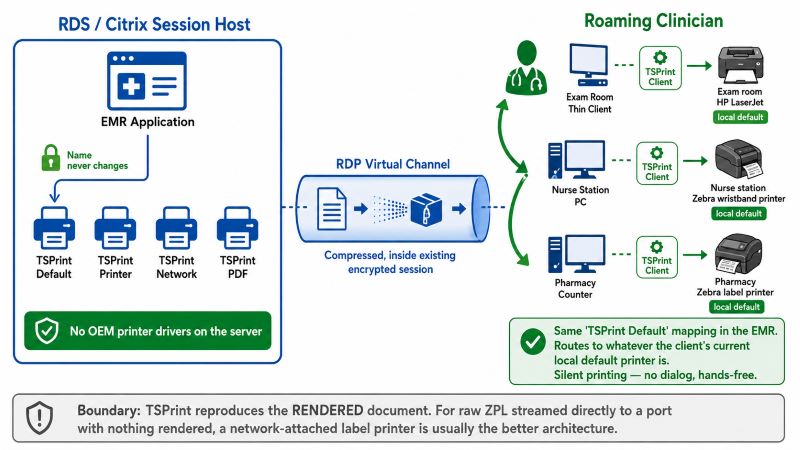
Two behaviors matter most for clinical workflows. First, the virtual printer name is stable — an EMR mapped to "TSPrint Default" never encounters a shifting (redirected N) suffix, and TSPrint Default routes each job to whatever the client's current local default printer is, which is exactly what a roaming clinician needs. Second, silent printing is supported, so driver-rendered wristband and label jobs fire without a dialog. TSPrint runs on Windows Server 2003 through 2025, on Citrix, and on cloud desktops such as Azure Virtual Desktop and Amazon WorkSpaces, with a native ARM64 client for Copilot+ thin clients.
We'll be candid about the boundary: TSPrint reproduces the rendered document faithfully, so it works well for label printers when the application prints through the printer's Windows driver (the ZDesigner or Dymo path). If your workflow depends on streaming raw ZPL directly to a port with nothing rendered, a directly network-attached label printer is usually the better architecture — validate that raw path by testing before committing. Compared with alternatives, TSPrint sits between free-but-fragile native Easy Print and heavier enterprise suites like ThinPrint or Tricerat ScrewDrivers: driverless, stable naming, wide OS and cloud coverage, and per-server licensing.
Frequently Asked Questions
Remote Desktop exposes your local printers inside the session with a (redirected N) suffix, and that number is assigned per session rather than fixed. When you reconnect, roam to another workstation, or fail over to a different session host, the suffix can change. Any application that saved the old exact name — most EMR and pharmacy systems do — no longer finds a match and reports the printer as missing. A stable virtual-printer name (as TSPrint provides) or a fixed server-side queue avoids the moving target.
Yes, but the method matters. If your software prints through the Zebra's Windows driver (ZDesigner), the job can be redirected and reproduced on the local printer reliably. If your software streams raw ZPL commands straight to the port, native Easy Print will usually mangle or drop it because its XPS pipeline expects a renderable page, not device commands. For a fixed, always-on Zebra at a pharmacy or lab, printing directly to the printer's network IP is often the most dependable choice.
For plain office documents — letters, visit summaries, reports — to standard laser or inkjet printers, Easy Print is often fine and costs nothing. It struggles with the two things clinics do most: label and wristband printing (barcode fidelity suffers under XPS rasterization) and applications that hard-code printer names (the redirected suffix keeps changing). If your clinic is document-only and Easy Print behaves, you may not need anything else; if labels or name-mapping are in the picture, plan for a different approach.
First determine whether the EMR drives the label printer through its Windows driver or by raw ZPL/EPL. Driver-rendered labels can be handled by a redirection tool with a stable printer name and silent printing, so the wristband fires hands-free at check-in. Raw-command labels to a fixed bedside or lab printer are usually best sent to that printer's network IP directly. The failure to avoid is a redirected printer whose name changes and silently breaks the EMR's label mapping mid-shift.
No printing method is "HIPAA compliant" by itself — compliance depends on your full environment, including BAAs, encryption, access controls, and audit logging. What you control is the print path: jobs carried inside the RDP virtual channel ride the session's existing encryption with no extra open hop, while jobs sent to a network printer's IP cross your LAN and must stay on a trusted, segmented VLAN. Also account for where spooled files rest (encrypt those disks) and for PHI left on shared trays (use badge or pull-release). Treat the printing tool as one control among several, not a compliance guarantee.
This is almost always the redirected-name problem. After a reconnect or a move to a different workstation, the printer your application was mapped to now has a different (redirected N) name, so jobs either error out, print nothing, or fall through to a default device — which may be the wrong printer entirely. Because that wrong printer can be on a shared tray, it's also a PHI exposure, not just a nuisance. Mapping the application to a stable virtual printer or a fixed server queue resolves it.
With native client redirection, yes — the host needs a matching driver for each redirected printer, which is how driver sprawl and spooler instability creep in. Easy Print avoids per-model drivers by using a universal driver, at the cost of the XPS fidelity issues described above. A driverless redirection tool like TSPrint installs its own virtual printers and needs no OEM drivers on the server at all, which is often the deciding factor for estates running many different clinic printer models on one host.
Yes. TSPrint installs the same way in a Citrix environment as on a standard RDP session host, and it supports cloud desktops including Azure Virtual Desktop and Amazon WorkSpaces. It also ships a native ARM64 client, which matters as clinics deploy Snapdragon-based Copilot+ thin clients where the native print path can otherwise break. The server component runs on Windows Server 2003 through 2025, so mixed-vintage healthcare estates are covered.
Summary
Remote desktop printing in healthcare fails on predictable seams: per-session printer renaming that breaks EMR name mappings, XPS rasterization that degrades barcodes, raw ZPL that native Easy Print can't carry, and PHI that has to stay encrypted end to end. Match the tool to the workflow — Easy Print for plain documents, direct network printing for fixed raw-label stations, and a driverless redirection layer for roaming clinicians, hard-coded printer names, and mixed printer fleets. TSPrint fits that last case with stable printer naming, no server-side drivers, silent printing, and wide OS, Citrix, and cloud support.
Learn more on the TSPrint product page.


