Microsoft Easy Print is enough when you have a small number of standard office printers (HP, Canon, Brother) attached to modern Windows clients, light print volume, and no specialized hardware. It struggles with label printers, receipt printers, PostScript devices, high-volume workloads, mixed client operating systems, and any scenario where driver compatibility or central print management matters. Third-party RDP printing solutions replace or supplement Easy Print in those cases.
This post covers how Easy Print actually works under the hood, the specific failure modes we see in production RDS deployments, how third-party solutions like TSPrint, ThinPrint, and ScrewDrivers approach the same problem differently, and a practical decision framework for choosing between them.
How Microsoft Easy Print Actually Works
Easy Print was introduced with Windows Server 2008 R2 to address a real pain point: before it existed, administrators had to install a matching printer driver on every RDS host for every printer a user might redirect to. That was unsustainable in environments with hundreds of printer models.
The XPS Rendering Pipeline
Easy Print is effectively a universal proxy driver. When a user redirects a local printer into an RDP session, the server-side driver that appears is the TS Output Driver (or Microsoft XPS Document Writer variants in newer versions). Applications on the server print to this driver, which serializes the output as an XPS (XML Paper Specification) document. The XPS file is transported over the RDP virtual channel — specifically, RDPDR, the device-redirection channel — to the client, where the local Windows print subsystem renders it back to the native printer's page description language (usually PCL, PostScript, or the printer's raw command set).
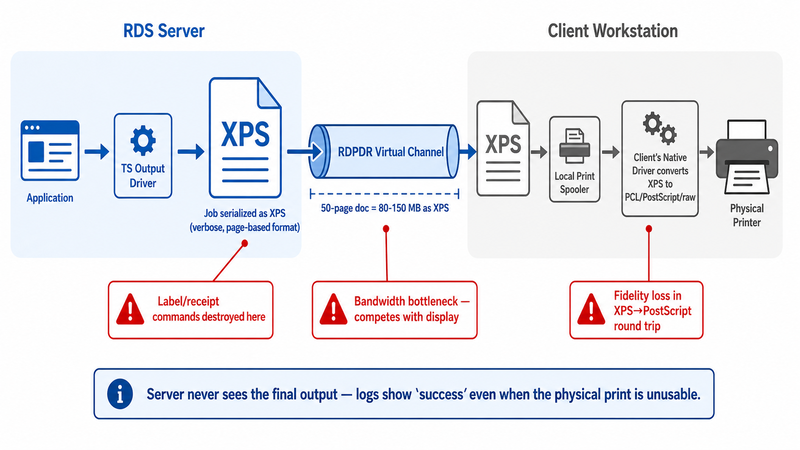
The key insight: all rendering work happens on the client, not the server. The server never needs the real printer driver. This is elegant in theory, but three architectural choices cause most of the problems we'll cover below.
- XPS is a page description format, not a command stream. Label and receipt printers that expect raw ZPL, EPL, ESC/POS, or DPL commands are fundamentally mismatched.
- The client must have a functioning printer driver installed for the physical device. If the driver is broken or wrong, so is Easy Print.
- The XPS-to-native conversion happens in the client's print spooler, which has been a security liability since PrintNightmare in 2021.
What Client-Side Rendering Really Means
In our experience supporting thousands of RDS environments, most administrators assume Easy Print "just handles printing." What it actually does is shift the rendering burden and the driver dependency to every user's workstation. If a user's local driver is a 15-year-old OEM package, that is what ultimately produces the output. The server is completely blind to what the printer does with the spool file, which means server-side logs will show successful jobs even when the physical output is unusable.
Where Easy Print Breaks Down in Production
One of the most common support tickets we receive is some variation of "Easy Print was fine for six months, then it started behaving strangely." That pattern has specific, identifiable causes.
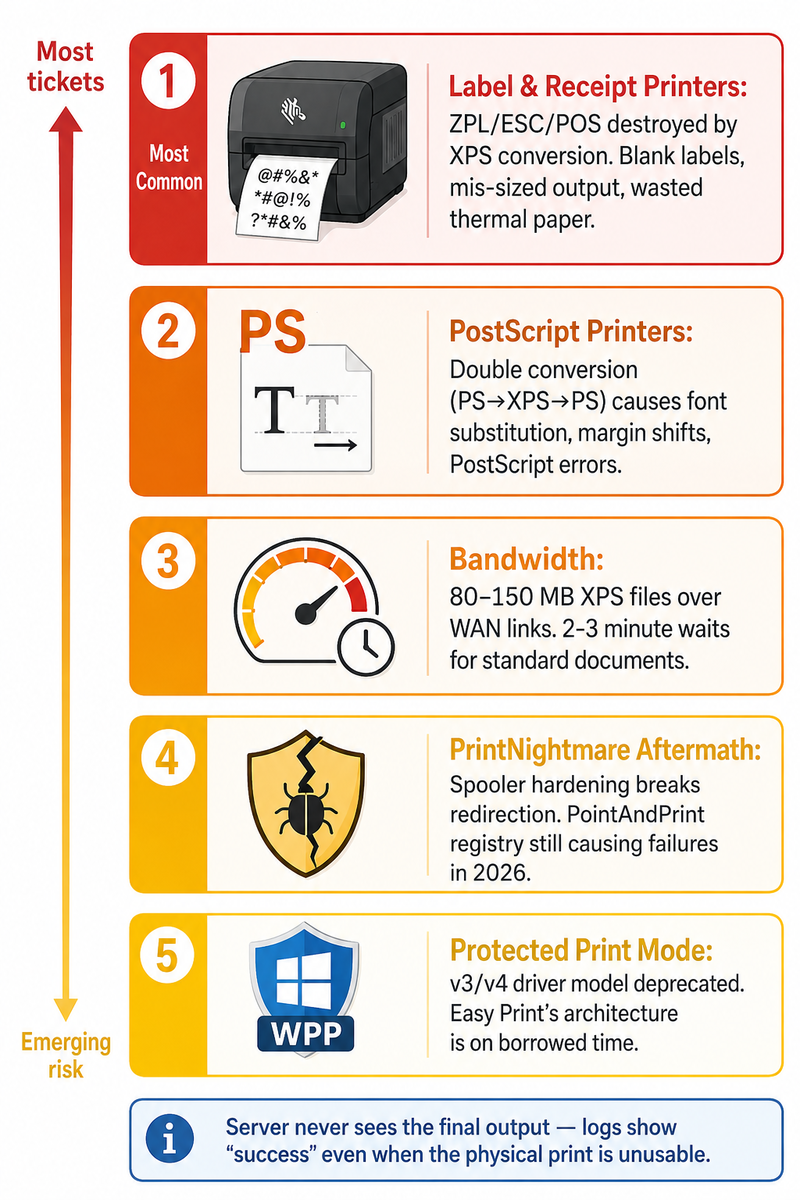
Label and Receipt Printers
Zebra ZPL-series printers (ZD420, ZT410, ZD620), Dymo LabelWriter models, and Epson TM-series receipt printers are the most frequent sources of complaints. These devices do not accept page-based output. A Zebra printer expects ZPL II commands; a Dymo expects its proprietary command set; an Epson TM-T88 expects ESC/POS. When Easy Print converts XPS to whatever the local driver emits, the result is often a rasterized full-page bitmap rather than a crisp command sequence, producing blurry labels, mis-sized output, or several feet of blank thermal paper.
For ZPL specifically, many Zebra deployments require generating raw ZPL on the server — from a WMS, EMR, or ERP application — and getting it to the printer byte-for-byte. Easy Print cannot do that. This is where TSPrint's raw passthrough mode or ThinPrint's native ZPL support becomes necessary, not optional.
PostScript and Specialty Printers
PostScript printers cause a different failure. The client driver converts XPS back to PostScript, but the fidelity loss from the double conversion (PostScript → XPS → PostScript) manifests as shifted margins, substituted fonts, and occasional PostScript errors on the printer panel. Plotters, wide-format printers, and color-critical devices used in design and print shops suffer the worst. In those environments, Easy Print is essentially unusable above draft quality.
Performance on Bandwidth-Constrained Links
XPS files are verbose. A 50-page document with embedded images and charts can produce an XPS spool file of 80–150 MB. Over a 10 Mbps WAN link — common in branch offices and retail — it takes roughly two to three minutes for the first page to emerge from the printer. Users interpret the delay as "the server is slow" and open more tickets. TSPrint and most third-party solutions render to PDF on the server, which compresses the same document to 2–5 MB before transmission, cutting perceived print time by an order of magnitude.
.png)
PrintNightmare and Its Aftermath
CVE-2021-34527 (PrintNightmare) and the follow-on CVEs throughout 2021 and 2022 forced Microsoft to lock down the Print Spooler service. The cumulative updates broke printer redirection in numerous environments — particularly where clients were running older Windows builds or using non-Microsoft print drivers. Even in 2026, we still see Easy Print failures traceable to the PointAndPrint registry, hardening the introduced patches. The spooler is no longer a "configure once and forget" service.
Windows Protected Print Mode
Windows Protected Print Mode (WPP), rolled out through Windows 11 24H2 and Server 2025, is the more consequential change. Microsoft is deprecating the v3 and v4 print driver architectures entirely in favor of Mopria/IPP-based driverless printing. Easy Print's underlying driver model is part of the deprecated stack. Organizations that enable WPP today will find that many legacy printer redirection scenarios — including most Easy Print configurations with non-IPP printers — stop working. Anyone planning an RDS deployment on Server 2025 needs to factor this into their plan.
What Third-Party RDP Printing Solutions Do Differently
The category is not monolithic. TSPrint, ThinPrint, UniPrint Infinity, Tricerat ScrewDrivers, ezeep, and FabulaTech Printer for Remote Desktop all take different approaches, but they share a few core architectural decisions that Easy Print does not make.
Server-Side Rendering to a Compressed Format
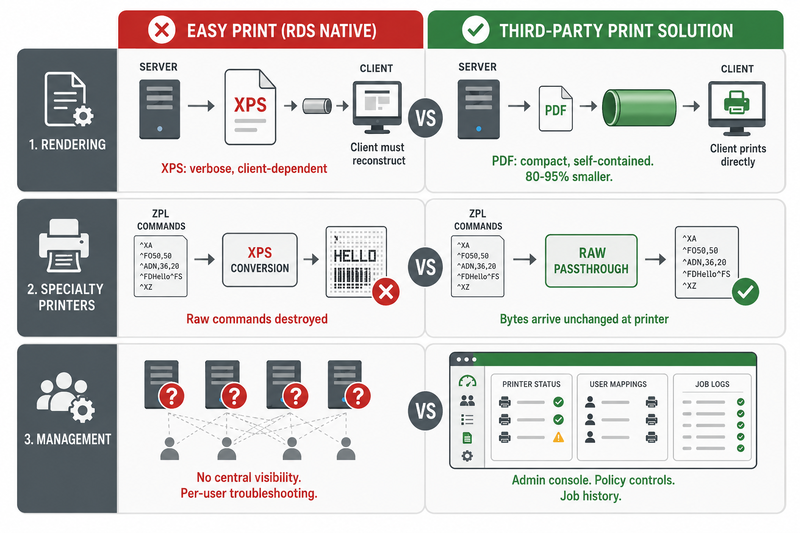
TSPrint renders print jobs as PDFs on the RDS host and transmits them to a small client agent, which then sends them to the local printer. ThinPrint uses its own proprietary .print format with aggressive compression and streaming. UniPrint also uses PDF. The common thread is that the server produces a compact, self-contained document that the client can print without needing to reconstruct anything. Bandwidth usage typically drops by 80–95% compared to XPS streaming.
Universal Drivers With Raw Passthrough
Instead of relying on the client's installed driver, third-party solutions ship a universal driver that appears identical across different physical printers. The client agent then hands the output to the real printer. Critically, good solutions include a raw passthrough mode — TSPrint calls this TSPrint RAW — where the application sends ZPL, ESC/POS, or EPL directly to a virtual printer on the server, and the bytes arrive unchanged at the physical device. This is what makes label and receipt printing work reliably.
Centralized Management and Visibility
A pattern we see repeatedly: an RDS farm grows from 50 users to 500, and Easy Print's per-user printer redirection becomes impossible to troubleshoot at scale due to a lack of central visibility. Third-party solutions add admin consoles that show which users have which printers mapped, job history, failure logs, and policy controls, such as restricting color printing or enforcing duplex printing. For deployments with more than roughly 100 concurrent users, this visibility alone often justifies the licensing cost.
Easy Print vs TSPrint vs Competitors: Honest Comparison
| Capability | Microsoft Easy Print | TSPrint | ThinPrint | ScrewDrivers | ezeep |
|---|
| License cost | Included with Windows Server | Per-server, perpetual | Per-user, subscription | Per-user, subscription | Per-user, subscription (cloud) |
| Raw ZPL / ESC-POS passthrough | No | Yes (TSPrint RAW) | Yes | Yes | Limited |
| Bandwidth efficiency | Poor (XPS) | Good (PDF) | Excellent (.print) | Good | Good |
| Works without local driver install | No | Yes (universal driver) | Yes | Yes | Yes |
| Central admin console | No | Yes | Yes (extensive) | Yes | Yes (cloud) |
| Azure Virtual Desktop support | Yes | Yes | Yes | Yes | Yes (native) |
| Non-Windows clients (Mac, Android, thin clients) | Limited | Yes | Yes | Yes | Yes |
| Typical deployment complexity | Low | Low | High | Medium | Low |
| Best fit | Small deployments, standard printers | SMB and mid-market RDS/Citrix | Large enterprise | Mid-market with many printer models | Azure-first, cloud-native |
A note on honesty: ThinPrint has the most sophisticated compression and streaming engine on the market. If you run a 5,000-seat Citrix environment with strict bandwidth budgets, ThinPrint is worth evaluating seriously, even when compared to TSPrint. TSPrint's strength is the 20–500 user range, where it is substantially cheaper, faster to deploy, and covers roughly 95% of the problems an enterprise solution would.
When Easy Print Is Genuinely Good Enough
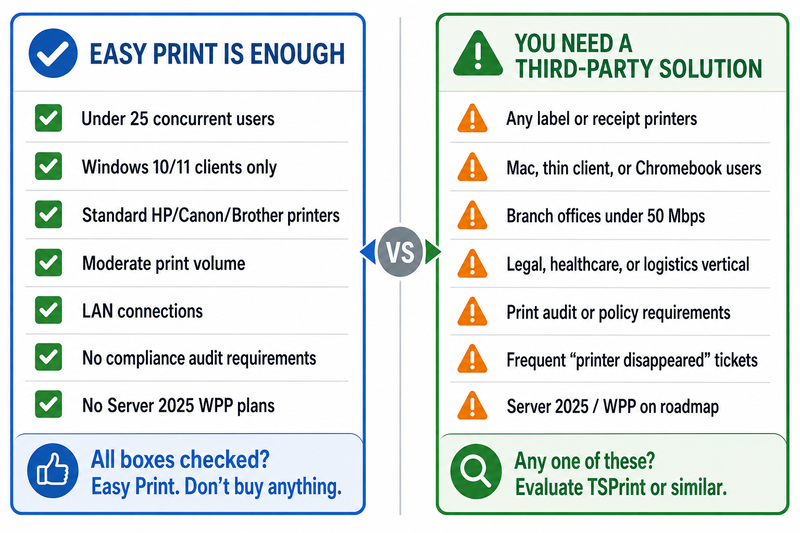
Based on over a decade of working with remote desktop printing, we tell prospects that Easy Print is the right choice in these cases:
- Fewer than 25 concurrent RDP users
- All clients run Windows 10 or Windows 11, fully patched, with drivers managed centrally
- Printers are standard office models from HP, Canon, Brother, or Xerox using PCL — no labels, no receipts, no plotters
- Print volume is moderate (hundreds of pages per day, not tens of thousands)
- LAN-speed connections, not WAN or VPN
- No compliance requirement to log or audit print jobs server-side
- No near-term plan to migrate to Server 2025 with Windows Protected Print Mode enabled
If you check every box, adding a third-party solution is overkill, and we will say so.
When a Third-Party Solution Pays for Itself
The threshold is rarely about user count alone. It is about whether any of the following apply:
- Any label or receipt printing in the environment (warehouses, retail POS, healthcare wristbands, shipping labels)
- Mixed client operating systems (Mac, thin clients, Chromebooks accessing the RDP session)
- Branch offices with sub-50 Mbps links
- A print-heavy vertical: legal (long pleadings), healthcare (EMR forms), logistics (BOLs and manifests), finance (statements and confirmations)
- Requirement to audit, log, or apply print policies centrally
- Frequent "my printer disappeared" tickets that waste helpdesk time
- Roadmap to Server 2025 or Windows 11 24H2, where Easy Print's driver model is on borrowed time
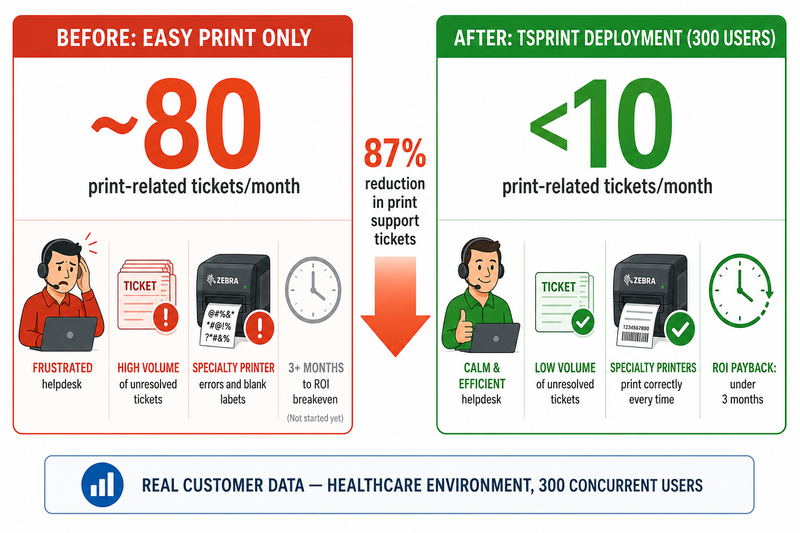
In these scenarios, the licensing cost of TSPrint or a comparable tool is dwarfed by the reduction in helpdesk burden and user complaints. A healthcare customer of ours cut print-related tickets from roughly 80 per month to under 10 after replacing Easy Print with TSPrint across 300 users — the payback period on licensing was under three months.
How TSPrint Specifically Fits This Picture
TSPrint is designed for the mid-market RDS and Citrix VDI deployment — organizations that have outgrown Easy Print but do not have the budget or operational complexity to justify ThinPrint. It installs in under 10 minutes, uses a perpetual license model (you buy it once per server), and supports Windows Server 2012 R2 through Server 2025. The raw passthrough mode handles Zebra, Dymo, and Epson printers without any per-printer configuration on the server. Bandwidth usage is consistently 80–90% lower than Easy Print in our customer benchmarks.
It is not the right choice if you need deeply granular per-user bandwidth shaping policies (ThinPrint is better), if your infrastructure is 100% Azure Virtual Desktop with no on-premises footprint (ezeep's cloud-native model may fit better), or if you have fewer than 10 RDP users with trivial printing needs (Easy Print is fine).
Frequently Asked Questions
Is Microsoft Easy Print free?
Yes. Easy Print is included with every supported version of Windows Server that has the Remote Desktop Services role. There is no separate license or add-on cost. The trade-off is that "free" refers only to the software licensing — the total cost of ownership, once you factor in helpdesk tickets, driver troubleshooting, and bandwidth consumption, is often higher than a paid third-party solution in larger environments.
Does Easy Print work on Windows Server 2025?
Easy Print still ships with Server 2025, but its underlying v3/v4 print driver architecture is deprecated under Windows Protected Print Mode. WPP is not enabled by default in Server 2025 yet, but Microsoft has stated it will become the default in future releases. If you are building a new RDS deployment on Server 2025 today, plan for Easy Print's capabilities to narrow over the next two to three years as the Mopria/IPP transition progresses.
Why does my Zebra label printer print blank labels or feed extra paper over RDP?
Because Easy Print converts your print job through XPS, and your local Zebra driver then renders it as a rasterized page image rather than ZPL commands. The printer interprets the bitmap at its default media size, which rarely matches your actual label. The fix is either to install a proper Zebra driver locally and use a ZPL-aware application, or to use a third-party solution that provides raw passthrough, sending ZPL directly to the printer.
Can Easy Print handle printing from a Mac client connected to a Windows RDS session?
Partially. The Microsoft Remote Desktop client for macOS supports printer redirection, but the underlying Easy Print pipeline still assumes a Windows print subsystem on the client. In practice, we frequently encounter issues with driver compatibility, paper-size handling, and feature loss (duplexing, stapling, tray selection). If you have Mac users connecting to a Windows RDS farm, a third-party solution with a native macOS client agent is considerably more reliable.
How much bandwidth does RDP printing actually use?
With Easy Print, expect roughly 1–3 MB per page of typical office content, sometimes far more for image-heavy documents. A PDF-based third-party solution like TSPrint typically transmits 50–200 KB per page for the same content. On a 20-user RDS host where users collectively print 5,000 pages per day, that difference translates to roughly 10–15 GB of daily bandwidth saved.
Is there a free version of TSPrint?
TSPrint offers a fully functional 15-day trial on every server. There is also TSPrint Lite, a lower-cost edition for smaller deployments that require core redirection and PDF rendering but not advanced features such as centralized reporting. Pricing and edition details are on the terminalworks.com purchase page.
Does switching from Easy Print to a third-party solution break my existing printer setup?
In most cases, no. TSPrint and similar tools coexist with Easy Print — they install their own virtual printer on the server, and you can migrate users gradually. We generally recommend leaving Easy Print enabled during the transition so that users have a fallback while you validate that every printer type works correctly through the new solution. Full cutover usually happens within one to two weeks.
Is RDP printing still secure after PrintNightmare?
The PrintNightmare family of vulnerabilities affected the Windows Print Spooler itself, not RDP printing specifically. Both Easy Print and third-party solutions depend on the spooler, so both are equally affected by the underlying CVEs. What third-party solutions offer is a narrower attack surface on the server side, because they do not require installing manufacturer print drivers on the RDS host. Reducing the number of third-party drivers loaded into the spooler is a defensive measure that is independent of the redirection technology you use.
How does TSPrint compare to ScrewDrivers by Tricerat?
Both use a universal driver approach, and both solve the core Easy Print problems. ScrewDrivers has historically been strong in Citrix environments and has a deeper policy engine for complex per-user printing rules. TSPrint is typically simpler to deploy, less expensive per seat, and, in our testing, offers better raw passthrough support for label printers. For an organization evaluating both, the decision usually comes down to the pricing model (TSPrint is perpetual, ScrewDrivers is subscription) and how much policy complexity you actually need.
Can I run Easy Print and TSPrint on the same server?
Yes. They operate as independent print drivers and do not conflict. Many customers run both during migration, or keep Easy Print available as a fallback for edge cases. The only caveat is user training — users need to know which printer name to select, because both will appear in the print dialog until you disable one.
Summary
Microsoft Easy Print was a major improvement over driver-per-printer redirection when it launched in 2008, and it remains adequate for small, homogeneous Windows-only RDS environments with standard office printers. For anything involving label printers, receipt printers, bandwidth-constrained links, mixed client operating systems, or serious scale, its XPS-based architecture and deprecated driver model create ongoing problems that third-party RDP printing solutions were built specifically to solve. The honest evaluation is to inventory your printer types and user workflows before deciding.
TSPrint is a practical fit for most SMB and mid-market RDS deployments that have outgrown Easy Print. You can download TSPrint for a free 25-day trial or view pricing and editions to find the license that best matches your environment.


