By TerminalWorks — Remote Desktop Scanning Solutions Since 2014
TSScan dynamic redirection intercepts every call your application makes to the TWAIN subsystem inside the remote session and forwards it to the TWAIN driver installed on the local workstation. Because the real vendor driver answers the capability negotiation, duplex, ADF batching, barcode detection, imprinters and custom vendor settings all work in remote desktop scanning exactly as they do locally.
This post explains what dynamic redirection actually does at the driver level, why generic virtual scanner drivers silently drop advanced features, why no version of Remote Desktop Services ships a native scanner redirection equivalent to Easy Print, and how the relevant TSScan settings behave in production. It also covers, honestly, the situations where a network scanner, a USB redirection setup or a mobile scanning app is the better answer and TSScan is not needed at all.
What Is TSScan Dynamic Redirection, and How Is It Different From a Virtual Scanner Driver?
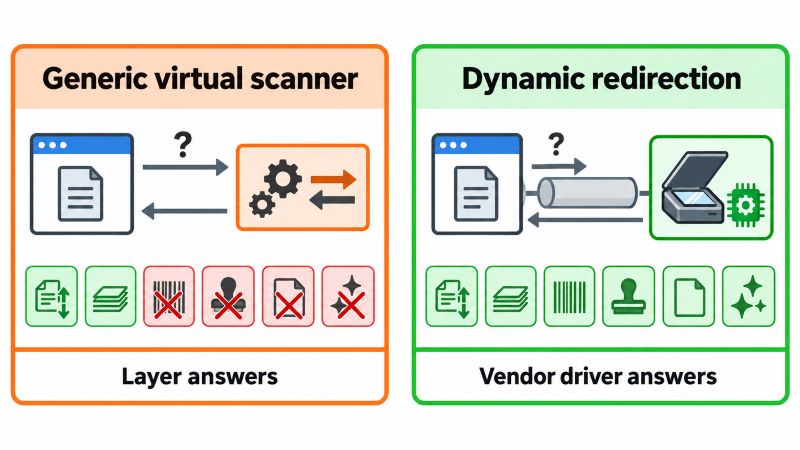
Most scanner redirection products, including earlier versions of TSScan, work by installing a single generic virtual TWAIN data source on the terminal server. The application sees one scanner, usually named something like "TSScan", and every physical device behind it is presented through that one abstraction layer. The virtual data source has to expose a fixed capability set that is safe for every possible scanner, so it exposes the lowest common denominator.
Dynamic scanner redirection, introduced in TSScan 3 and enabled by default since then, works differently. Instead of presenting one virtual device, it hooks the TWAIN subsystem in the session and passes calls through to the client workstation, where the manufacturer's own driver is doing the work. Your local scanners appear in the session under their own names, by default prefixed with RDP-, and each one behaves as the physical device behaves locally.
Why a Generic Virtual Data Source Loses Features
TWAIN is a negotiation protocol, not a fixed API surface. An application opens the Data Source Manager (twain_32.dll for 32-bit applications, twaindsm.dll for 64-bit), opens a data source, and then queries and sets capabilities one by one: ICAP_XRESOLUTION, ICAP_PIXELTYPE, CAP_DUPLEXENABLED, CAP_FEEDERENABLED, and so on. A modern production scanner driver exposes somewhere between 60 and 120 capabilities. Anything above CAP_CUSTOMBASE (0x8000) is vendor-defined and completely proprietary, which is where multi-feed sensitivity, imprinter text, patch code separation and vendor-specific image processing usually live.
A generic virtual data source cannot forward what it does not implement. It typically answers a couple of dozen core capabilities correctly and returns TWRC_FAILURE or a default value for everything else. The application does not crash. It just quietly scans single sided, at the wrong resolution, without the endorser, without blank page removal. One of the most common support tickets we receive is a variation of this: "scanning works, but the duplex option is greyed out and my batch separation stopped."
What Changes With Dynamic Redirection
With dynamic redirection the negotiation is proxied rather than emulated. When the document management application asks whether the device supports duplex, the answer comes from the Canon or Fujitsu driver on the user's desk, not from a translation layer. The vendor's own configuration dialog can also be displayed, so users see the interface they were trained on. In our experience supporting thousands of RDS environments, this is the difference between "scanning works" and "the workflow the client actually bought the scanner for works."
Why Doesn't Remote Desktop Have Native Scanner Redirection?
Remote Desktop Services redirects printers, drives, serial and parallel ports, smart cards, the clipboard, audio and cameras. It has never included a scanner redirection channel in any version, from Windows Server 2008 R2 through Windows Server 2025. The reason is architectural rather than an oversight.
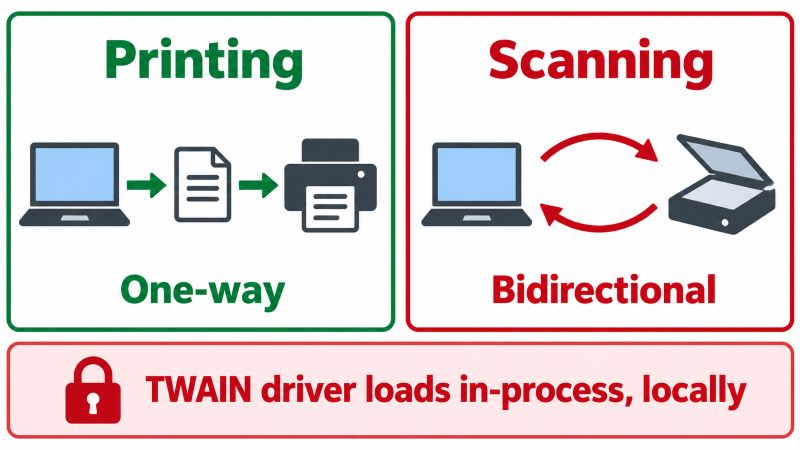
Printer redirection was solvable because printing is a one-way, well-abstracted operation. The GDI or XPS spool file is generated on the server and handed to the client, and Easy Print removed the driver problem entirely by using a single universal driver. Scanning is the opposite: it is a stateful, bidirectional, latency-sensitive conversation between an application and a device, conducted through a driver model that Microsoft does not own. TWAIN is maintained by the TWAIN Working Group, not by Microsoft, and its data sources are in-process DLLs loaded into the calling application's address space in a specific session. There is no server-side abstraction Microsoft could have written that would satisfy every vendor driver.
Why USB Device Redirection Alone Is Unreliable for Scanners
RemoteFX USB redirection is the usual first attempt, and it fails for business scanning in four predictable ways.
- It is not available on session hosts. RemoteFX USB redirection is supported for VDI style personal virtual desktops, not for multi-session RDSH deployments. The policy lives at
Computer Configuration\Administrative Templates\Windows Components\Remote Desktop Services\Remote Desktop Connection Client\RemoteFX USB Device Redirection and does not change that limitation. - The driver moves to the server. Redirecting the raw USB device means the vendor scanner driver must be installed on the host. On a farm of six session hosts serving forty branch offices with eleven different scanner models, that is a driver matrix nobody wants to maintain, and vendor scanner drivers are frequently not certified for server operating systems.
- USB is chatty and latency-intolerant. Bulk and interrupt transfers assume microsecond-scale bus latency. Over a 30 ms WAN link, the round trips accumulate and scanners time out mid-batch. A sheet-fed unit running at 60 pages per minute duplex produces two images per second and will not wait.
- Device claims are exclusive per session. A redirected USB device is owned by one session. It cannot be shared, and a reconnect or session refresh commonly leaves a stale handle that requires the user to power cycle the scanner.
WIA and ISIS Do Not Solve It Either
WIA is service-based, running under the Windows Image Acquisition service (stisvc), and was designed for a single interactive user with locally attached hardware. Its feature set is also thinner than TWAIN's for document capture: flatbed and simple feeder scans are fine, advanced batch control generally is not. ISIS, still common on Kodak, Canon and Panasonic production scanners, is a separate commercial driver model that no remote desktop protocol redirects at all. Applications built on ISIS need the device local to the machine running the application, which is exactly the constraint remote desktop scanning has to work around.
How Dynamic Redirection Moves Image Data Without Killing the Session
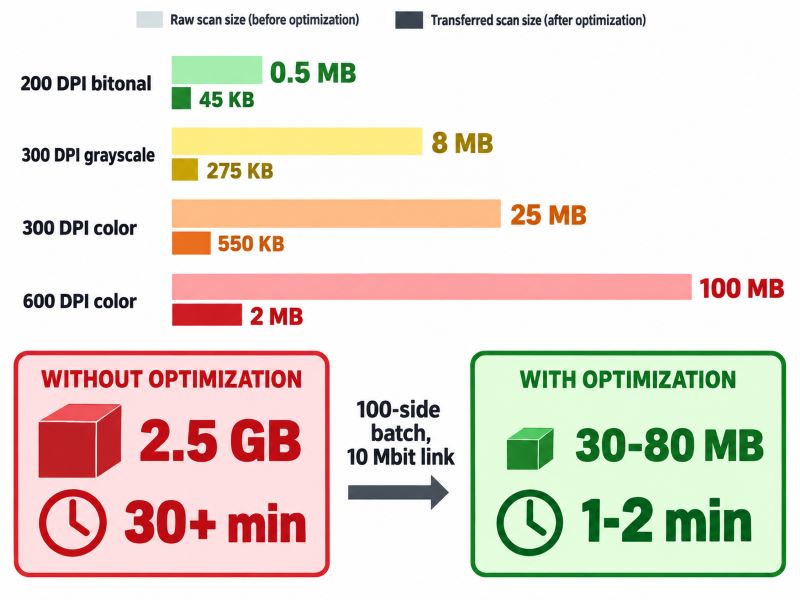
Redirected scanning is a bandwidth problem before it is anything else. A single Letter or A4 page at 300 DPI in 24-bit color is roughly 2550 x 3300 pixels, about 8.4 million pixels, or approximately 25 MB uncompressed per side. A 50-page duplex batch is 100 sides and therefore around 2.5 GB of raw image data. On a 10 Mbit/s branch office uplink, transferring that untouched would take over half an hour and would saturate the link for every other user in the office.
TSScan compresses images on the client before they cross the wire. At the default JPEG quality of 70, that same page typically lands between 300 KB and 800 KB, so the 100-side batch becomes roughly 30 to 80 MB and moves in about one to two minutes on the same link. Bitonal scanning is cheaper again: 200 DPI black and white is about 467 KB uncompressed per page and compresses to 30 to 60 KB, which is why high-volume archival workflows should not be run in color by default.
The transport matters as much as the compression. TSScan can use dynamic virtual channels rather than static ones. Dynamic virtual channels let the RDP protocol itself allocate and throttle bandwidth for the channel, so a large batch transfer does not starve the interactive session. With a static channel, a heavy transfer can visibly degrade screen responsiveness while it runs. A pattern we see repeatedly is a customer blaming the scanner for a "slow RDP session" when the actual fix is a channel and compression setting.
| Scan profile | Approx. raw size per page | Approx. transferred size | Typical use |
|---|
| 200 DPI bitonal | 0.5 MB | 30 to 60 KB | Archival, high-volume invoices, OCR input |
| 300 DPI grayscale | 8 MB | 150 to 400 KB | Contracts, signed documents, general office |
| 300 DPI color | 25 MB | 300 to 800 KB | Patient records, ID documents, colour-coded forms |
| 600 DPI color | 100 MB | 1.2 to 3 MB | Photographs, engineering drawings, forensic detail |
Which TWAIN Features Actually Depend on Dynamic Redirection?
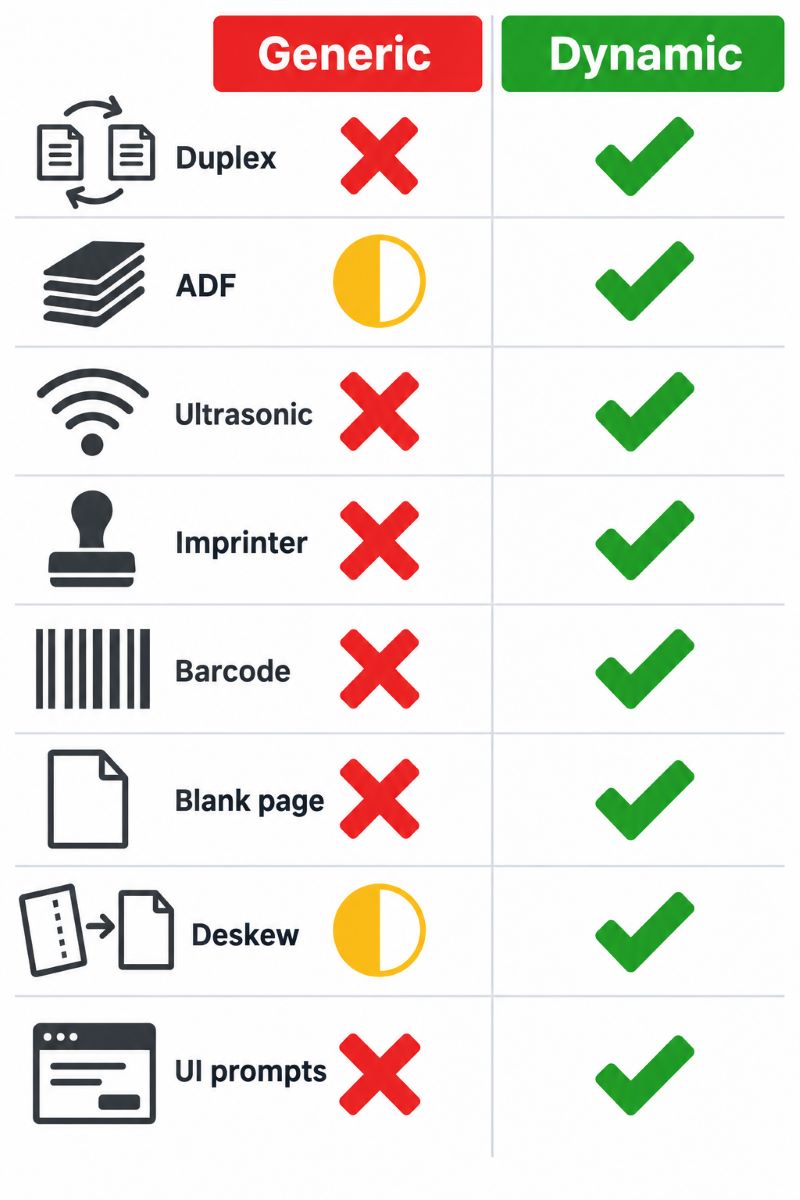
Not every scanning workflow needs it. If your application acquires a single flatbed page at 200 DPI and saves a PDF, a generic virtual data source is adequate. The features below are the ones that break when the real driver is not in the conversation.
| Feature | TWAIN capability | Generic virtual scanner | Dynamic redirection |
|---|
| Duplex scanning | CAP_DUPLEXENABLED | Often unavailable or ignored | Full |
| ADF feeder control and paper detection | CAP_FEEDERENABLED, CAP_FEEDERLOADED | Partial | Full |
| Ultrasonic multi-feed detection | Vendor custom capability | No | Full |
| Imprinter / endorser text | CAP_PRINTER and vendor extensions | No | Full |
| Barcode and patch code separation | ICAP_BARCODEDETECTIONENABLED, vendor extensions | Rarely | Full |
| Blank page removal, auto colour detection | Vendor custom capabilities | No | Full |
| Auto deskew and border detection | ICAP_AUTOMATICDESKEW, ICAP_AUTOMATICBORDERDETECTION | Sometimes | Full |
| Vendor's native scanner dialog | Driver-supplied UI | Replaced by generic dialog | Native UI shown on the client |
The industries where this list stops being academic are predictable. Healthcare teams scanning patient records into an EMR rely on duplex and blank page removal so a 40-page chart does not become 80 images, half of them empty. Legal firms scanning signed contracts need reliable double-feed detection, because a missed page in a redirected batch is a missed clause. Banks processing KYC packets use patch code separation to split a stack into per-customer documents automatically. Accounting firms feeding DocuWare, M-Files or SharePoint through a TWAIN capture client depend on barcode-driven indexing that simply does not fire when the barcode capability is not exposed.
The TSScan Settings That Change Behaviour
Most deployment problems we see come down to three or four settings. They can be applied per user, or to every user on the host if the configuration tool is opened as an administrator.
| Setting | Default | What it does |
|---|
| Dynamic scanner redirection | On | Catches TWAIN subsystem calls in the session and redirects them to the local workstation and its scanners. Disabling it reverts to the older single virtual data source behaviour. |
| Use both server and client scanners | On | Shows locally redirected scanners alongside any scanners installed on the host. The select source dialog appears on the server, and redirected devices are prefixed with RDP-. |
| Use client scanners only | Off | Filters out server-installed scanning drivers entirely. The select source dialog appears on the client and names are not prefixed, which is useful when an application stores the selected source name in a profile. |
| Dynamic virtual channels | On | Lets RDP allocate and limit bandwidth for the transfer channel so image transfers do not degrade interactive session performance. |
| JPEG quality level | 70 | Controls compression. Values below roughly 70 introduce visible artefacts on text; higher values increase transfer size quickly with little visible gain. |
When You Should Deliberately Turn Dynamic Redirection Off
Honest answer: occasionally. If a legacy line-of-business application has a hardcoded data source name stored in its configuration, or an in-house application enumerates sources and picks the first one it finds, the older single virtual scanner behaviour can be more predictable. Disabling dynamic redirection reverts to that model. It is also a useful diagnostic step: if a problem disappears when redirection is off, the issue is in the capability negotiation with that specific vendor driver, and the driver version is the first thing to check.
Two Environment-Level Issues Worth Knowing About
On Citrix, the built-in TWAIN redirection virtual driver conflicts with third-party scanner redirection. If scanners fail to enumerate in an ICA session, open HKEY_LOCAL_MACHINE\SOFTWARE\Citrix\ICA Client\Engine\Configuration\Advanced\Modules\ICA 3.0, edit the VirtualDriver value and remove TwainRdr, from the list.
On the client side, a corrupt TWAIN driver will break enumeration for every application, not just the redirected one. TWAIN data sources live in C:\Windows\twain_32\, one folder per vendor. Testing locally with a simple TWAIN application before blaming the remote session saves a great deal of time: if the scanner cannot be driven locally, redirection has nothing to redirect.
When Is Remote Desktop Scanning With TSScan the Right Choice, and When Is It Not?
We would rather a reader solve their problem with a network share than buy software they do not need. Here is where each approach genuinely fits.
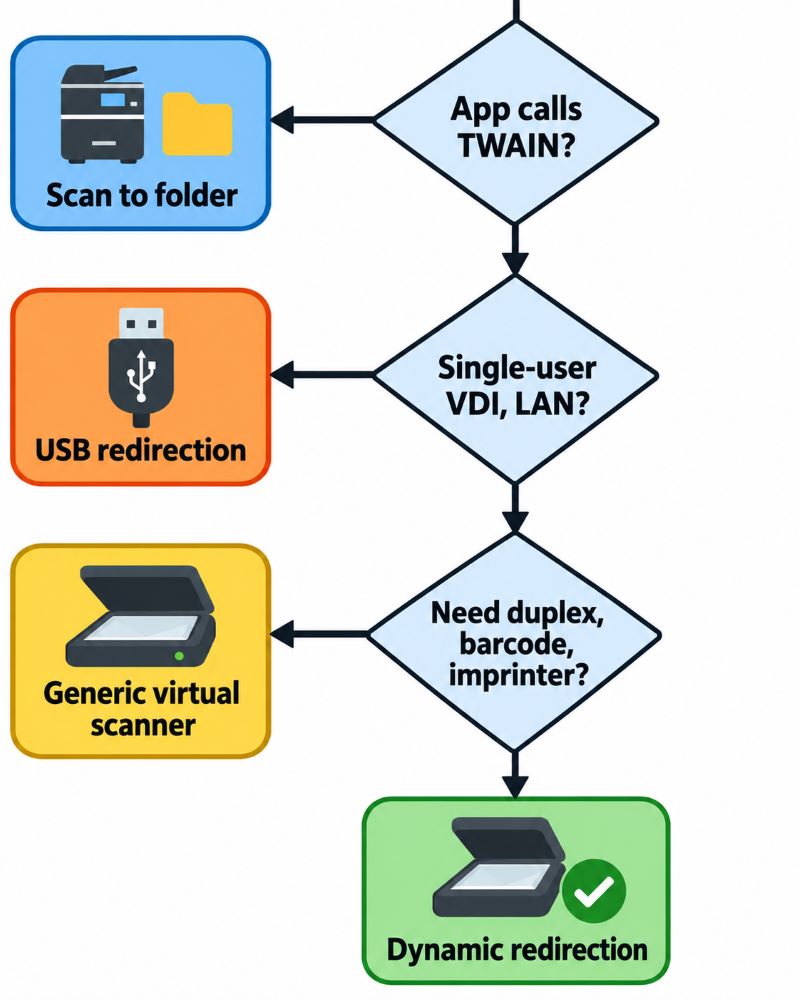
| Approach | Works well when | Breaks down when |
|---|
| Network scanner with scan-to-folder or scan-to-email | Low volume, one shared MFP per office, users are happy to scan then attach the file manually, no per-user device separation needed | The business application calls TWAIN directly, indexing must happen at scan time, or twenty users share one device and files land in one folder with unhelpful names |
| USB device redirection | Single-user VDI desktops, a small number of identical scanner models, a LAN with low latency, and vendor drivers certified for the host OS | Multi-session RDSH hosts, mixed scanner fleets, WAN links, or high-speed ADF batches that time out mid-run |
| Mobile scanner apps | Occasional capture, field staff, receipts and single-page documents, and an application that accepts uploads | Volume work, duplex, legally-defensible image quality, or any workflow that must complete inside the desktop application |
| Dedicated scanner redirection (TSScan) | The application acquires through TWAIN or WIA, users are in a session on a terminal server or VDI, scanners differ by location, and no drivers can be installed on the host | The application has no scanning interface at all, or scanning happens on physical desktops with no remote session involved |
Within the dedicated redirection category there are alternatives, notably RemoteScan and FabulaTech Scanner for Remote Desktop. All three solve the same core problem: getting a client-attached imaging device into a remote session without server-side drivers. The practical differences show up in how completely the vendor driver's capability set is passed through, how compression and virtual channels are handled on constrained links, and how each product behaves with non-standard devices. Fujitsu and Ricoh ScanSnap units are the usual test case here, because ScanSnap does not present a conventional TWAIN interface in its default mode, and generic redirection layers frequently cannot see it at all.
Summary
Remote desktop scanning fails in feature-specific ways, not obvious ways: the scan completes, but the duplex, the imprinter and the barcode separation quietly stop working. TSScan dynamic redirection addresses that by proxying the TWAIN conversation to the manufacturer's driver on the client workstation instead of emulating a generic scanner on the server, so full TWAIN capability negotiation survives the trip through the RDP virtual channel. It is not the right tool for every situation, and a network MFP with scan-to-folder is a perfectly good answer for low-volume work. When the business application itself needs to drive the scanner from inside a terminal server or VDI session, scanner redirection in RDS is the only architecture that works, and full capability support is what separates a usable deployment from a frustrating one.
Learn more on the TSScan product page.
Frequently Asked Questions
It is the core mechanism introduced in TSScan 3 and enabled by default. Rather than presenting one generic virtual scanner on the terminal server, it catches calls made to the TWAIN subsystem inside the session and redirects them to the client workstation, where the manufacturer's driver executes them. Your local scanners appear in the session under their own names, by default with an RDP- prefix. Because the real driver answers the capability negotiation, all TWAIN capabilities including vendor-specific ones are available to the application.
No. The driver stays on the workstation where the scanner is physically connected, which is the point of the design. This matters most in mixed fleets: a firm with Fujitsu fi-series units at head office, Brother MFC devices in branches and a Canon imageFORMULA on one director's desk would otherwise need every one of those drivers on every session host. Many consumer and small-office scanner drivers are also not certified for Windows Server, so installing them is not always an option to begin with.
The prefix marks redirected client devices so they can be distinguished from scanning drivers installed on the server itself, and it appears when the "use both server and client scanners" setting is active, which is the default. If your application stores the selected source name in a user profile or configuration file, the prefix can cause it to lose the saved selection. Switching to "use client scanners only" removes the prefix, filters server-side scanners out of the list, and moves the select source dialog to the client.
Not when it is configured with dynamic virtual channels, which is the default. Dynamic channels let the RDP protocol allocate and limit bandwidth for the transfer, so a large batch does not starve the interactive display channel. Static channels can in theory slow a session during heavy image transfer. Compression matters just as much: a 100-side colour batch at 300 DPI is roughly 2.5 GB raw but around 30 to 80 MB at the default JPEG quality of 70.
Yes. Unchecking the dynamic redirection option reverts the session to the earlier TSScan model, where a single virtual data source represents all client scanners. Two situations justify it: a legacy application with a hardcoded scanner name that expects one fixed source, and diagnostics. If a specific scanner misbehaves with redirection on but works with it off, the problem is almost always in that vendor driver's capability handling, and updating or reinstalling the driver is the next step.
Yes, redirection works across RDS session hosts, Citrix, VDI and cloud-hosted desktop environments. One Citrix-specific conflict is worth knowing: Citrix ships its own TWAIN redirection virtual driver, and the two can collide. If scanners fail to enumerate in an ICA session, open HKEY_LOCAL_MACHINE\SOFTWARE\Citrix\ICA Client\Engine\Configuration\Advanced\Modules\ICA 3.0, edit the VirtualDriver value and remove TwainRdr, from it, then reconnect.
Yes. ScanSnap models are a frequent question because they do not expose a conventional TWAIN interface in their default operating mode, which is why several generic redirection layers cannot see them at all. Through TSScan they can be selected in an RDP, Citrix or PCoIP session like any other locally installed TWAIN-compliant scanner, with no additional driver or configuration on the remote host. The general rule still applies: the device must be working correctly on the local workstation first.
A feeder that stops after one page usually means the application is not configured for multipage or feeder scanning, so it requests a single image and closes the source. Check the application's own acquisition settings before changing anything in the redirection layer. If enumeration fails entirely or an error is thrown from the client component, a corrupt TWAIN data source is the common cause. Those live in C:\Windows\twain_32\, one folder per vendor, and removing them one at a time identifies the offender quickly.
ISIS is a separate commercial driver model used by many Kodak, Canon and Panasonic production scanners, and no remote desktop protocol redirects it. If your capture application is built strictly on ISIS, it needs the device attached to the machine running the application. In practice most production scanners ship both an ISIS and a TWAIN driver, and switching the capture application to the TWAIN path makes redirection possible. Worth confirming with your capture software vendor before planning a deployment around it.


