Last updated: September 22, 2026
By Terminalworks — Remote Desktop Scanning Solutions
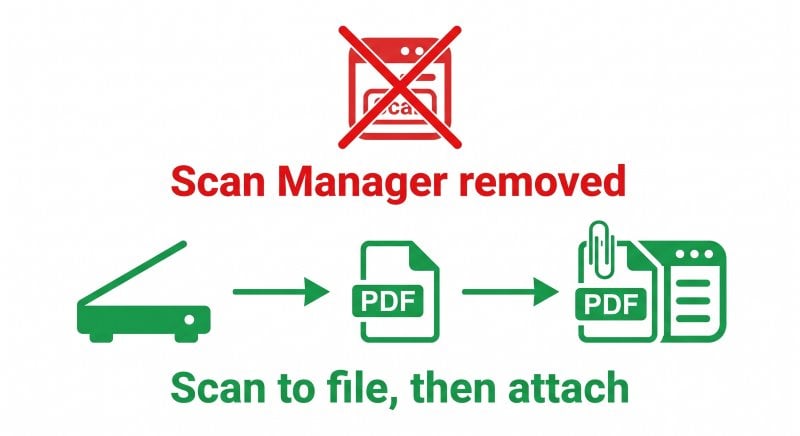
Accounting firms can scan into a compatible remote application through scanner redirection, or scan to a file and import it. The right approach depends on the application version, scanner and remote desktop client. In particular, current QuickBooks Desktop workflows require file attachment or import rather than the discontinued Scan Manager.
This guide explains scanning in hosted accounting environments, the different document workflows in QuickBooks Desktop and Xero, and how to test capacity for tax season. It covers USB redirection, network scanners, mobile capture and TSScan, with recommendations to validate against your actual applications and devices.
Why Won't My Scanner Work in QuickBooks on Remote Desktop?
A scanner that works locally may not appear in a remote application. First check whether the application still includes direct scanning: QuickBooks Desktop 2022 and Enterprise 22.0 removed Scan Manager. Scanner redirection cannot restore that removed feature.
Printer redirection does not automatically redirect scanners
Remote Desktop Easy Print handles printer redirection. A scanning application instead needs to control acquisition settings and receive images from a scanner. Microsoft documents that Windows App does not support high-level TWAIN scanner redirection; USB scanners can use supported low-level USB redirection. Availability depends on the client, host and policy. Do not assume that enabling printer redirection also enables scanning.
How TWAIN and WIA acquisition actually works
TWAIN and Windows Image Acquisition (WIA) are different scanning interfaces. A remote application needs a compatible acquisition source in its own environment; a driver installed on the local PC does not automatically supply one. For TSScan, the documented remote application interface is TWAIN scanner mapping. Do not assume that a WIA-only application or a WIA-only driver is interchangeable with a supported TWAIN workflow.
What to check before using USB redirection
Low-level USB redirection, also described as RemoteFX USB redirection in Microsoft settings, can be an option where supported. Validate these dependencies:
- The remote host needs a compatible scanner driver for the redirected device.
- Check driver support for the host operating system and multi-user deployment; do not assume that desktop support covers every hosted configuration.
- Check whether the redirected device remains available locally and which session can use it.
- Test feeder batches over the actual network; latency and bandwidth can affect the experience.
- Confirm that the hosting provider permits the required USB redirection and driver installation.
A successful single-user test is not a capacity test. Before adopting USB redirection, repeat representative batches with the expected number of concurrent users.
QuickBooks vs. Xero: What Each Actually Needs From a Scanner
The two platforms put scanning in very different places, and that changes whether you need remote desktop scanning at all.
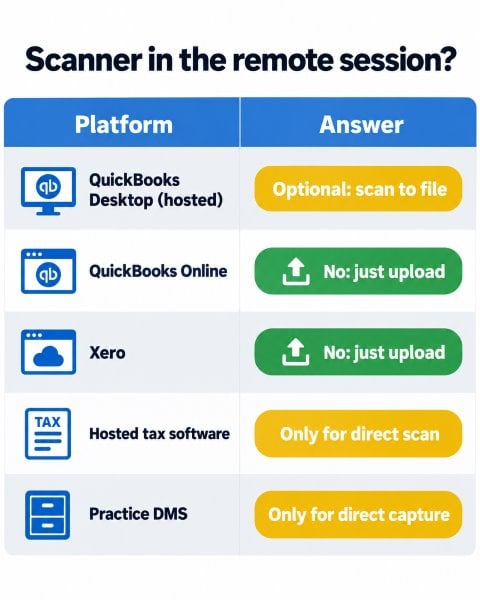
| Platform | Where it runs | How documents get in | Needs scanner in the remote session? |
|---|
| QuickBooks Desktop (Pro, Premier, Enterprise, Accountant) | Often hosted on RDS or a cloud hosting provider | File attachments/import; Scan Manager removed in Desktop 2022 and Enterprise 22.0 | No for attaching an existing file; optional remote scanning creates that file |
| QuickBooks Online | Browser | File upload, receipt capture in the mobile app, email forwarding | No, only a file on whichever machine runs the browser |
| Xero | Browser | File upload, Xero Files inbox by email, Hubdoc capture | No; a remote browser needs access to the file, not necessarily a scanner |
| Hosted tax software (Drake, UltraTax CS, Lacerte, ProSeries, CCH ProSystem fx) | Commonly on RDS or hosted by a provider | Document modules or file import; acquisition support varies by product and version | Only for a compatible direct-scanning module |
| Practice DMS (DocuWare, M-Files, SharePoint, firm-specific file cabinets) | Desktop, server or browser, depending on the product | Capture clients, file uploads, watched folders or email import, depending on the product | Yes for direct capture; no for folder or email import |
QuickBooks Desktop on a hosted server
For QuickBooks Desktop 2022 and later, scan to a file and attach or import it using the available document workflow. TSScan Standalone can create the file in the hosted environment. For an older installation that retains Scan Manager, verify TWAIN compatibility and the QuickBooks support status before relying on it.
Xero and cloud-native workflows
Xero supports file uploads and an email inbox; Hubdoc also supports uploads, email and mobile capture. Local browser users can scan locally and upload. If the browser runs in a remote session, its file picker uses the remote environment's accessible locations. An approved transfer method or cloud upload can still work; a scanner inside the session is optional.
What Tax Season Does to Remote Desktop Scanning
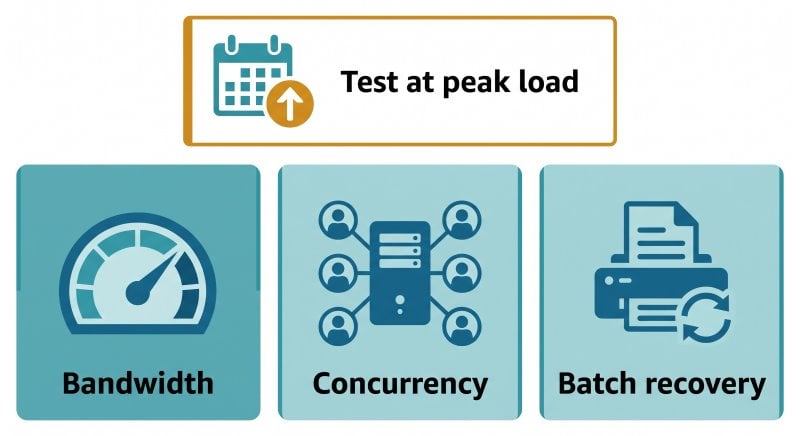
Plan for the busiest scanning period, not just an average day. For example, moving from 20 to 400 scans a day is a useful stress-test scenario, not a measured industry baseline. Test bandwidth, concurrency and batch recovery together.
Bandwidth: the numbers behind "scanning is slow"
A letter-size page at 300 DPI is roughly 2,550 × 3,300 pixels, about 8.4 million pixels. The raw data size depends almost entirely on color mode:
| Mode (300 DPI, letter) | Raw size per page | Illustrative compressed size (not a TSScan benchmark) | Raw 40-page client packet |
|---|
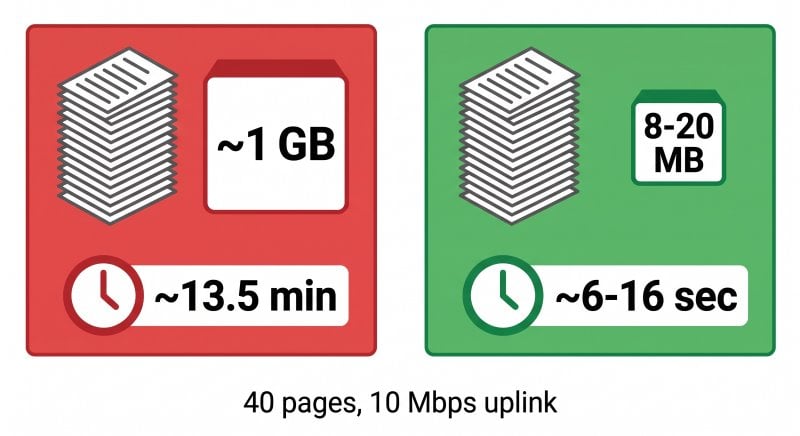
| 24-bit color | ~25 MB | ~0.4–1 MB (JPEG) | ~1 GB |
| 8-bit grayscale | ~8.4 MB | ~0.2–0.5 MB (JPEG) | ~340 MB |
| 1-bit black and white | ~1 MB | ~30–100 KB (CCITT G4) | ~42 MB |
Using decimal MB, an uncompressed 300 DPI letter-size color page contains about 25.2 MB of pixel data. At an otherwise idle 10 Mbps uplink, its theoretical transfer time is about 20 seconds; 40 pages take about 13.5 minutes before overhead. If grayscale compression produces 0.2–0.5 MB per page, 40 pages require roughly 6–16 seconds of transfer time under the same assumptions. These are calculations, not measured scan times: acquisition, processing, shared bandwidth and image content add variability. Compression before transfer can reduce network traffic; compressing only the saved file afterwards cannot.
Choosing the right color mode for tax documents
- Black and white, 300 DPI: a starting point for clean typed forms, W-2s, 1099s and engagement letters. Check fine print and OCR accuracy; thresholding can lose faint details.
- Grayscale, 200–300 DPI: test for faded thermal receipts, shading and light stamps; increase resolution when small text needs it.
- Color, 200–300 DPI: use when highlights, annotations or other meaningful details depend on color; inspect legibility before choosing the lower resolution.
At the same resolution, 8-bit grayscale has one-third the raw pixel data of 24-bit color; 1-bit black and white has one twenty-fourth. Actual compressed sizes depend on the page and codec, so measure savings rather than assuming a fixed 80–95% reduction. JPEG is lossy; the compressed figures above are illustrative file-size ranges, not guaranteed TSScan transfer sizes.
Concurrency: many preparers, one server
Test the server with the expected number of preparers scanning simultaneously, each using the intended scanner and application. Check session mapping, shared-device contention, CPU, memory and bandwidth. Keeping vendor drivers on client PCs avoids installing those drivers on the host, but does not remove every possible resource limit or configuration issue.
Batch reliability with feeder scanners
For multi-page packets, test an automatic document feeder (ADF), duplex capture and recovery after a jam or disconnect. Count scanned sides as pages: 40 duplex sheets can produce 80 images. Local acquisition can reduce dependence on raw USB traffic over the network, but neither batch completion nor automatic recovery should be assumed. Check page order, missing pages and duplicates before filing.
Compliance: Scanning Client Tax Data Over Remote Desktop
The FTC Safeguards Rule covers tax preparation firms within its scope and requires a written information security program. IRS Publication 4557 explains taxpayer-data safeguards; it is guidance, rather than the source of the legal obligation. Include scanning in the firm's risk assessment:
- Scan-to-email can create copies in mail systems. Assess encryption, recipients, access and retention rather than assuming that every email transfer is unencrypted.
- Scan-to-folder on a local PC creates endpoint files that need appropriate access controls, protection and deletion policies.
- Drive redirection gives the remote session access to the selected local resources. Its scope depends on configuration; it does not automatically expose every drive in both directions.
Direct remote scanning can reduce manual file copies. Protect the connection, endpoints, temporary files and server storage; it does not guarantee that images never exist locally. For EU practices, reducing unnecessary copies can support GDPR data minimisation and security measures, but using scanner redirection alone does not establish compliance.
When to Use What: Remote Scanning Options for Accounting Firms
Choose a workflow based on where documents must end up, whether the application supports direct acquisition, and the controls required by the firm.
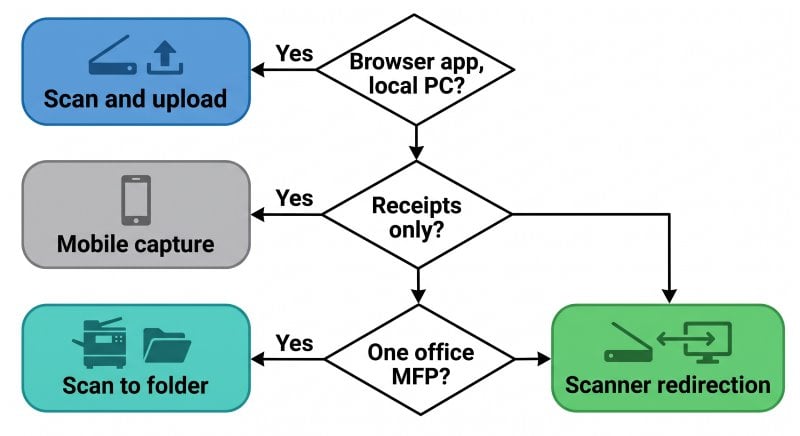
| Approach | Works well when | Breaks down when |
|---|
| Supported low-level USB redirection | Client, host, policies and server-side driver support the device; pilot succeeds | Unsupported drivers or policies, device contention, or unacceptable performance in testing |
| Network scanner with scan-to-folder or scan-to-email | Central office MFP, documents filed later, no need to attach scans inside the application | Users cannot reach the destination, direct acquisition is required, or controls are inadequate |
| Mobile capture apps (Hubdoc, QuickBooks receipt capture, scanner apps) | Receipts and single pages, cloud-native Xero or QBO firms | Large or duplex batches make manual capture impractical, or image quality is insufficient |
| Dedicated scanner redirection (such as TSScan) | Compatible hosted scanning applications or scan-to-file workflows in a remote session | No remote scanning is needed, or the specific scanner/application combination is unsupported |
Where TSScan fits
TSScan installs a server component on the remote host and a client component on the local workstation. Compatible remote applications can select TSScan or a dynamically redirected TWAIN source while acquisition uses the local scanner. Manufacturer scanner drivers stay on the client. TSScan also offers standalone scanning to files for attachment workflows. This does not add a Scan button to applications that lack one, and WIA-only compatibility should be checked separately.
Evaluate the actual scanner, remote client and application together. Compare deployment requirements, supported acquisition features, compression controls and current licence terms. TSScan licensing is applied per server, with user limits depending on the selected licence; size it against the current purchase terms rather than assuming unlimited use.
When TSScan is not the right fit
- Your firm is fully on Xero or QuickBooks Online and staff work on local PCs. Scan locally and upload. You do not need scanner redirection.
- Your scanner or application lacks a supported acquisition path. Check compatibility before replacing hardware. ScanSnap is an important exception to the assumption that every scanner needs a conventional TWAIN driver: TSScan provides specific ScanSnap support. See the FAQ below for setup requirements.
- All scanning happens on one office MFP and documents are indexed later. A well-configured scan-to-folder workflow on the internal network may be enough.
How to Set Up Remote Desktop Scanning for an Accounting Firm
- Inventory scanners and applications. Record models, local operating systems, remote clients and application versions. Check TWAIN acquisition or file-import support and any special setup such as ScanSnap integration.
- Test each scanner locally first. Verify normal acquisition with its supported software, then test the intended TSScan workflow. Install TSScan Server on the host and TSScan Client on the workstation before reconnecting.
- Set firm-wide scan defaults. Start with black and white or grayscale at 300 DPI. Test duplex, compression and blank-page removal against representative originals; avoid removing intentional or faintly marked pages.
- Pilot with your highest-volume preparer. Use a representative 40–60 page test packet over the real connection. Verify image quality, page count, import or attachment, and recovery from interruptions.
- Check concurrency before tax season. Test simultaneous scanning, scanner selection and licence capacity with several users on the same server.
- Review transfer permissions. Retire unnecessary workarounds after testing. Do not disable folder redirection indiscriminately: some TSScan Mac configurations require a redirected folder for communication.
Common Remote Desktop Scanning Problems in Accounting Software
A scanning application reports "No TWAIN device found"
Confirm that the application supports TWAIN and can see the intended source in the session. Check the local driver, client/server installation and remote connection. For QuickBooks, first confirm that the installed version actually includes Scan Manager.
Scans arrive but the session freezes during large batches
Check network utilisation, image size, server resources, driver behaviour and application processing. In TSScan, Raw image transfer disables its image compression; optional JPEG compression trades quality for size. Change settings one at a time and inspect the resulting documents.
The wrong user's scanner appears
Check the selected source, shared scanners, redirection settings and client/server versions. A wrong scanner list is not proof of one particular cause. TSScan release 3.5.5.6 includes fixes for incorrect scanner selection and scanner lists in TSScan2 mode; use current versions and investigate reproducible mapping problems.
Scanning worked last year but broke after a hosting migration
A migration can change the host OS, installed components, remote client or redirection policies. Confirm the provider's supported scanning configuration and test before moving production work.
Frequently Asked Questions
Not through Scan Manager in QuickBooks Desktop 2022 or later: Intuit removed it. Scan to a file and attach or import it instead. TSScan can help create that file remotely. Direct scanning in an older version depends on its retained Scan Manager feature and TWAIN compatibility.
Usually not. Staff can upload locally scanned files or use supported Hubdoc capture methods. Even with a remote browser, direct scanner redirection is optional if an approved workflow makes the file accessible for upload.
Low-level USB redirection depends on a compatible remote driver and supported client/host configuration. Validate policies, local device availability, concurrent use and performance over the real connection. Reliability varies; a failure is not inevitable for every scanner or multi-user environment.
Start with 300 DPI for clear printed forms and test grayscale for faint text or receipts. Keep color when it conveys information. Check readability and OCR results before standardising settings. At 300 DPI, a letter-size page contains about 25.2 MB of raw 24-bit color data or 1.05 MB of 1-bit data, before compression.
Yes, TSScan supports ScanSnap from version 3.0.5.13 onward. Install the appropriate ScanSnap software locally and select TSScan as the application's source, then the ScanSnap device. Terminalworks' English FAQ specifies ScanSnap Manager; its German FAQ also lists ScanSnap Home. Confirm the combination for your model and OS. The documented TSScan Scan Engine 3.0 does not support ScanSnap as a source; this is an engine limitation, not a statement that TSScan 3 as a product lacks ScanSnap support.
It depends on the controls. Consider recipient verification, encryption, mailbox access and retention. Covered firms must account for this workflow in their security program. Direct remote scanning may reduce email copies, but temporary files, endpoints and server storage still need protection.
Yes, subject to the configuration, licence and available resources. Test simultaneous jobs with each user's intended scanner and check that sources and results are mapped correctly. Shared physical scanners, network capacity and application behaviour can still limit throughput.
Confirm with the provider which scanning product, client and application versions it supports, who installs the server component, and whether the required redirection is allowed. Test the complete scan-and-attach workflow before committing to the deployment.
Summary
Choose remote scanning around the document workflow your application actually supports. Current QuickBooks Desktop uses attachment/import workflows after Scan Manager's removal; Xero and QuickBooks Online can use local capture and uploads. For compatible hosted scanning applications or remote scan-to-file workflows, TSScan offers TWAIN mapping and standalone capture. Validate scanner compatibility, image quality, concurrent use and data handling before tax season.


