How to Use a Fujitsu ScanSnap in Remote Desktop, Citrix, and VDI
By TerminalWorks, Remote Desktop Scanning Solutions Since 2014
A Fujitsu ScanSnap will not appear inside a Remote Desktop, Citrix, or VDI session on its own. ScanSnap models are driven by ScanSnap software on the local PC rather than by a general purpose TWAIN driver, and Windows Server has no built-in scanner redirection. The workable options are scan to folder with drive redirection, USB redirection in single user VDI, or scanner redirection software such as TSScan.
Below: why ScanSnap hardware behaves differently from an fi-series or Canon imageFORMULA scanner, what the TWAIN and WIA driver models require, why USB redirection is unreliable for imaging devices, how the realistic approaches compare, and the prerequisites for running a ScanSnap through TSScan.
Why a ScanSnap Behaves Differently From Other Scanners in a Remote Session
One of the most common support tickets we receive starts the same way: a document management application is published from an RDS or Citrix farm, every Brother MFC and Canon imageFORMULA in the office appears in its scanner list, and the ScanSnap does not. The difference is architectural.
ScanSnap uses a push model, TWAIN uses a pull model
Most business scanners expose a TWAIN data source. TWAIN is a pull architecture: the application calls the Data Source Manager (twain_32.dll or twaindsm.dll), the DSM loads the vendor data source DLL from C:\Windows\twain_32\ into the calling application's own process, the application negotiates capabilities such as duplex, resolution and paper source, then pulls the image data back.
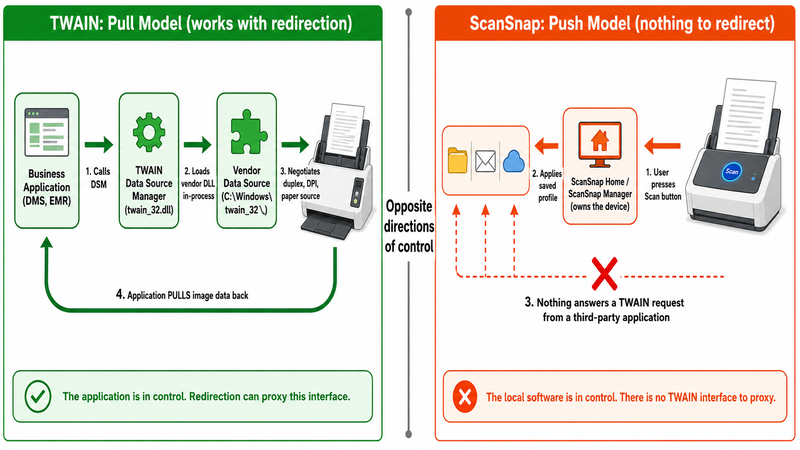
ScanSnap inverts this. The device is a push appliance: ScanSnap Home or the older ScanSnap Manager owns the scanner, the user presses the Scan button or a touchscreen profile on an iX1600, and the local software applies a saved profile and delivers finished output to a folder, an email client, a cloud service or a local application. Nothing in that chain answers a TWAIN request from a third party application, which is exactly what a remote session needs.
Which ScanSnap models expose a driver interface at all
The consumer and small office line (iX1600, iX1500, iX1400, iX1300, iX100, S1300i, S1100i, SV600) ships with no general purpose TWAIN driver. The fi-series and the newer Ricoh branded production scanners are the opposite: PaperStream IP provides proper TWAIN and ISIS drivers, which is why an fi-8170 drops into a redirection setup with almost no friction while an iX1600 does not.
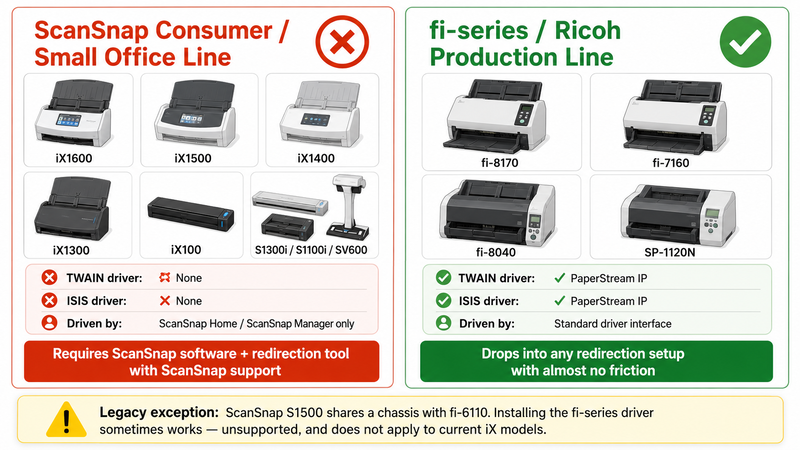
A pattern we see repeatedly is confusion caused by hardware kinship: the older ScanSnap S1500 shares a chassis with the fi-6110, so administrators sometimes install the fi-series driver to obtain TWAIN support. It occasionally works, it is unsupported, and it does not carry over to the current iX generation.
Why Won't My Scanner Work in Remote Desktop at All?
Even with a fully TWAIN compliant scanner, remote desktop scanning is not solved in the box.
There is no scanner equivalent of Easy Print
Remote Desktop Services redirects drives, printers, ports, smart cards, the clipboard and audio through the rdpdr channel. Printing gets a real abstraction layer in Easy Print because printing is a one way, spooled, stateless job: the client renders a page description (EMF or XPS) and one generic server side driver can represent any printer, because every printer consumes the same page stream.
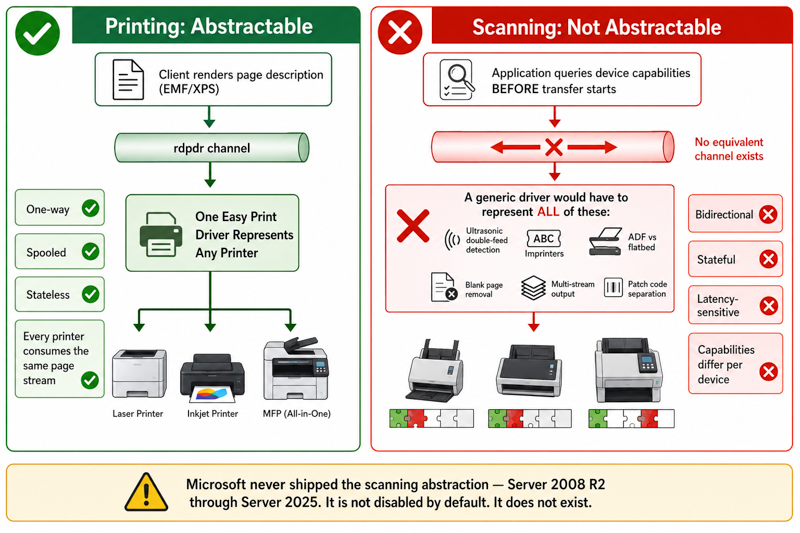
Scanning has none of those properties. It is bidirectional, stateful, latency sensitive and capability driven: a generic driver would have to represent ultrasonic double feed detection, imprinters, ADF versus flatbed selection, blank page removal, multi-stream output and patch code separation, all of which differ per device and all of which the application queries before a transfer starts. Microsoft never shipped that abstraction, in any version of RDS from Windows Server 2008 R2 through Windows Server 2025. Scanner redirection in RDS is not disabled by default, it does not exist.
Why installing the scanner software on the server does not help
The TWAIN data source must live on the machine where the application runs, because the DSM loads it in process. Administrators install the vendor software on the RDS host, the data source loads correctly, and it reports no device, because it walks the server's USB stack while the scanner sits on a workstation hundreds of kilometres away. WIA fails for a related reason: it depends on the Windows Image Acquisition service (stisvc), which on Windows Server needs the Desktop Experience feature and does not run on a default installation, and it assumes a locally attached device, so per-session handles collide as soon as a second user acquires.
Why USB Redirection Alone Is Not a Reliable Answer for Remote Desktop Scanning
Passing the raw device into the session and running the vendor driver server side sounds like the obvious fix. In practice the constraints rule it out for most deployments.
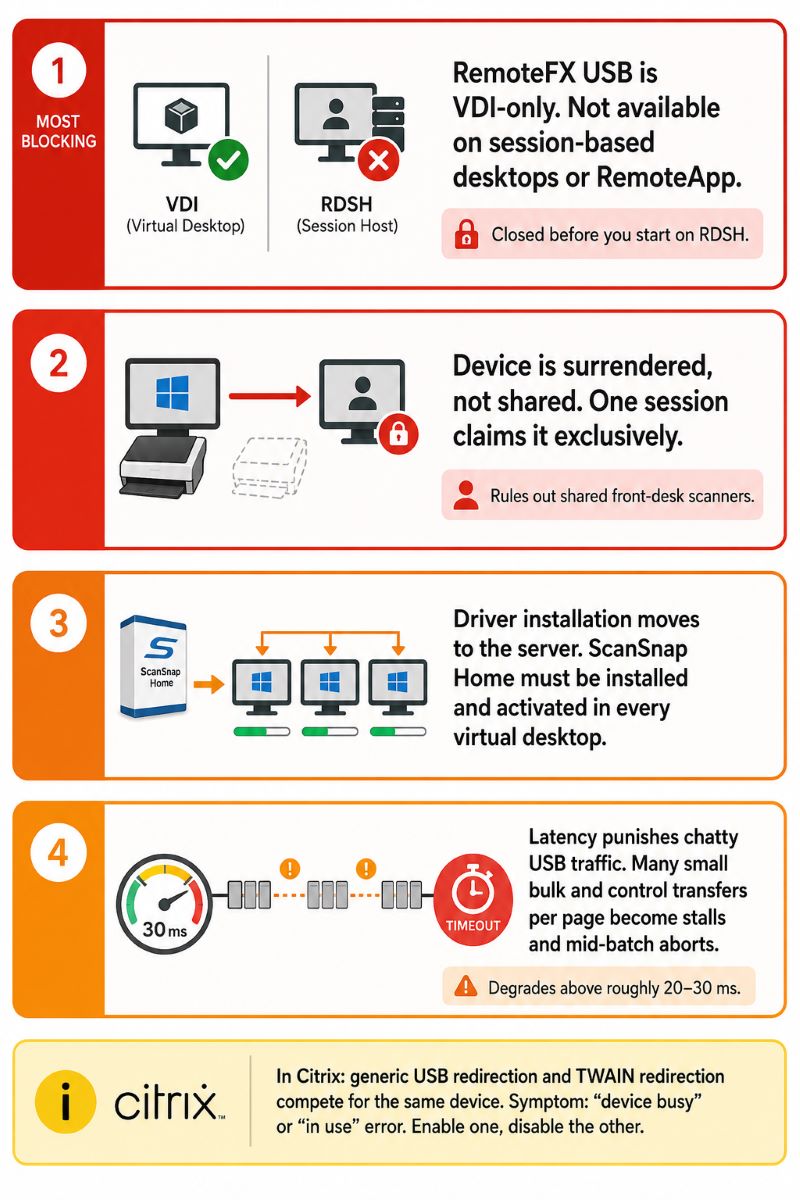
- RemoteFX USB redirection is a VDI feature, not an RDSH feature. It applies to virtual desktops running a Windows client OS, not to session based desktops, so if your users connect to a shared server desktop or a RemoteApp this path is closed before you start. It is configured under
Computer Configuration \ Administrative Templates \ Windows Components \ Remote Desktop Services \ Remote Desktop Connection Client \ RemoteFX USB Device Redirection. - The device is surrendered, not shared. Once redirected, the scanner disappears from the local workstation and is claimed by exactly one session, which rules out a shared front desk device.
- Driver installation moves to the server. ScanSnap Home has to be installed and activated inside every virtual desktop.
- Latency punishes chatty USB traffic. Scanner drivers issue many small bulk and control transfers per page. Over a 30 ms WAN link, a pattern invisible on a local bus becomes stalls, timeouts and mid-batch aborts.
In Citrix, generic USB redirection and TWAIN redirection also compete for the same device, and the usual symptom is a device busy or in use error. Separate them deliberately, with the Client TWAIN device redirection policy or the AutoRedirectImage value under HKLM\SOFTWARE\Wow6432Node\Citrix\ICA Client\GenericUSB\Devices.
What Citrix and VMware Already Give You, and Why It Does Not Rescue a ScanSnap
Citrix Virtual Apps and Desktops includes TWAIN redirection, enabled by default, with two relevant policies: Client TWAIN device redirection and TWAIN compression level. VMware Horizon offers a scanner redirection component covering TWAIN and WIA devices. Both rest on the same premise: the vendor TWAIN driver is installed on the endpoint and the redirection layer proxies that interface into the session.
That premise is what a ScanSnap does not satisfy. With no TWAIN data source registered on the client, there is nothing to redirect and the scanner list in the session stays empty. Before spending a day on policy tuning, install the Twacker TWAIN test application on the endpoint and check whether the ScanSnap appears under File and Select Source. If it is absent there, no redirection product will surface it in the session.
When to Use What: Comparing the Realistic Approaches
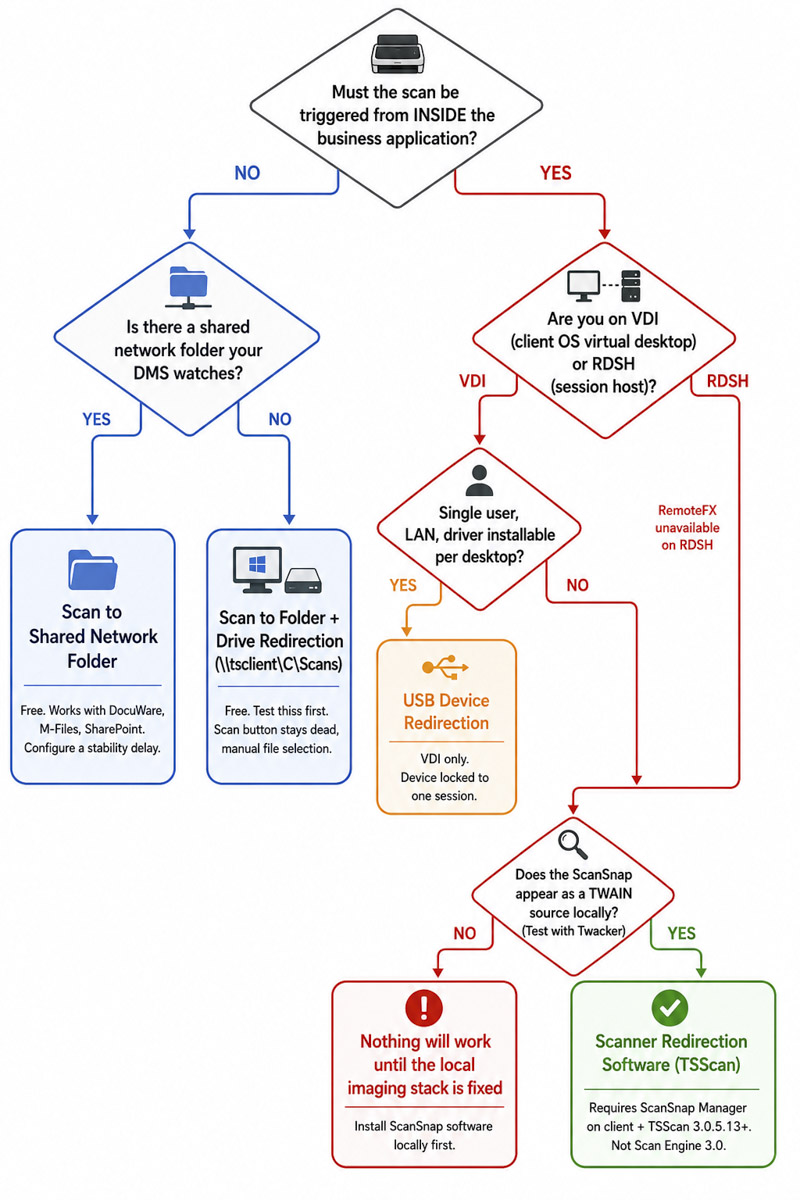
The right choice depends on whether the scan must originate inside a business application, how many users share the device, and how much manual file handling the workflow tolerates.
| Approach | How it works | Works with ScanSnap? | Best fit | Main limitation |
|---|
| Scan to folder plus drive redirection | ScanSnap Home saves a PDF locally, visible in the session | Yes, natively | Occasional scanning and archiving | Scan button unusable, manual file selection, no metadata |
| Scan to a shared network folder | Local software or an MFP writes to a shared SMB path | Yes, natively | DMS watched folders (DocuWare, M-Files, SharePoint) | Partially written files, no capture time indexing |
| Network MFP scan to email or SMB | Brother MFC or Epson WorkForce sends from the device | Replaces the ScanSnap | Shared office device, low volume | Slower feeders, no application driven acquisition |
| USB device redirection | Raw USB device passed in, driver runs server side | Sometimes, in VDI only | Single user VDI desktops | Unavailable on RDSH, one session claims the device |
| Citrix or Horizon TWAIN redirection | Client side TWAIN driver proxied over ICA or Blast | No, absent a client TWAIN source | fi-series, imageFORMULA, Kodak scanners | Platform specific, no help for RDS |
| Scanner redirection software (TSScan, RemoteScan, FabulaTech) | Virtual TWAIN source mapped to the local device | Yes, with the prerequisites below | RDS, Citrix, VDI and PCoIP with direct acquisition | Licensed product, needs a working local imaging stack |
The Free Path: ScanSnap Scan to Folder With Drive Redirection
Test this before buying anything, because for a meaningful minority of customers it is enough. Create a ScanSnap profile with a Scan to Folder destination pointing at a fixed local path such as C:\Scans, then enable drive redirection in the Remote Desktop client under Local Resources. The path becomes \\tsclient\C\Scans inside the session.
Be clear about what this gives up. The application's Scan button stays dead, so users switch between the local desktop and the remote session for every document, and there is no capture time metadata, so a clinician scanning into an EMR associates the file with a patient manually. Watched folder imports can also pick up a PDF while it is still being written, so configure a stability delay first.
When TSScan Is the Right Answer for a ScanSnap, and When It Is Not
TSScan creates virtual TWAIN scanners on the RDS, Citrix or VDI host and maps them one to one to the imaging devices on the connected workstation. Image data travels inside the existing RDP, ICA or PCoIP connection over a Microsoft Virtual Channel, so no extra firewall ports are needed and no scanner drivers are installed on the server.
The ScanSnap specific requirements
ScanSnap support in TSScan is real but conditional, and the conditions are worth stating plainly:
- TSScan 3.0.5.13 or newer is required. Older builds do not enumerate ScanSnap devices.
- ScanSnap Manager must be installed on the local workstation. That is the mechanism exposing the device to TSScan. Without it, the ScanSnap will not appear as a source.
- TSScan Scan Engine 3.0 does not support ScanSnap as a source. If the device is missing from the list, check this setting first.
New deployments hit a planning consideration in 2026: distribution and support of ScanSnap Manager ended in October 2024, and Ricoh now directs users to ScanSnap Home. ScanSnap Manager had been free for the iX1600, iX1500, iX1400, iX1300, iX100, SV600, S1300i and S1100i. If you cannot obtain it for a new fleet, confirm the current supported configuration with our support team before purchasing licences.
Where TSScan is not the right fit
If the local workstation cannot see and operate the scanner itself, no redirection product can help, ours included: redirection maps a working imaging interface into a session, it does not replace a missing driver. If your workflow is one document a week filed into a folder, drive redirection is free and adequate. If you need production capture with barcode separation, imprinting and per document indexing, the constraint is the ScanSnap hardware rather than the remote protocol.
How TSScan compares to other redirection products
RemoteScan and FabulaTech Scanner for Remote Desktop share the same architecture: a virtual data source on the host bound to the client device. Differences show up in licensing and edge case device support, and TSScan is licensed per terminal server installation rather than per scanner or per client. Test with your own scanner model and line of business application during the trial.
Bandwidth, Resolution, and Why Colour Depth Matters More Than the Link
Based on more than a decade of tuning TWAIN and WIA redirection over constrained links, most complaints about slow remote desktop scanning are resolution and colour depth problems rather than bandwidth problems. A single A4 page at 300 DPI is roughly 2480 by 3508 pixels, about 8.7 megapixels.
| Setting | Raw size per A4 page | Typical compressed size | 50 sheets duplex (100 sides) |
|---|
| 200 DPI colour, 24-bit | ~11.6 MB | ~0.6 MB JPEG | ~60 MB |
| 300 DPI colour, 24-bit | ~26 MB | ~1.2 MB JPEG | ~120 MB |
| 300 DPI greyscale, 8-bit | ~8.7 MB | ~0.5 MB JPEG | ~50 MB |
| 300 DPI bitonal, 1-bit | ~1.1 MB | ~60 KB CCITT G4 | ~6 MB |
| 600 DPI colour, 24-bit | ~104 MB | ~4 MB JPEG | ~400 MB |
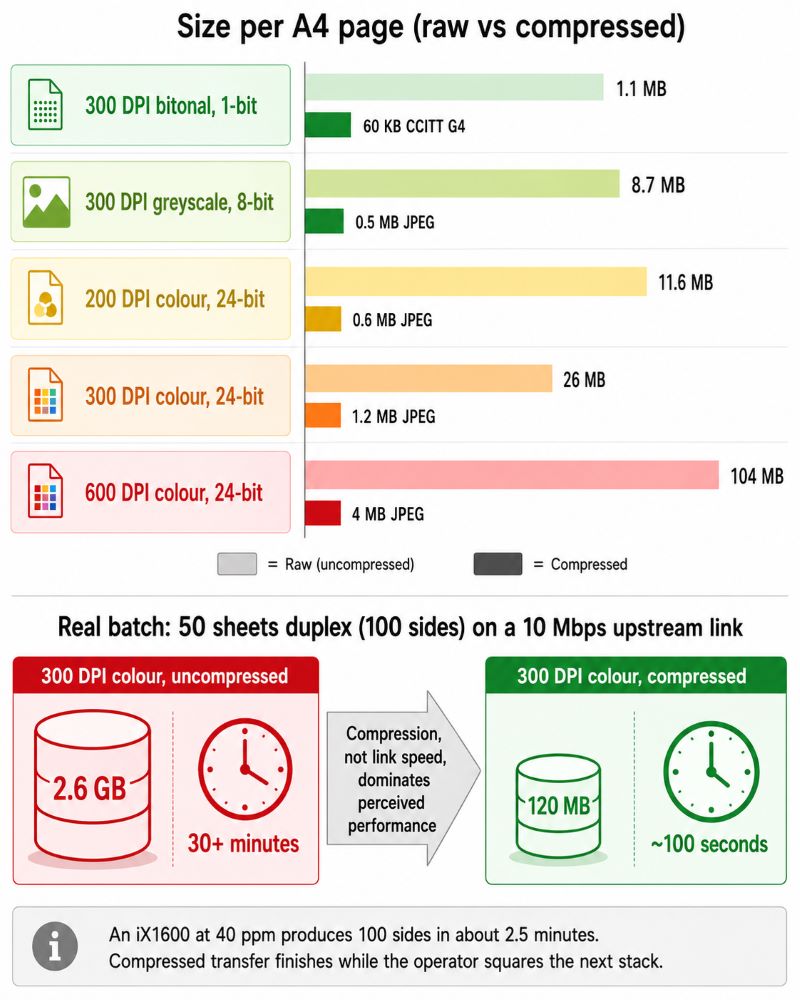
An iX1600 at 40 pages per minute produces 100 sides in about two and a half minutes. At 300 DPI colour that is roughly 2.6 GB of raw data, which uncompressed over a 10 Mbps upstream link would take more than half an hour; compressed to around 120 MB it takes roughly 100 seconds, finishing while the operator squares the next stack. Compression settings therefore dominate perceived performance far more than raw link speed. Contracts, invoices and identity documents rarely benefit from more than 300 DPI, and text only documents scanned bitonal produce files an order of magnitude smaller with no loss of OCR accuracy.
Where This Bites in Practice
Healthcare is the sharpest case: clinics running an EMR as a published application need the scan to originate inside the patient record so the document binds to the correct chart at capture, and a folder based workaround puts a human in the middle of that association. Accounting and legal firms hit the volume version, losing more time to file shuffling than to scanning at 400 to 600 pages a day. Banks handling KYC packets need a traceable chain from device to record, which a shared folder weakens. An architecture practice scanning a drawing twice a week can use drive redirection indefinitely and spend the budget elsewhere.
Deployment Checklist for ScanSnap in RDS, Citrix, and VDI
- Confirm the ScanSnap works locally, and check with Twacker whether it appears as a client side TWAIN source.
- Decide whether the application must trigger the scan. If not, test scan to folder with drive redirection first.
- On RDSH, discount RemoteFX USB redirection immediately. It applies to VDI only.
- In Citrix, choose either generic USB redirection or TWAIN redirection, and disable the other.
- For redirection software, verify the prerequisites: ScanSnap Manager on the client, TSScan 3.0.5.13 or newer, not Scan Engine 3.0.
- Set colour depth and resolution per document type before blaming the network.
Frequently Asked Questions
Not natively. Remote Desktop Services has no scanner redirection in any version, and ScanSnap devices are driven by ScanSnap software rather than a standard TWAIN driver, so they never appear in the source list of an application running on the server. The options are saving scans locally and reaching them through drive redirection, or scanner redirection software that maps the local device into the session. TSScan supports ScanSnap from version 3.0.5.13 onward, provided ScanSnap Manager is installed on the workstation.
Because the TWAIN Data Source Manager on the server enumerates data sources installed on the server, and your scanner is on a client machine. Installing ScanSnap software on the server does not help: the data source then searches the server's own USB stack and finds nothing. The scanner must also be visible as an imaging source on the client first, which means the ScanSnap software has to be installed and working locally.
For the documented TSScan configuration, ScanSnap Manager is the requirement on the local PC, and the device is not offered as a source without it. ScanSnap Home is the current Ricoh software and the right choice for scan to folder workflows, since it writes directly to a local or network path. Distribution of ScanSnap Manager ended in October 2024, so for a new fleet, confirm the supported configuration with our support team before buying licences.
Citrix TWAIN redirection is enabled by default and controlled by the Client TWAIN device redirection and TWAIN compression level policies, but it requires a vendor TWAIN driver on the endpoint. A typical ScanSnap exposes no such driver, so there is nothing for the channel to redirect. Verify with the Twacker test application on the client: if the ScanSnap is not listed under File and Select Source locally, no redirection technology will surface it in the session.
Usually not. RemoteFX USB redirection is supported for VDI virtual desktops and not for session based desktops on an RDS session host, so it is unavailable to most terminal server deployments. Where it is available, the device is claimed exclusively by one session and disappears from the local workstation, which rules out shared front desk scanners. Scanner drivers also generate many small USB transactions per page, which degrades once latency exceeds roughly 20 to 30 ms.
Fifty sheets scanned duplex is 100 sides. At 300 DPI in colour that is roughly 2.6 GB of raw image data, or about 120 MB compressed to JPEG, which transfers in roughly 100 seconds over a 10 Mbps upstream link. The same batch scanned bitonal at 300 DPI compresses to around 6 MB. Resolution and colour depth are the levers to pull before considering a circuit upgrade.
For high volume or application driven capture, it is usually the cleaner answer. fi-series scanners ship with PaperStream IP, which provides standard TWAIN and ISIS drivers, so they behave predictably with Citrix TWAIN redirection, Horizon scanner redirection and products such as TSScan. Canon imageFORMULA and Kodak production scanners are comparable. If your ScanSnap works and your volume is modest there is no reason to replace it, but avoid buying new units for a scanning heavy workflow.
Summary
A Fujitsu ScanSnap will not work over Remote Desktop, Citrix or VDI without help, because RDS has never included scanner redirection and the ScanSnap line is driven by profile based software rather than a standard TWAIN driver. For light use, ScanSnap Home writing to a local folder exposed through drive redirection is free and sufficient. Where the business application itself must acquire the image, scanner redirection is the mechanism, subject to the prerequisites above. For new hardware, a TWAIN capable fi-series scanner removes most of this friction.
Learn more about TSScan remote desktop scanning


