By TerminalWorks — Remote Desktop Printing Solutions Since 2014
Printing receipts, labels, and specialty documents in a remote desktop POS environment breaks when the print path rasterizes raw printer commands into XPS or EMF images. Receipt printers speak ESC/POS and label printers speak ZPL or EPL, so the reliable fix is to keep rendering on the client, where the local printer driver runs. Client-side tools such as TSPrint tunnel the job over the RDP connection and print locally, preserving correct receipts and labels.
That one difference, where the rendering happens, explains almost every POS printing problem we see over Remote Desktop. This post covers why native RDP redirection and Easy Print struggle with thermal and label hardware, how receipt printers (Epson, Star, Bixolon), label printers (Zebra, Dymo, Brother), and specialty documents behave differently in an RDS or Citrix session, when the built-in redirection is genuinely good enough, and when a client-side print engine like TSPrint is the better choice. Based on over a decade of supporting remote desktop printing across 30,000+ companies, POS hardware generates a disproportionate share of the hardest tickets, so the detail below is the detail that actually matters.
Why POS Printing Breaks Over Remote Desktop
Regular office printing over RDP is mostly a solved problem: a laser printer with a signed Windows driver redirects into the session and prints a document. POS printing is different because receipt and label printers are not general-purpose document printers. They are command-driven devices, and the standard remote desktop print path was never designed with them in mind.
Raw Commands vs Rendered Pages (ESC/POS and ZPL)
A desktop application prints a page by drawing it through the Windows driver, which produces a rendered page for the printer. A POS device works differently. A receipt printer expects a stream of ESC/POS control codes: bytes prefixed with ESC (0x1B) or GS (0x1D) that set text size, print a barcode, cut the paper (GS V), or fire the cash drawer kick. A Zebra label printer expects ZPL, a text command language wrapped between ^XA and ^XZ, or the older line-based EPL. These are instruction streams, not pictures of a page.
The trouble starts when a print path treats that instruction stream as if it were an ordinary document to be rendered and rasterized. Control codes get stripped or flattened, the cutter and drawer commands never reach the device, and a crisp barcode becomes a fuzzy image. A pattern we see repeatedly is a barcode that scans perfectly when printed locally but fails at the scanner after the same job travels through a rendering print path in the session.
The XPS and Easy Print Problem for Thermal and Label Printers
Native printer redirection rides the RDPDR virtual channel. For it to work with a physical driver, the exact matching driver has to exist on the server, which is precisely what most administrators want to avoid on a shared RDS host. To sidestep server-side drivers, Microsoft introduced Remote Desktop Easy Print (Windows Server 2008 and later). Easy Print renders the job to XPS on the server, ships the XPS to the client, and lets the client driver turn XPS into physical output.
XPS is a fixed-page document format, and that is the root cause of most POS failures. A thermal receipt is not a fixed page, it is a variable-length strip on continuous roll media. A ZPL label is a command program, not a Letter or A4 page. When Easy Print forces that content into an XPS page model, receipts print centered on a full A4 or Letter sheet, labels rasterize into blurry graphics at the wrong scale, and hardware control codes for cutting and the cash drawer are simply lost because XPS has no concept of them. Many receipt and label drivers also ship as generic or text-only drivers that lack a proper XPS rendering path, so Easy Print degrades or fails outright.
Custom Paper Sizes and Continuous Roll Media
POS media rarely matches a standard page. A shipping label is typically 4 by 6 inches, a product label might be 2 by 1 inch, and a receipt roll is usually 80mm or 58mm wide with no fixed length. Native redirection and Easy Print tend to assume Letter or A4 defaults, so a job that looks correct on the local workstation prints cut off, scaled down, or padded with white space once it runs from the session. One of the most common support tickets we receive from retail and logistics customers is exactly this: labels that are the right content but the wrong size after moving a workflow onto a terminal server.
Receipt Printers in Remote Desktop: Epson, Star, Bixolon
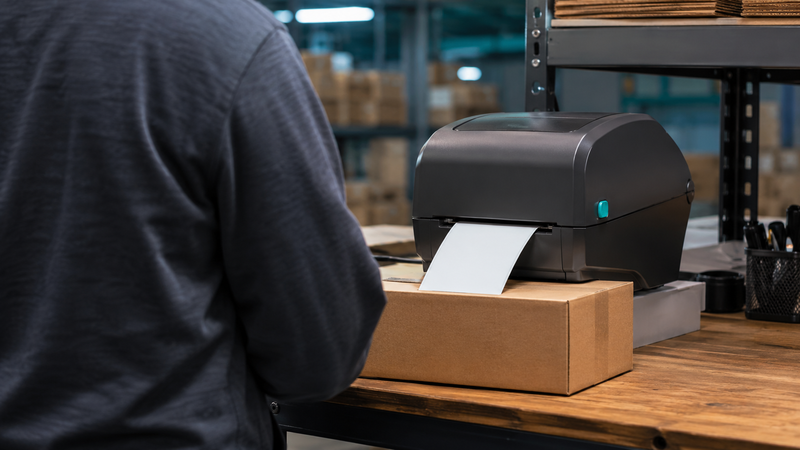
Receipt printers are the most command-dependent devices in a POS stack, which makes them the most sensitive to the print path. Beyond printing text, they carry hardware functions that ride on the same ESC/POS stream:
- Paper cutting, triggered by a cut command at the end of a receipt.
- Cash drawer kick, where the drawer is wired to the printer's DK or RJ11 port and opened by a pulse the printer emits when it receives the drawer command.
- Barcode and QR printing, generated by the printer firmware from an ESC/POS command rather than drawn as an image.
If the print path rasterizes the receipt, all three break at once: no cut, no drawer, and a barcode that may not scan. Connectivity adds a second layer. Many receipt printers are serial (COM) or USB rather than network devices, and serial devices are not redirected the same way as spooled printers. In our experience supporting thousands of RDS environments, a serial Epson TM series printer on a workstation COM port is one of the setups most likely to need explicit port handling rather than ordinary printer redirection.
There is also a hard boundary worth stating plainly. Some POS applications drive receipt hardware through OPOS or POS for .NET, talking to the device directly rather than through the Windows spooler. That direct device path is not printer redirection at all, so no remote printing tool, ours included, can redirect an OPOS device by acting as a virtual printer. Those environments need device-level redirection (COM or USB) instead.
Label Printers in Remote Desktop: Zebra, Dymo, Brother
Label printers split into two workflows, and knowing which one you have determines what will work.
The first workflow is driver-based label printing, where the application prints through the Windows label-printer driver like any other document. This covers the majority of Windows business software that prints Zebra, Dymo, or Brother labels. Here the driver on the machine that renders the job needs to understand the label size and language. If that rendering happens server-side through Easy Print, the label warps. If it happens on the client through the real Zebra or Dymo driver, it comes out correctly.
The second workflow is raw pass-through, where the application sends ZPL or EPL straight to the printer port, bypassing the Windows driver entirely. Warehouse and ERP systems that emit raw ZPL do this deliberately, because raw ZPL gives pixel-exact, repeatable labels. Raw jobs need a pass-through path that never rasterizes the command stream, which is a different requirement from driver-based printing and one that ordinary XPS redirection cannot meet.
Specific hardware quirks recur often enough to name. Zebra printers using ZPL versus the older EPL will silently misprint if the driver language setting does not match the printer. Dymo LabelWriter drivers are notably particular about media selection and often print the wrong label unless the exact size is chosen at both ends. Brother QL series roll printers hit the same continuous-media assumptions as receipt printers.
Specialty Documents: Checks, Prescriptions, and Secure Output
POS and back-office environments also produce documents where fidelity is not optional. MICR check printing depends on precise font rendering and positioning that a rasterizing path can shift out of tolerance, causing bank reject rates to climb. Pharmacy prescription printing (for example EMR-driven Rx output) frequently uses custom forms and label stock with strict layout requirements. Multi-part and preprinted-form printing depends on exact alignment to the physical form. In each case the failure mode is the same as with labels: content that is correct but positioned or scaled wrong once a server-side rendering step is inserted between the application and the printer.
.png)
When Native Redirection Is Enough, and When You Need TSPrint
Native redirection and Easy Print are not bad tools, they are simply built for document printing, not POS printing. It is worth being honest about where they are sufficient, because paying for a third-party tool you do not need is a waste.
Native RDP redirection or Easy Print is usually fine when: you print to standard laser or inkjet printers with proper signed drivers, volumes are low, and you are not dealing with thermal receipts, custom label sizes, cash drawers, or raw command streams. A single-location office printing invoices to an HP LaserJet rarely needs anything more.
A client-side engine like TSPrint earns its place when: you print to receipt or label printers, you need custom or continuous media sizes to survive the trip, you cannot or will not install printer drivers on the RDS host, you run Citrix, VDI, or Azure Virtual Desktop with many concurrent users, or driver conflicts are already crashing the print spooler on your session hosts.
| Requirement | Native driver redirection | RD Easy Print (XPS) | TSPrint |
|---|
| Receipt printers (ESC/POS) | Fragile, exact driver needed | Poor, rasterizes to a page | Client driver renders it |
| Label printers (ZPL/EPL, driver-based) | Fragile, exact driver needed | Blurry, wrong size | Client driver renders it |
| Custom / continuous paper sizes | Manual, often breaks | Unreliable | Handled locally |
| Server-side printer drivers | Required | Not required | Not required |
| Cash drawer / paper cut | Only if driver and app support it | Usually lost | Works via the local driver path |
| Multi-user / Citrix / AVD | Driver conflicts common | Stable but poor POS output | Supported, driver-free on server |
| Setup effort | High | Low | Low |
How TSPrint Handles POS Printing
TSPrint changes where rendering happens, and that single design choice is why it suits POS work. Instead of loading printer drivers on the terminal server, TSPrint installs its own virtual printers on the server. When an application prints to a TSPrint virtual printer, TSPrint converts the job to a compact intermediate format, compresses it, and tunnels it over a dynamic virtual channel to the TSPrint client on the local workstation. The client then prints to the chosen local printer using that printer's own local driver.
For POS hardware this matters directly. The real Zebra, Dymo, or Epson driver runs on the client, next to the physical device, so the printer's native language and its custom media sizes are handled where they belong instead of being flattened into XPS on the server. Because no physical printer drivers live on the RDS host, you also remove the most common cause of spooler crashes and driver conflicts on shared session hosts. TSPrint uses Microsoft virtual channel technology, so it works wherever the remote session connects, with no extra firewall or network configuration, and the same license path covers RDS, Citrix, VDI, and Azure Virtual Desktop.
Two honest caveats. First, the default TSPrint path prints labels as graphics through the local driver, which is correct for the large majority of driver-based Windows label printing but is not the same as sending untouched raw ZPL to the port; applications that require true raw pass-through, or serial receipt printers, may still need device or COM port redirection alongside TSPrint. Second, as noted above, OPOS and POS for .NET devices are driven directly and are outside the scope of any virtual-printer approach. Being clear about these boundaries up front saves a lot of time during a pilot.
TSPrint vs Other Remote Printing Tools for POS
TSPrint is one of several tools built around moving rendering off the server, and it helps to know where it sits.
- ThinPrint is the enterprise heavyweight, with strong feature depth and its own driver-free model, but it carries higher cost and configuration complexity than many POS-focused sites need.
- triCerat ScrewDrivers and UniPrint are established universal-driver and PDF-based printing tools, popular in large Citrix estates, and are reasonable alternatives where you are already standardized on that stack.
- ezeep is cloud-first, which fits cloud-native and hybrid printing well but adds a cloud dependency that some retail and healthcare sites specifically want to avoid.
- FabulaTech Printer for Remote Desktop is a lighter redirection utility focused on pushing local printers into the session.
TSPrint's position is the practical middle: driver-free on the server, client-side rendering that keeps POS output correct, a straightforward one-time license per server rather than per-seat subscriptions, and native clients across CPU architectures including ARM64. For a retail, logistics, or clinic environment whose main pain is receipt and label printers over RDP, that combination usually solves the problem without enterprise-tier overhead.
Frequently Asked Questions
Yes, but the result depends on where the label is rendered. With native Easy Print, the server renders to XPS and the label often comes out blurry or the wrong size. The reliable approach is to render on the client using the actual Zebra driver, which is what a client-side tool like TSPrint does. If your application sends raw ZPL directly to the printer port, you additionally need a pass-through or port-redirection path rather than ordinary printer redirection.
This is the classic XPS page-model problem. Easy Print forces the receipt into a fixed page format, so the printer treats the continuous roll as a full sheet and pads it out. The fix is to keep the receipt printer's own driver in control of the media, which means rendering on the client rather than on the server. Setting the correct 80mm or 58mm roll size at the client end resolves the padding.
Generally not well. Easy Print is built around XPS rendering of document-style pages, and thermal receipt printing depends on ESC/POS control codes and continuous media that XPS does not represent. In practice you lose the paper cut, the cash drawer kick, and often correct sizing. Thermal receipt hardware almost always needs a print path that preserves the printer's native commands.
You can, provided the drawer command reaches the physical receipt printer intact. The drawer is wired to the printer and opened by a pulse the printer emits when it receives the ESC/POS kick command, so the command has to survive the trip without being rasterized away. A client-side print path that uses the local receipt driver preserves that command. If the application controls the drawer through OPOS instead of the print stream, you need device-level redirection rather than printer redirection.
Blurry or mis-sized labels almost always mean the label was rasterized into an image on the server and then scaled, usually by Easy Print's XPS path, instead of being generated by the real label driver. Label printers depend on exact media dimensions and their native language, both of which are lost when the job is turned into a generic page. Rendering on the client with the correct label size selected restores crisp, correctly sized output.
Dymo LabelWriter drivers are particular about media selection, so the key is to let the Dymo driver on the client handle the job with the exact label size chosen. Running the render on the server through Easy Print typically produces the wrong label or scaling. A client-side engine like TSPrint keeps the Dymo driver local while still letting the application print from the session. Confirm the same label size is selected on both the application and the local Dymo driver.
TSPrint's core strength is client-side driver rendering, which correctly handles the large majority of driver-based receipt and label printing. Truly raw workflows, where the application streams untouched ZPL or ESC/POS directly to a port, are a distinct requirement that may need dedicated pass-through or COM port redirection in addition to TSPrint. The right way to confirm your case is to test your specific application during the 25-day trial. If you are unsure which workflow you have, our support team can help identify it.
Sometimes, yes. If the shop prints only to a standard laser or inkjet printer with a proper driver and does not rely on thermal receipts, label printers, or a cash drawer, native redirection may be perfectly adequate. The moment receipt printers, label stock, or custom media enter the picture, native redirection and Easy Print start to struggle. A short pilot is the cheapest way to find out where your specific hardware falls.
Yes. Because TSPrint keeps physical drivers off the session host and renders on the client, the same model applies across RDS, Citrix, VDI, and Azure Virtual Desktop. That is often the deciding factor in multi-user environments, where installing and maintaining POS printer drivers on shared hosts is exactly the fragility administrators are trying to eliminate. The driver-free server footprint also reduces spooler-related instability as the number of concurrent sessions grows.
Summary
POS printing over Remote Desktop fails for one core reason: receipt and label printers are command-driven devices, and server-side XPS rendering flattens those commands into pages, breaking cuts, drawers, barcodes, and label sizing. Native redirection and Easy Print are fine for ordinary document printing, but thermal, label, and specialty output usually need the local driver to stay in control, which means rendering on the client. TSPrint is built around that approach and keeps printer drivers off your RDS, Citrix, or Azure Virtual Desktop hosts entirely. You can test it against your own POS hardware with a free 25-day trial: download TSPrint here or see licensing and purchase options.


