By TerminalWorks, Remote Desktop Printing Solutions Since 2014
Yes. The Windows Print Spooler remains one of the most frequently patched services in Windows, with new elevation of privilege and remote code execution flaws published throughout 2026. Remote desktop printing is unusually exposed because every printer driver installed on a session host executes inside a SYSTEM level service shared by all logged in users. Removing server side drivers removes most of that exposure.
This post explains why the print stack keeps producing vulnerabilities, what PrintNightmare actually changed in Windows (including the hardening that broke RDP printing for thousands of environments), what Windows Protected Print Mode and Windows Ready Print mean for terminal server printing in 2026 and 2027, and how a driverless server architecture compares to the native options. It ends with a hardening checklist and an honest assessment of when you need a third party solution and when you do not.
Why Does the Windows Print Spooler Keep Producing Vulnerabilities?
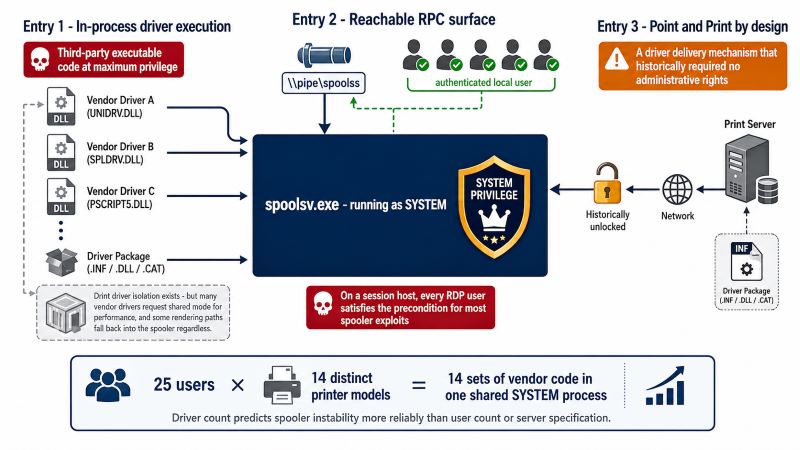
The Print Spooler service (spoolsv.exe) runs as SYSTEM and, in the classic v3 driver model, loads third party driver DLLs directly into its own process. A printer driver is not configuration data. It is executable code, written by a printer manufacturer, running with the highest privilege level on the machine.
Three architectural decisions compound the problem:
- In-process driver execution. Print driver isolation exists and can be forced through
Computer Configuration > Administrative Templates > Printers > Execute print drivers in isolated processes, but many vendor drivers request shared mode for performance, and some rendering paths fall back into the spooler regardless. - A reachable RPC surface. The spooler exposes RPC over the
\pipe\spoolss named pipe. On a session host, every user with an active RDP session is an authenticated local user, which satisfies the precondition for most spooler exploits. - Point and Print by design. The feature exists so that a client can pull driver code from a print server automatically. It is a driver delivery mechanism that historically did not require administrative rights.
In a multi-user environment this scales badly. A modest Remote Desktop Services host with 25 users and 14 distinct local printer models is loading 14 sets of vendor code into one shared SYSTEM process. In our experience supporting thousands of RDS environments, that number is what predicts spooler instability far more reliably than user count or server specification.
What PrintNightmare Actually Was
PrintNightmare is two related issues that are often conflated. CVE-2021-1675 was patched in June 2021 as a local elevation of privilege bug and later reclassified once researchers demonstrated remote code execution. CVE-2021-34527 followed as an out of band fix in July 2021 (KB5004945). The mechanism in both cases was the RpcAddPrinterDriverEx call: an authenticated user could instruct the spooler to load an arbitrary DLL from a network path as a printer driver, and the spooler would execute it as SYSTEM.
Terminal servers and RDS session hosts were among the worst exposed systems in the industry, because the exploit's requirement of an authenticated local session is exactly what an RDS host hands out by design. A single compromised user account on a session host meant SYSTEM on that host, and from there, lateral movement into the domain.
How PrintNightmare Hardening Broke Remote Desktop Printing
The patches themselves caused more support tickets than the vulnerability. Two changes are responsible for most of them, and both are still in force today.
KB5005652 (August 2021) changed the default behaviour of Point and Print so that installing a new driver, or updating an existing one, requires administrative rights. This is controlled by RestrictDriverInstallationToAdministrators under HKLM\SOFTWARE\Policies\Microsoft\Windows NT\Printers\PointAndPrint, and from the October 2021 updates onward it is also exposed through Computer Configuration > Administrative Templates > Printers > Limits print driver installation to Administrators. Microsoft's own guidance is explicit that no combination of alternative mitigations is equivalent to leaving this set to 1.
The September 2021 updates enforced a higher RPC authentication level for printer bindings (CVE-2021-1678), producing the error 0x0000011b when connecting to shared printers whose servers had not been updated consistently. The workaround that circulated widely, setting RpcAuthnLevelPrivacyEnabled to 0 under HKLM\SYSTEM\CurrentControlSet\Control\Print, restores printing by removing the protection. A pattern we see repeatedly is that this "temporary" registry value is still present on production print servers five years later, usually because nobody documented why it was added.
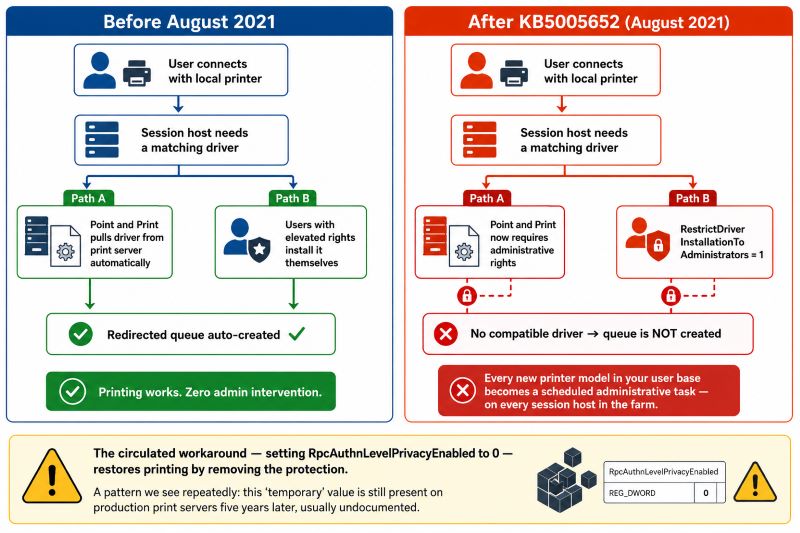
For remote desktop printing specifically, the consequence is structural. Native printer redirection auto-creates a queue in the session only if a compatible driver already exists on the host. Before 2021, drivers arrived through Point and Print or through users with elevated rights. After 2021, every new printer model in your user base becomes a scheduled administrative task on every session host in the farm.
| Setting | Location | Secure value | Effect on RDP printing |
|---|
RestrictDriverInstallationToAdministrators | HKLM\SOFTWARE\Policies\Microsoft\Windows NT\Printers\PointAndPrint | 1 | Non-admin users cannot add drivers for redirected printers. New device models require admin intervention on each host. |
RpcAuthnLevelPrivacyEnabled | HKLM\SYSTEM\CurrentControlSet\Control\Print | 1 or undefined | Shared queues on unpatched or inconsistent print servers fail with 0x0000011b. |
| Point and Print Restrictions | Computer Configuration > Administrative Templates > Printers | Enabled, prompts on | Elevation prompts appear inside RDP sessions where users have no rights to answer them. |
| Execute print drivers in isolated processes | Computer Configuration > Administrative Templates > Printers | Enabled | Contains driver crashes, but some vendor drivers lose functionality or performance in isolated mode. |
Windows Protected Print Mode and Windows Ready Print: The 2026 and 2027 Timeline
Microsoft's long term answer to the driver problem is to stop running vendor drivers at all. Windows Protected Print Mode (WPP) was introduced in Windows 11 24H2 and Windows Server 2025. When enabled, printers using third party drivers are uninstalled, the driver is deleted from the driver store, and new third party driver installations are blocked. Printing then goes exclusively through the Microsoft IPP class driver, which talks to Mopria certified devices.
In May 2026 Microsoft introduced the name Windows Ready Print for the modern IPP based platform itself, which has caused some confusion in IT forums. The two are not interchangeable:
- Windows Ready Print is a preference. From 1 July 2026, new printer installations default to the inbox IPP driver where the device supports it, with manufacturer drivers still available as a fallback. Administrators control this through the Settings toggle "Default install printers using Windows Ready Print" and the Group Policy
Configure Windows Ready Print driver ranking. - Windows Protected Print Mode is enforcement. There is no fallback. It is still disabled by default as of mid-2026, and Microsoft has stated it will become the default at a future date, with 2027 the date most widely cited across the industry.
| Milestone | What changes | Fallback to vendor drivers? |
|---|
| Windows 11 24H2 and Server 2025 | WPP available, off by default | Yes, unless WPP is switched on |
| 1 July 2026 | IPP class driver becomes the default for new printer installations | Yes, via Settings toggle or driver ranking policy |
| Expected 2027 | WPP becomes the default enforcement mode | No, while WPP is active |
Which Printers Break First Under Driverless Printing
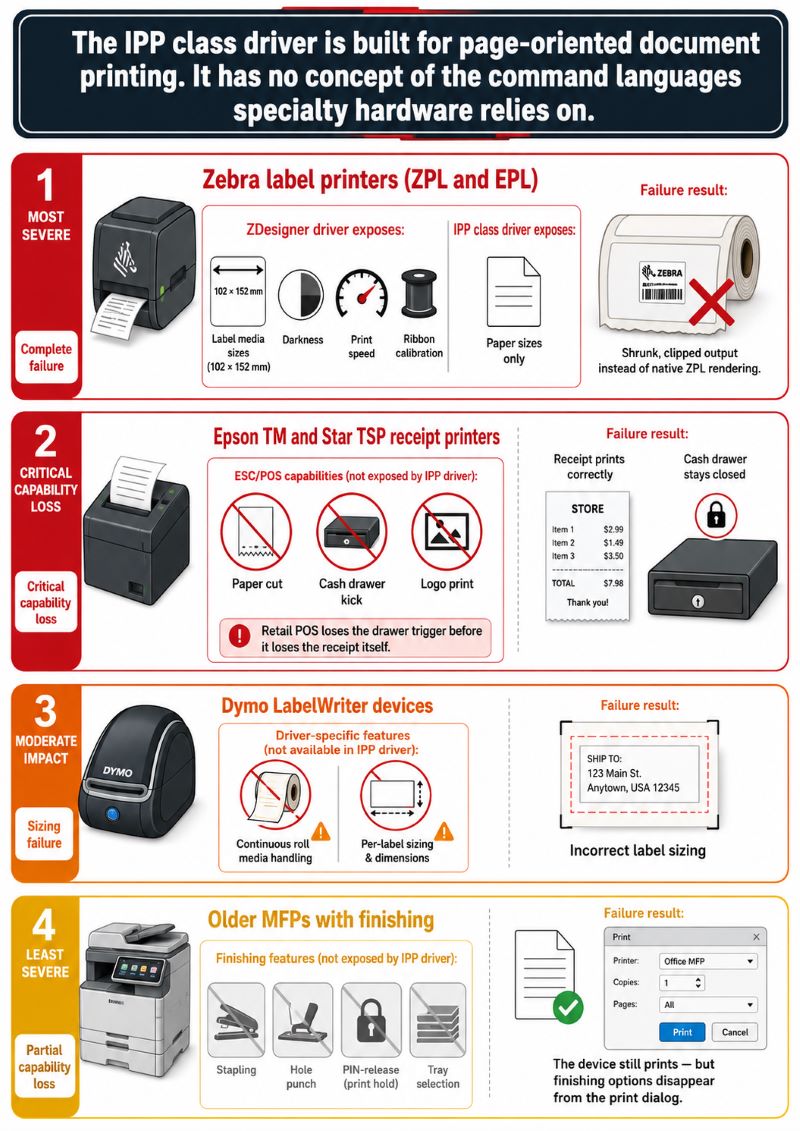
The IPP class driver is built for page oriented document printing. It has no concept of the command languages that specialty hardware relies on. Based on over a decade of working with remote desktop printing, these are the categories that fail first, and the technical reason each one fails:
- Zebra label printers (ZPL and EPL). A ZDesigner driver exposes label media sizes such as 102 x 152 mm, darkness, print speed, and ribbon calibration. The IPP class driver exposes paper sizes. A label job routed through it typically prints as a shrunk or clipped image on the label rather than as native ZPL.
- Epson TM and Star TSP receipt printers. These depend on ESC/POS commands for cut, cash drawer kick, and logo printing. None of that survives a generic IPP path. Retail POS environments lose the drawer trigger before they lose the receipt itself.
- Dymo LabelWriter devices. Continuous roll media and per-label sizing are driver specific.
- Older MFPs with finishing. Stapling, hole punch, secure PIN release, and tray selection are usually implemented in vendor driver extensions. The device still prints, but the finishing options disappear from the print dialog.
What Protected Print Mode Means for Easy Print
Remote Desktop Easy Print is Microsoft's redirection fallback. The server renders the job through the Microsoft XPS Document Writer based Easy Print driver, ships the XPS to the client over the RDPDR virtual channel, and the client converts it using the real printer's local driver. Because the Easy Print driver is Microsoft's own, it is not the component WPP removes.
The breakage is indirect but real. Environments that use Easy Print for ordinary documents and fall back to a locally installed vendor driver on the session host for label or receipt hardware lose that fallback the moment WPP is enabled. One of the most common support tickets we receive from Server 2025 sites follows exactly this shape: office printing continues, and the warehouse Zebra queues vanish.
Easy Print also carries its own cost. XPS is verbose. A ten page text document usually produces 1 to 3 MB of XPS data, while a fifty page document containing charts and photographs commonly produces 30 to 50 MB. On a 2 Mbps branch link shared by fifteen users, that is minutes of transfer for a single job, and it is the reason "printing is slow over RDP" is so often a rendering format problem rather than a network problem.
The Case for a Driverless Server Architecture in Remote Desktop Printing
There are two different meanings of "driverless" in circulation, and conflating them leads to bad architecture decisions.
Microsoft's driverless model removes vendor drivers from the operating system and standardises on IPP at the device level. It solves the security problem completely and the compatibility problem not at all, because it requires every device in your fleet to speak IPP and be Mopria certified.
A driverless server architecture removes vendor drivers from the session host only. The document is rendered once by the application on the server, written to a single virtual print queue, compressed, sent to the client over the RDP virtual channel, and printed on the client by the printer's own native driver, which is already installed there and already works.
The security argument is arithmetic. The spooler attack surface on a session host is a function of how many distinct third party driver DLLs it loads. Going from fourteen vendor drivers to one virtual queue does not eliminate the spooler as a service, and it does not make the host immune to spooler CVEs, but it removes the driver delivery path that PrintNightmare abused and it makes the hardened defaults survivable. You can leave RestrictDriverInstallationToAdministrators at 1 and keep Point and Print restrictions fully locked down, because no per-device driver is ever installed during a session.
The stability argument is the same arithmetic seen from the helpdesk. A crashed spoolsv.exe on a session host takes down printing for every user on that host, not just the one whose driver misbehaved.
The Spooler Is Still Patched Territory
Reducing drivers does not exempt anyone from patching. The 2026 patch cycles alone have included multiple Print Spooler and print configuration fixes, among them a use after free remote code execution issue rated CVSS 8.8 in March, a local privilege escalation use after free in April, a spooler race condition in May, and a heap based buffer overflow enabling local escalation to SYSTEM in July. None of these are PrintNightmare in severity, and none were reported as exploited in the wild, but the pattern is the point: the print stack has produced a steady stream of SYSTEM level bugs every year since 2021.
Comparing the Four Approaches to Remote Desktop Printing
| Approach | Drivers on the session host | Under strict WPP | Specialty printers | Bandwidth profile |
|---|
| Native driver redirection | One per printer model, matched by name | Vendor drivers removed, redirection of those queues fails | Full fidelity while drivers are permitted | Raw spool data, no compression |
| Easy Print (XPS) | Microsoft Easy Print driver only | Easy Print driver survives, vendor fallbacks do not | Poor for ZPL, ESC/POS, and PostScript specific output | High, XPS is verbose |
| IPP class driver and Mopria | Inbox Microsoft driver only | Fully supported, this is the target state | Limited to Mopria certified devices | Efficient for standard documents |
| Universal virtual printer (TSPrint and similar) | One virtual driver, no per-device drivers | Requires validation, see the caveat below | Handled client side by the device's own driver | Compressed transfer over the RDP channel |
When the Native Approach Is Enough, and When It Is Not
Native redirection or Easy Print is genuinely sufficient when most of the following are true:
- Users print ordinary documents to standard office printers and MFPs.
- The printer fleet is standardised, ideally Mopria certified, and refreshed on a known cycle.
- Sessions run on a LAN or a well provisioned WAN link, so XPS payload size is not a practical constraint.
- Nobody depends on stapling, secure release, cash drawers, or label calibration.
- You have the administrative capacity to manage drivers on each session host, or your fleet is small enough that this is rare.
The native path stops being adequate when any of these appear:
- Label or receipt hardware in the mix, which is the norm in retail, logistics, and healthcare specimen labelling.
- Users on unmanaged or home devices with unpredictable printer models, where you cannot pre-stage drivers at all.
- Bandwidth constrained sites, particularly clinics and branch offices printing image heavy documents from an EMR or document management system.
- A security posture that requires the hardened Point and Print defaults to stay in place, with no exception registry values on session hosts.
- Session host farms where per-host driver maintenance multiplies by the number of hosts.
Where TSPrint Fits, and Where It Does Not
TSPrint installs a single virtual printer on the session host. The application renders the job, TSPrint converts and compresses it, the job travels through the RDP virtual channel, and the TSPrint Client on the workstation prints it using the local printer's own driver. No manufacturer drivers are installed on the server for any user device. TerminalWorks has been building this since 2014 and it is in production at more than 30,000 companies.
TSPrint is a practical fit when you have mixed or unmanaged client hardware, specialty printers, bandwidth constrained sites, or a farm where driver maintenance has become an ongoing administrative cost. It runs on Remote Desktop Services, Citrix, Azure Virtual Desktop, and Windows 365, with clients for Windows, macOS, and Linux.
It is not the right tool for every problem, and it is worth being direct about the limits:
- It requires a client installation. Every workstation needs the TSPrint Client. Silent MSI deployment through Group Policy or SCCM makes this manageable, but if you cannot install software on client devices at all, a browser based or cloud print service is a better match.
- It is not print management. Quota enforcement, badge based pull printing, departmental cost recovery, and fleet reporting are the domain of tools such as PaperCut, ezeep, or a full print management platform. TSPrint solves redirection, not governance.
- It does not replace server side drivers where you deliberately want them. If a line of business application needs a specific vendor driver's page setup on the server, TSPrint supports mapping to a Windows driver printer, but that reintroduces a server side driver by choice.
- Very large, heavily governed deployments with thousands of seats and complex policy requirements may find ThinPrint's feature depth and bandwidth control policies a closer fit, at a correspondingly higher cost. UniPrint, ScrewDrivers, and FabulaTech Printer for Remote Desktop occupy similar ground with different trade-offs in pricing model and platform coverage.
An Honest Note on WPP Compatibility
Windows Protected Print Mode blocks third party print drivers as a category, and a universal virtual printer driver is technically a third party driver. A driverless server architecture removes the per-device driver problem, which is the dominant source of both instability and attack surface, but it is not the same thing as Microsoft's driverless print stack. Before enabling full WPP across a session host farm, test your printing solution in a pilot host first and confirm the current behaviour with the vendor. Anyone telling you that any third party print product is unconditionally unaffected by WPP is describing an intention rather than a tested result.
Hardening Checklist for RDS Print Environments in 2026
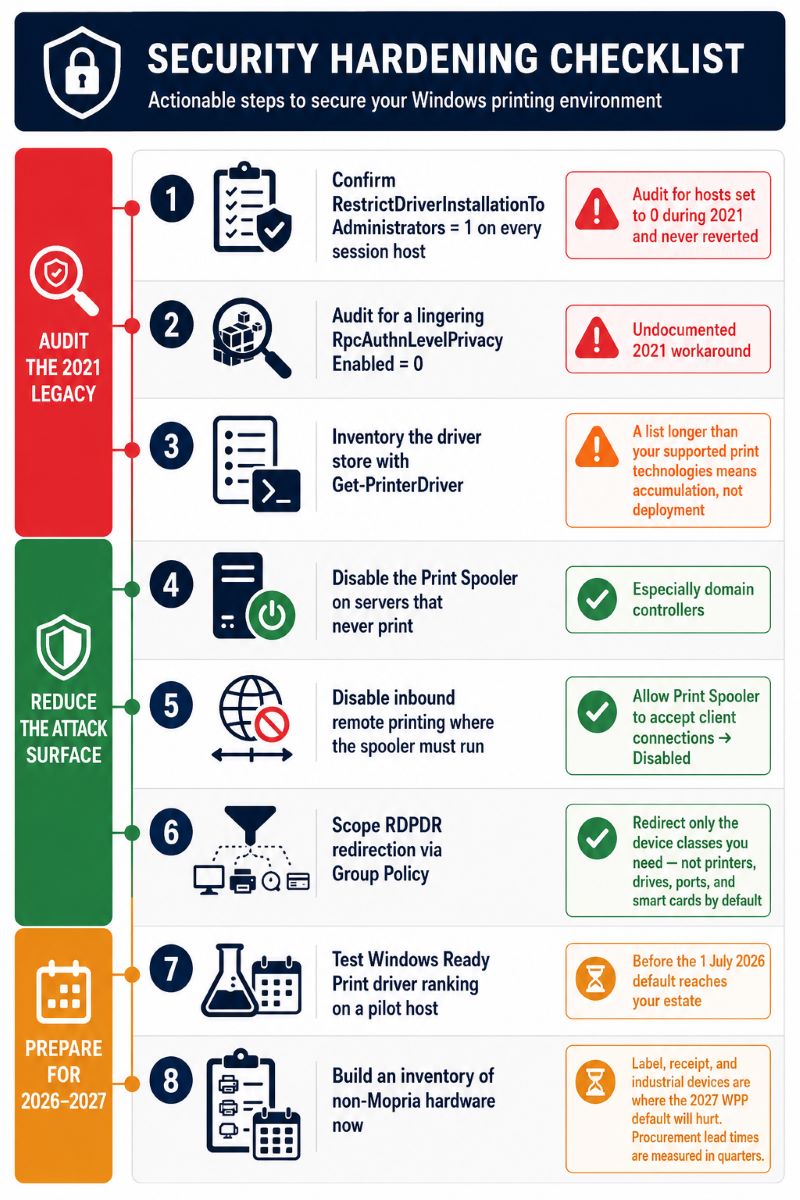
- Confirm
RestrictDriverInstallationToAdministrators is set to 1 on every session host, and audit for hosts where it was set to 0 during the 2021 incident and never reverted. - Audit
HKLM\SYSTEM\CurrentControlSet\Control\Print for a lingering RpcAuthnLevelPrivacyEnabled value of 0. - Inventory the driver store on each session host with
Get-PrinterDriver. If the list is longer than the number of print technologies you actually support, you have accumulated drivers rather than deployed them. - Disable the Print Spooler service entirely on servers that never print, especially domain controllers, using
Set-Service -Name Spooler -StartupType Disabled. - Where the spooler must run, disable inbound remote printing on hosts that are not print servers via
Computer Configuration > Administrative Templates > Printers > Allow Print Spooler to accept client connections. - Scope RDPDR redirection through Group Policy so that sessions redirect only the device classes you need, rather than printers, drives, ports, and smart cards by default.
- Test Windows Ready Print driver ranking behaviour on a pilot host before the July 2026 default reaches your estate through a Windows 11 or Server 2025 rollout.
- Build an inventory of non-Mopria hardware now. Label, receipt, and industrial devices are where the 2027 WPP default will hurt, and procurement lead times are measured in quarters.
Frequently Asked Questions
The original vulnerabilities, CVE-2021-1675 and CVE-2021-34527, were patched in 2021 and a fully updated system is not exploitable through them. The practical risk today is different: environments that disabled the hardening in order to restore printing. Setting RestrictDriverInstallationToAdministrators to 0 or RpcAuthnLevelPrivacyEnabled to 0 returns you to the pre-patch posture. We still find these values on production session hosts during migrations, usually undocumented.
Not if users print from that host, because the spooler is what creates and services print queues in their sessions. Disabling it is the correct hardening step for domain controllers, database servers, application servers, and any other machine that has no printing role. On session hosts, the useful middle ground is to keep the spooler running but disable inbound client connections through Group Policy, so the host services local sessions without accepting remote print requests.
Windows Ready Print is the name Microsoft introduced in May 2026 for the modern IPP based print platform. It is a preference: from 1 July 2026 new printer installations default to the inbox IPP driver, but manufacturer drivers remain available as a fallback through a Settings toggle and the driver ranking Group Policy. Windows Protected Print Mode is the enforcement layer on top of it. With WPP enabled there is no fallback, third party drivers are removed from the driver store, and only Mopria certified devices work.
It breaks the parts that depend on vendor drivers being present on the session host. Redirected queues that matched a manufacturer driver on the server stop being created, because that driver has been removed. Easy Print itself uses a Microsoft driver and survives, so ordinary document printing usually continues. The failure is concentrated in specialty hardware and in any device whose queue was working specifically because someone installed the vendor driver on the host.
Because they are not page printers. A Zebra device expects ZPL, an Epson TM expects ESC/POS, and both rely on driver exposed settings such as label dimensions, print darkness, cut behaviour, and cash drawer signals. The Microsoft IPP class driver models a document going onto a sheet of paper. It has no representation for a 102 x 152 mm continuous label or a drawer kick command, so those capabilities disappear even when the device still produces output.
Yes, with either of two approaches. You can pre-install and maintain the required drivers on every session host as an administrator, which is secure but becomes an ongoing task proportional to fleet diversity multiplied by host count. Or you can use an architecture where no per-device driver is needed on the server at all, such as Easy Print for standard documents or a universal virtual printer for mixed and specialty hardware. Setting the value to 0 to make printing work is the option to avoid.
It comes from the September 2021 print RPC binding change for CVE-2021-1678, which raised the required authentication level for printer connections. It appears when a client connects to a shared queue on a server whose patch level or RpcAuthnLevelPrivacyEnabled setting does not match. It affects shared network printers rather than RDP redirection directly, but it commonly surfaces in terminal server environments where users connect to shared queues hosted on a separate print server. The correct fix is consistent patching across both ends, not disabling the setting.
Technically yes. WPP blocks third party print drivers as a category, and a virtual printer driver installed by redirection software falls in that category. The meaningful benefit of a universal driver is different: it collapses many per-device vendor drivers into one component, which removes the Point and Print delivery path and shrinks the code loaded into the spooler. Treat WPP compatibility as something to validate on a pilot host before a farm wide rollout, not as a vendor claim to accept at face value.
Both, for the same reason. Every vendor driver is third party code executing in a SYSTEM level service, so fewer drivers means both fewer crash sources and less code running at maximum privilege. It also lets you keep the hardened Point and Print defaults in place, which closes the delivery mechanism that PrintNightmare exploited. What it does not do is remove the spooler service itself, which is why patching remains mandatory regardless of architecture.
Summary
The Windows print stack is still generating SYSTEM level vulnerabilities in 2026, and remote desktop printing carries a disproportionate share of that risk because session hosts concentrate many vendor drivers into one shared privileged process. The PrintNightmare hardening of 2021 made secure defaults incompatible with driver-dependent redirection, and Windows Protected Print Mode will finish that transition when it becomes the default. Environments running only Mopria certified office hardware can follow Microsoft's driverless path directly, while environments with label, receipt, or mixed unmanaged hardware need an architecture that keeps device drivers on the client side. Auditing your session hosts for leftover 2021 workaround registry values and inventorying non-Mopria devices are the two steps worth doing this quarter regardless of which path you choose.
If you want to test a driverless server approach to remote desktop printing in your own environment, you can download TSPrint with a free 25 day trial or review licensing on the TSPrint purchase page.


