Last updated: October 2026
By Terminalworks - Remote Desktop Scanning Solutions Since 2014
As of October 29, 2026, no end-of-life date or deprecation plan has been announced for the TWAIN standard. TWAIN is maintained by the non-profit TWAIN Working Group. The latest published specification identified for this article is TWAIN 2.5, ratified in November 2021. Backward compatibility is a design goal, but continued operation of a particular scanner still depends on its driver, application and operating system.
For long-term planning, distinguish the standard from the products that implement it. Driver architecture, manufacturer support, Windows updates and remote-session compatibility can affect a working installation even without a change to TWAIN itself. This article explains those dependencies, the differences between scanning and printer-driver servicing, and the available approaches to remote scanning.
Why Is There No TWAIN Deprecation Timeline?
A deprecation timeline requires an announcement from the organization responsible for the technology or implementation. No such timeline has been identified for the TWAIN standard. Its independent governance should not be interpreted as a guarantee that every implementation will remain supported indefinitely.
The standard and its implementations have separate lifecycles
TWAIN defines an interface between applications and image sources. Its ecosystem includes three main roles:
- The TWAIN Working Group publishes the specification and the Data Source Manager (DSM), the small library (
TWAINDSM.dll) that sits between applications and drivers. - Scanner manufacturers (Fujitsu/Ricoh, Canon, Epson, Brother, Kodak Alaris, Plustek, Visioneer and others) ship TWAIN data sources, the drivers that actually talk to the hardware. Support policies vary by manufacturer and scanner model.
- Application vendors (EMR systems, DMS platforms, accounting and legal software, capture SDKs) call the TWAIN API from their own code.
Microsoft does not govern the TWAIN specification, but Windows controls the platform on which Windows TWAIN components run. The legacy twain_32.dll and the modern TWAINDSM.dll are different DSM implementations; applications and driver packages can supply the modern DSM. Changes to Windows, device support or security requirements can affect a TWAIN workflow without retiring the standard itself.
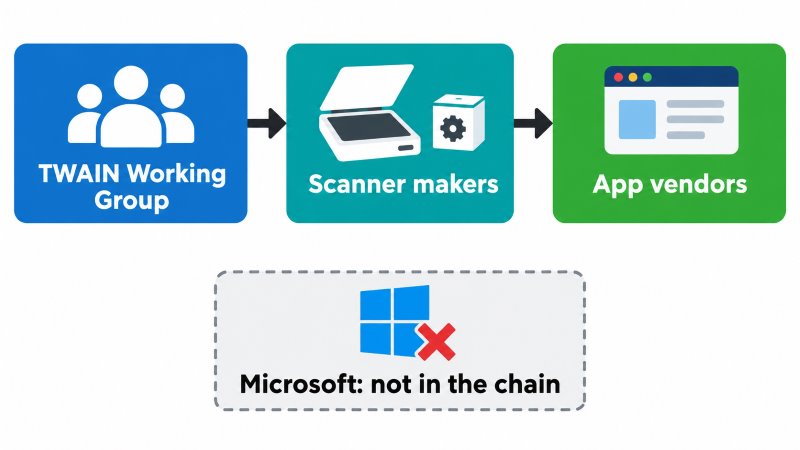
Illustration clarification: TWAIN governance is independent of Windows, but Windows changes can still affect a driver or application. Independence does not guarantee future compatibility.
Backward compatibility is written into the standard
Backward compatibility helps applications and data sources using different TWAIN protocol versions work together. It does not remove operating-system, CPU-architecture or application requirements. An older application may work with a newer data source when their architectures and supported operations are compatible; that is not a guarantee that every application and driver combination will work.
TWAIN Direct offers another integration path
TWAIN Direct was publicly released in September 2019. It provides a driverless network interface for compatible scanners and applications, separate from the classic TWAIN API. Existing TWAIN scanners can also participate through a compatible TWAIN Direct Bridge or Side Car implementation. Native TWAIN Direct support in the scanner is therefore not the only option, and an existing TWAIN application does not automatically become a TWAIN Direct client. See the TWAIN Working Group announcement.
Specification versions do not determine driver support
TWAIN 2.5 was ratified on November 4, 2021. The age of a specification alone does not establish whether a particular scanner is supported. Check the published TWAIN specification separately from the scanner manufacturer's supported operating systems and driver lifecycle.
How Is Scanning Different from Printing on Windows?
Microsoft announced its end-of-servicing plan for legacy third-party v3 and v4 printer drivers in September 2023. For Windows 11 and later and Windows Server 2025 and later, the updated schedule restricts publication of new drivers to Windows Update from January 15, 2026, changes driver ranking to prefer the Windows IPP inbox class driver from July 1, 2026, and limits further third-party printer-driver updates to security fixes from July 1, 2027. Exceptions and signing conditions apply. Separate vendor installation packages remain possible; this is not a blanket ban on installed printer drivers. See Microsoft's servicing plan.
That printer-driver schedule is not a TWAIN end-of-life announcement. Windows also supports driverless scanning with compatible eSCL/Mopria devices. However, Windows Protected Print Mode can affect scanner availability: Microsoft warns that some scanners, including scanning functions on multifunction devices, are unavailable when the mode is enabled. Check scanning compatibility separately from printing compatibility. See Microsoft's Protected Print Mode guidance.
| Area | Printing on Windows | Scanning on Windows |
|---|
| Who maintains the interface or driver model | Microsoft (v3/v4 driver model) | TWAIN Working Group (TWAIN); Microsoft (WIA); Tungsten Automation, formerly Kofax (ISIS) |
| Published servicing or lifecycle position | Windows Update servicing restrictions, including security-only updates from July 2027; separate vendor installation remains possible | No announced TWAIN end-of-life date identified; check individual driver and product lifecycles |
| Microsoft's preferred path | IPP class driver, Mopria, Print Support Apps | eSCL/Mopria for compatible driverless scanners; other interfaces depend on application and device support |
| Enforcement mode | Windows Protected Print Mode | No TWAIN-specific retirement mode; Protected Print Mode can still make some scanners unavailable |
| Microsoft-provided remote-session redirection | Yes (Easy Print) | TWAIN redirection is in preview for supported Windows App cloud-desktop scenarios; classic RDS support must be checked separately |
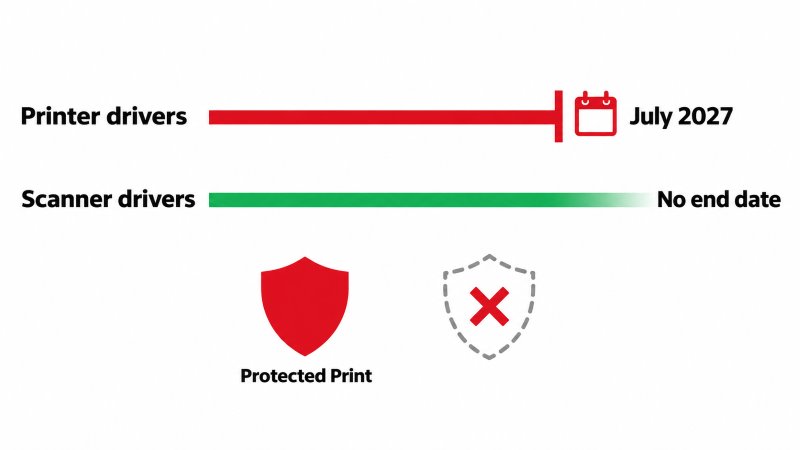
Illustration clarification: The printer-driver servicing schedule and Protected Print Mode are separate mechanisms. Protected Print Mode can affect scanners, and Microsoft now offers TWAIN redirection in preview for supported cloud-desktop scenarios.
Remote scanning support now depends on the service and client. Microsoft documents TWAIN scanner redirection in preview for Azure Virtual Desktop, Windows 365 and Microsoft Dev Box, with a supported Windows App client, a host-side component and explicit configuration. This should not be generalized to every classic RDS or mstsc deployment. Citrix also provides its own TWAIN redirection in supported configurations.
How TWAIN, eSCL and WIA Compare for Business Scanning
TWAIN, WIA and eSCL address related needs at different layers: TWAIN and WIA provide application interfaces, while eSCL is a device communication protocol. They are not always mutually exclusive. Choose a supported combination based on the application, scanner and required functions, rather than assuming one interface is limited to simple documents.
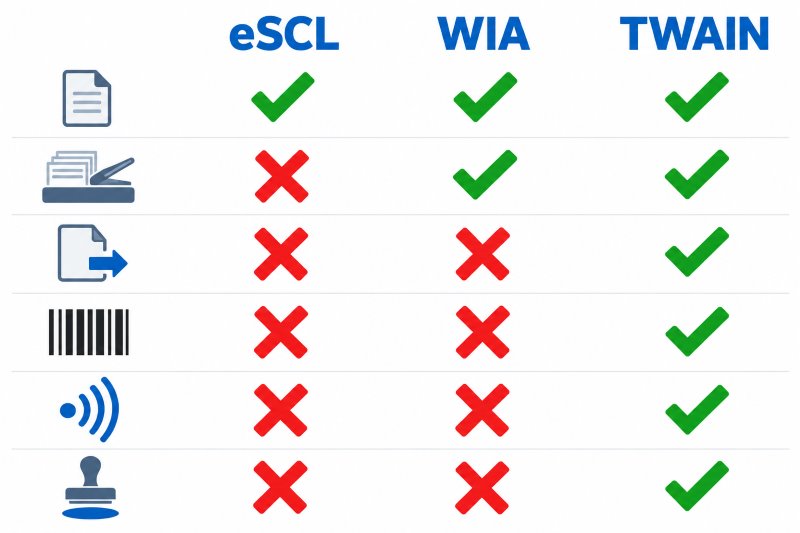
Illustration clarification: The capability limits suggested by this illustration are not universal: eSCL supports multi-page ADF and duplex scanning, and WIA defines advanced capture functions. Actual support depends on the device, driver and application.
Capability depth
eSCL devices expose capabilities such as supported sources, resolutions and color modes. Compatible implementations support automatic document feeders, multi-page batches and duplex scanning; eSCL is not limited to single pages. The sane-airscan implementation documents these functions. TWAIN defines many advanced controls and metadata capabilities, but availability still depends on the data source and scanner.
WIA also defines advanced functions, including barcode and patch-code readers, imprinters, endorsers and MICR readers, plus optional blank-page detection and removal. A particular WIA driver or application may expose fewer features than its TWAIN counterpart, but that is an implementation limitation, not proof that WIA lacks those functions. See Microsoft's WIA item categories and blank-page controls.
Application integration
Many business applications integrate with TWAIN. A TWAIN-only application needs a compatible TWAIN data source or bridge; it cannot directly use an eSCL endpoint simply because Windows discovers that device. Check the exact application version and supported interfaces. For example, QuickBooks Scan Manager supported TWAIN, but Intuit discontinued Scan Manager in QuickBooks Desktop 2022, so it is not a current general example of in-app TWAIN scanning.
Reliability on updates
Driverless scanning still depends on operating-system components, device firmware and application support. Vendor-driver workflows depend on those layers too, as well as the installed driver. Test Windows feature updates with representative scanners, connection types and scan settings; neither eSCL nor an installed TWAIN driver guarantees immunity to update-related failures.
Where TWAIN Workflows Actually Break
When a TWAIN workflow fails, investigate the implementation before assuming the standard has been retired. Four common areas to check are application architecture, manufacturer support, multi-user behavior and access to the local scanner from a remote application.
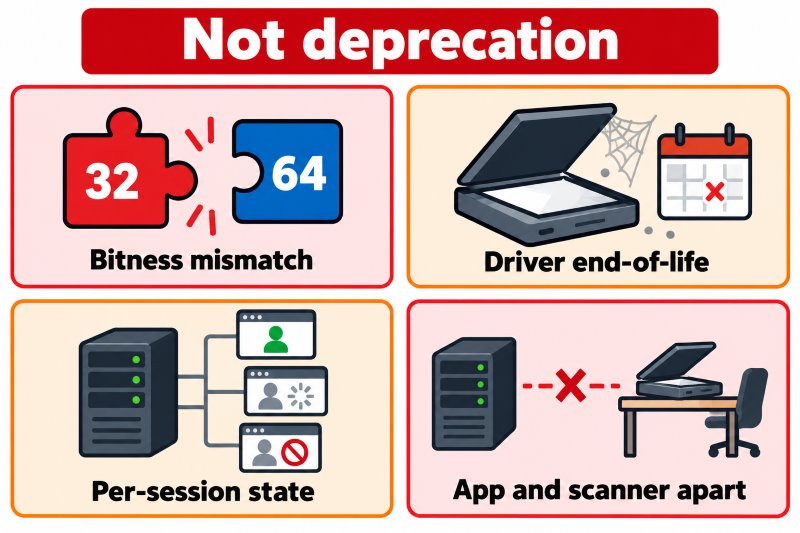
32-bit vs 64-bit data sources
In a conventional Windows TWAIN workflow, the DSM loads the data source into the application's process. The application, DSM and data source must have compatible architectures: a 64-bit application cannot directly load a 32-bit data source. If a scanner disappears after an application upgrade, check for a matching driver and DSM. A separately supported bridge or redirection product may handle an architecture mismatch, but this is not an automatic feature of TWAIN.
Vendor end-of-support for specific scanner models
A scanner manufacturer can end support for a model independently of the TWAIN standard. An older driver may continue working, but compatibility with a later Windows release is not guaranteed. Check the supported operating-system list, vendor support status and application requirements; the date of the last driver update alone is not an end-of-life policy.
Per-session driver state on terminal servers
Some scanner drivers assume a single interactive user or exclusive access to a physical device. Shared settings, machine-wide temporary files and device locks can create conflicts on a multi-user session host. Validate the manufacturer's support for the intended environment and test concurrent sessions, disconnects and reconnects. Redirection does not make one physical scanner able to scan multiple jobs simultaneously.
The application and the scanner are on different machines
In a remote workflow, the application runs on a session host while the scanner may be attached to the user's local PC. A compatible source must be available to the remote application, but it can be a redirected source rather than the hardware vendor's driver. Available routes include low-level USB redirection, platform-provided TWAIN redirection where supported, and dedicated third-party scanner redirection. Network scanning or file-based capture may be alternatives if the application supports them.
What TWAIN's Longevity Means for Remote Desktop Scanning
An established TWAIN integration can remain useful without an announced retirement date. For remote deployments, the main design choice is how to connect that integration to the scanner while meeting compatibility, support and performance requirements.
USB device redirection
Low-level USB redirection, including the RemoteFX USB option in supported Microsoft clients and Citrix generic USB redirection, forwards USB communication to the remote machine. The required vendor driver must be available there. The redirected device is normally exclusive to one session and unavailable locally while redirected. Results depend on the device and driver; latency and reconnects can affect reliability. See Microsoft's redirection guidance.
Platform-provided and dedicated TWAIN redirection
High-level scanner redirection keeps hardware access on the endpoint and makes a TWAIN-compatible source available to the remote application. Products may expose a generic virtual source or map individual local scanners. Requests and acquired images pass between the session host and endpoint, avoiding the need to install every hardware vendor's scanner driver on the host.
Evaluate the platform's own scanning support before adding another product. Microsoft's TWAIN redirection is currently a preview in supported cloud-desktop configurations, and Citrix has its own TWAIN redirection. Dedicated tools can be useful when the platform, client mix, required features or support requirements call for them. Test device naming, architecture compatibility and advanced controls with the chosen implementation.
Bandwidth is an important constraint
An A4 page at 300 DPI in 24-bit color is approximately 2480 × 3508 pixels, or 26.1 MB of uncompressed pixel data. A batch of 50 sheets scanned on both sides contains 100 images, roughly 2.61 GB. At a sustained 20 Mbit/s, transferring that data alone takes about 17.4 minutes, before protocol overhead. If compression reduces the batch to 50–100 MB, the theoretical transfer time is about 20–40 seconds; actual size and duration depend on content, quality settings, bandwidth and processing. These times exclude physical scanning.
At the same size and resolution, 8-bit grayscale is about 8.7 MB per image and 1-bit black-and-white about 1.1 MB, before compression. JPEG is lossy, so choose quality settings based on legibility, OCR accuracy and retention requirements. Compression before network transfer can reduce bandwidth use, but scanner speed, latency and application processing also affect total job time.
How to Plan Scanning Workflows That Last
Plan around supported components and tested workflows rather than assuming either imminent TWAIN retirement or indefinite compatibility. These checks help identify practical lifecycle risks:
| Risk | What to check | Mitigation |
|---|
| Bitness mismatch | Is the scanning application 32-bit or 64-bit, and does the scanner vendor ship a matching data source? | Confirm before upgrading the application; require drivers compatible with the application and endpoint architecture |
| Driver end-of-life | Does the manufacturer support the model on the intended operating system? | Plan replacement or an alternative workflow when required support ends; driver age alone is not an expiry date |
| Session host driver sprawl | How many scanner drivers are installed on RDS hosts? | Where supported, keep vendor drivers on endpoints and use a compatible redirected TWAIN source |
| Windows feature updates | Which device protocols, drivers and Protected Print Mode settings are used? | Pilot updates and print-policy changes with every scanner model and acquisition path in use |
| Bandwidth | Typical batch size, color mode, and branch uplink speed | Default to grayscale or B/W where color isn't required; enable compression in transit |
| Production capture features | Does the workflow need patch codes, barcodes, or imprinters? | Verify every required function in the actual device, driver and application; retain the working interface until alternatives pass testing |
A note on ISIS
Production scanners may offer both ISIS and TWAIN drivers. ISIS is a proprietary, licensed interface associated with Tungsten Automation, formerly Kofax. TWAIN provides an open specification, but an actual TWAIN workflow still depends on its device and software vendors. Compare the capture application's supported interfaces and the manufacturer's support commitments before changing drivers.
When to Use What: Choosing a Remote Desktop Scanning Approach
TSScan is not the right answer for every environment. Here is how we see the options:
| Approach | Works well when | Falls short when |
|---|
| USB device redirection (RemoteFX / Citrix) | A few users on a fast LAN, one scanner model, driver installed on the host | Latency, reconnects, driver deployment or exclusive device access are unacceptable |
| Network scanner with scan-to-folder or scan-to-email | Users scan, then attach files manually; the MFP is on the same network as a file share the server can read | The application needs a scan button that acquires directly into a record |
| Mobile scanner apps | Occasional single-page captures, field staff, receipts | The application requires direct scanner integration, controlled optical resolution or capture features the mobile app does not provide |
| eSCL-capable scanning software / WIA applications | The application and device support the required interface and functions, including ADF or duplex where available | Required controls are missing from the implementation, or a TWAIN-only remote application has no compatible bridge or redirector |
| TWAIN Direct | The application supports TWAIN Direct and the scanner is compatible natively or through a supported Bridge/Side Car | The application lacks TWAIN Direct support or no suitable scanner integration is available |
| Platform-provided TWAIN redirection | The supported Citrix configuration or Microsoft cloud-desktop preview meets the workflow requirements | The deployment is unsupported, required functions are missing, or preview software is unsuitable for production policy |
| Dedicated scanner redirection (TSScan, RemoteScan, FabulaTech Scanner for Remote Desktop) | Applications on RDS, Citrix, VDI, or AVD that acquire directly via TWAIN; mixed scanner fleets; branch offices on WAN | The device, application interface or required feature is unsupported by the chosen product |
TSScan offers TWAIN-compatible scanner mapping, including a virtual source and dynamic redirection options, plus a standalone scanning application. It uses virtual-channel communication with compression and encryption and offers Windows and macOS client options. Supported devices and features depend on the client, driver and configuration. Compare the current support matrices and test TSScan, RemoteScan or FabulaTech against the actual application and scanner fleet before choosing a product.
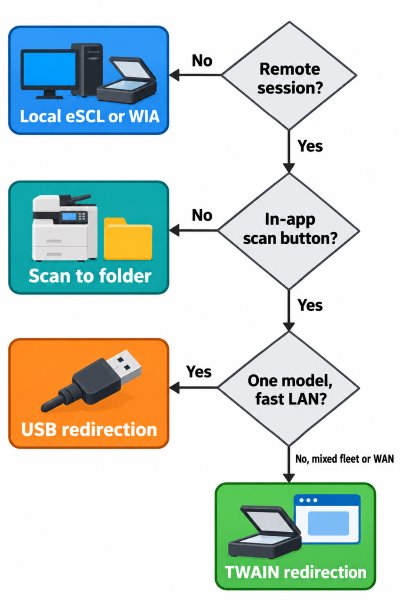
Illustration clarification: Platform-provided options also belong in this decision: supported Citrix TWAIN redirection and Microsoft's TWAIN redirection preview may meet the requirement. Dedicated third-party redirection is not mandatory in every remote environment.
Check scanners and signature pads often depend on specialist SDKs or vendor-specific remote-session components. If the required workflow uses such an interface, a TWAIN redirector alone will not provide it. Verify whether the exact model offers a supported TWAIN interface and whether it exposes the required functions, such as MICR data or signature metadata. Use vendor-supported integration or USB redirection where appropriate.
Industry Scenarios Where TWAIN's Stability Matters
Healthcare
A clinic acquiring insurance cards, referral letters or consent forms directly into an EMR needs a capture path supported by that EMR. If it uses TWAIN, verify the application architecture, available scanner drivers and redirection support before upgrading. Test image quality, routing to the correct patient record and behavior after reconnecting a remote session.
Legal
A legal team capturing contracts into a DMS should test resolution, completeness and the required output format throughout the workflow. For ScanSnap or other devices that rely on their own capture software, check the exact model and supported integration rather than assuming a conventional TWAIN driver is available. Some redirection products offer additional device-specific integration.
Accounting
For invoice batches, test duplex scanning, blank-page handling, batch separation and OCR using representative documents. These functions may be provided by the scanner, its driver or the capture application. Moving to another interface can change which controls are available, but eSCL supports multi-page and duplex workflows and WIA defines advanced capture functions. Evaluate the complete implementation before deciding whether a migration would lose essential features.
Frequently Asked Questions
No TWAIN-standard deprecation or end-of-life announcement has been identified as of October 29, 2026. Microsoft's printer-driver servicing plan is separate. However, Windows changes and Protected Print Mode can affect particular scanners, so the absence of a TWAIN retirement date is not a compatibility guarantee.
TWAIN 2.5, ratified on November 4, 2021, is the latest published specification identified for this article. Backward compatibility is a design goal, but applications, the DSM and data sources still need compatible architectures and supported operations.
No replacement deadline has been identified. TWAIN Direct provides a different network integration model. Compatible Bridge or Side Car implementations can support existing TWAIN scanners, while the application still needs a TWAIN Direct integration. Existing classic TWAIN applications do not automatically gain support.
Consider switching when the alternative supports your application and required features. eSCL can support multi-page ADF and duplex scanning. WIA defines functions including barcode and patch-code reading, imprinter controls and blank-page handling, but actual driver and application support varies. A TWAIN-only application still needs a compatible TWAIN source or bridge.
A conventional Windows TWAIN data source is loaded into the application's process, so the application, DSM and data source need compatible architectures. Check for the appropriate driver and DSM. If only a 32-bit driver exists, options may include a supported 32-bit application, a bridge or redirection product explicitly supporting that combination, or a different scanner.
It depends on the platform and client. Microsoft now documents TWAIN scanner redirection in preview for supported Azure Virtual Desktop, Windows 365 and Microsoft Dev Box deployments using Windows App, with additional host components and configuration. This is not universal support across classic RDS clients or deployments. Citrix also provides TWAIN redirection. Where platform support does not meet the requirements, consider dedicated scanner redirection, supported USB redirection or file-based capture.
There is no universal guarantee. Compatibility depends on the application, DSM, driver, device and target operating system. High-level redirection can keep the hardware vendor's driver on the endpoint, reducing server-side driver dependencies, but the redirection components and complete workflow still need validation after server or client upgrades.
At 300 DPI, an A4 image is about 26.1 MB in 24-bit color, so 50 duplex sheets produce about 2.61 GB before compression. At 20 Mbit/s, that is approximately 17.4 minutes of theoretical transfer time. If the compressed batch is 50–100 MB, transfer alone takes about 20–40 seconds under ideal conditions. Actual compression ratios and end-to-end times vary; test representative documents and image-quality settings.
Summary
As of October 29, 2026, no end-of-life date has been announced for the TWAIN standard. Long-term scanning still depends on supported drivers, compatible application architectures, operating-system behavior and a suitable remote-access design. Evaluate TWAIN, WIA, eSCL and TWAIN Direct according to the functions the complete workflow delivers. Include Microsoft's TWAIN redirection preview, Citrix's scanning support and dedicated redirection products where applicable, and test both Windows upgrades and Protected Print Mode before deployment.
Learn more about TSScan for remote desktop scanning


