Challenges of Cloud Administration
One of the common challenges in cloud administration is the constant demand from users to handle increasing responsibilities. There are more users to support, each with expanding needs. This leads to the deployment of more workloads, each with specific requirements and dependencies, across an increasingly diverse range of services and capabilities. Also, middleware platforms and DevOps toolchains add complexity, often spanning multiple clouds or more environments. Taken together, these factors make the scope and scale of cloud administration feel almost exponential.
Beyond the pressure to do more, there's also a critical focus on how tasks are executed. These tasks must be completed accurately, in compliance with regulatory requirements, securely, with high performance, consistency, and cost-efficiency, and within tight timeframes. Research and customer interviews reveal several key needs. First, guidance is required for learning Azure and gaining visibility into existing environments and services. Second, accelerated and error-free deployment of workloads is a priority. Flexible and reliable data storage options are crucial for supporting diverse use cases. Given a specific workload, how can the most suitable services and capabilities be identified? Customers often look for guidance in selecting the best options. Also, many routine, low-risk tasks could be automated, freeing up time. Once applications, infrastructure, and environments are up and running, gaining meaningful insights into their performance and behavior becomes essential. However, real-world conditions are not always perfect. Misconfigurations can occur, resources like CPU can become constrained, and issues arise, requiring troubleshooting. This becomes challenging as environments scale. With more systems, services, and dependencies in play, identifying and resolving problems is increasingly complex. When downtime directly impacts business operations, speed and accuracy in troubleshooting become critical. Finally, once systems are running smoothly, the focus often shifts to optimization. Optimization can take many forms, improving performance and latency, increasing reliability, meeting compliance requirements, or reducing costs. Each of these involves trade-offs, and there is no single solution. The best solution depends on the specific goals, constraints, and challenges of a given environment. These customer insights directly informed the design and development of Microsoft Copilot for Azure.
Microsoft Copilot for Azure
Microsoft Copilot for Azure is an AI-powered assistant that streamlines the design, operation, optimization, and troubleshooting of applications, services, and infrastructure, both in the cloud and at the edge. It is accessible through the Azure Portal, Azure mobile app, and CLI. By spanning multiple platforms, Copilot ensures comprehensive management and operational capabilities wherever cloud resources are administered.
Across the range of capabilities, several core themes emerge from customer feedback. One of the most pressing needs is gaining deeper and faster insights that are personalized and context-aware, tailored to the unique characteristics of each environment. With the rapid pace of innovation, discovering both new and relevant functionality is another challenge. As tasks grow in complexity, there's a strong demand for accelerating high-effort work, whether it involves optimization or writing advanced queries. Microsoft Copilot for Azure provides support in different ways. Users can extract answers and continue managing their environments as usual, or they can delegate actions directly to Copilot to perform management operations.
Microsoft Copilot for Azure: Using across the lifecycle
Microsoft Copilot for Azure is designed to support the entire cloud lifecycle, spanning design, operation, optimization, and troubleshooting. These four categories reflect the core activities that users engage in daily based on consistent feedback and usage patterns.
Design: Involves creating and configuring services in alignment with organizational policies, governance frameworks, and architectural standards. Copilot assists by streamlining setup while ensuring compliance with internal requirements.
Operation: This includes answering questions like "What's happening in the environment?", navigating to complex configurations, or locating specific settings across the vast array of Azure services. With so many tools and options available, Copilot helps users reach the proper controls.
Troubleshooting: This emphasizes diagnosing and resolving issues. Copilot orchestrates data across services to provide holistic insights, summarize problems, suggest root causes, and recommend actionable fixes, helping accelerate the resolution process.
Optimization: This is about improving performance, cost-efficiency, scalability, and reliability. Copilot delivers tailored recommendations based on the specific environment, allowing teams to make informed decisions that drive measurable improvements.
Behind the scenes in the Azure Portal
One of the powerful aspects of Azure is its rich and deeply integrated data model. This model underpins how resources are defined, connected, and managed across the platform. It's visually represented in the layered diagram shown here, illustrating how different components build upon one another.
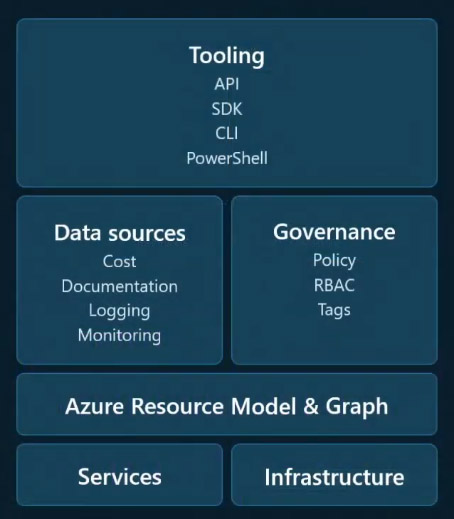
Azure is built on a rich and layered data model that provides deep visibility and control over every aspect of the platform. At the foundation are the physical infrastructure, regions, and their associated availability zones. Above that are the services, each with its own set of capabilities, toolchains, and integration methods.
Azure includes Azure Resource Manager and Azure Resource Graph, which describe resources, their attributes, and the actions that can be taken on them. From a modelling perspective, this structured data is valuable. For example, if a question asks about rebooting a virtual machine, Copilot can infer the presence of a VM object with a restart method.
This model is enriched further with governance layers, including policies, role-based access control (RBAC), and tags, which provide additional context for how resources can be accessed and managed. Data sources are also essential: some, such as documentation that exists outside the subscription, while others, like cost data, combine a formal data model with its instances within the subscription. Logs and monitoring metrics are deeply integrated into the subscription. For example, if the goal is to understand what's happening with a VM, the data model indicates which metrics are available.
On top of all these layers sits the tooling ecosystem, including SDKs, the Azure CLI, PowerShell, and Bicep, which allows users to interact with Azure in different ways.
These data sources collectively form a rich and structured data model. Built on top of that is the Copilot large language model. Since the interaction occurs within the Azure Portal, Copilot is aware of the user's location within the interface, the specific resources being viewed, and relevant subscription-level details. By combining this intent and context, Copilot generates a plan to resolve the query.
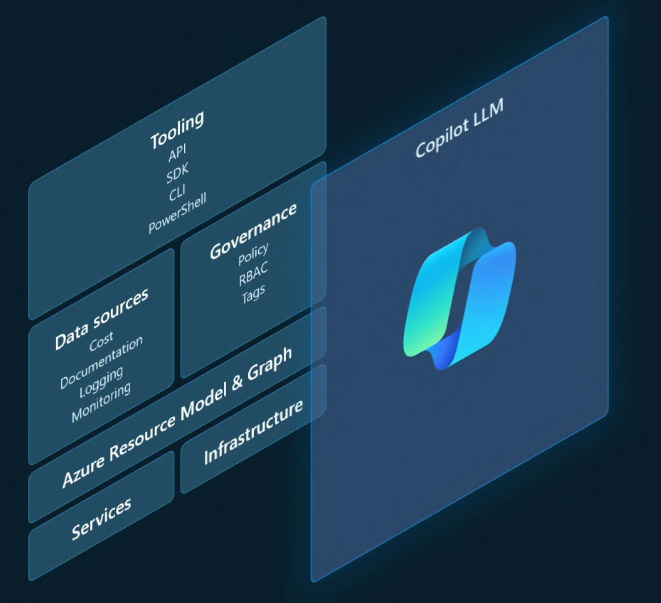
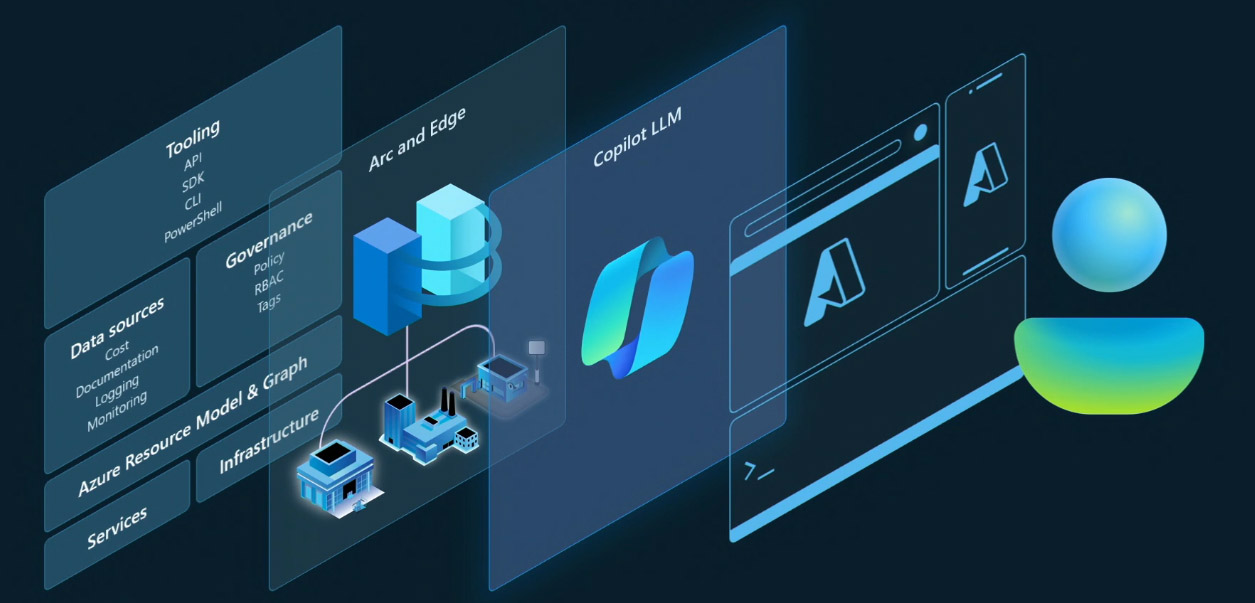
On top of the foundational data model and language model, there are user interfaces, such as the Azure Portal, mobile app, CLI, and the user. One compelling aspect of this system is that any data feeding into the data model becomes something Copilot can reason over. For example, if Edge-connected devices are integrated via Azure Arc, the information they send back to Azure can also be queried and analyzed through Copilot. Once user intent is identified, Copilot constructs a plan to answer the question or complete the task. It then executes that plan on behalf of the user. This raises an important point: Copilot always operates within the context of the user identity. That means all RBAC permissions, policies, and governance rules are fully respected. There is no elevated or privileged access. Copilot inherits the user's existing security, compliance, and privacy configurations. Another common question concerns data handling. All data used by Copilot is treated with the same strict security and compliance standards applied across Azure, ensuring enterprise-grade trust and protection.
This is the end-to-end flow of how Copilot processes a user's input in the Azure experience. When a question is typed into the chat, Copilot gathers contextual signals, such as the user's current location in the portal, the data model, and the relevant resource information, to construct a targeted plan. Once the plan is defined, it begins execution. For example, if the user asks, "How many resources do I have?" Copilot may determine that an Azure Resource Graph query is the right approach. It executes that query, retrieves the results, and understands that the original question requested a count, so it summarizes the response accordingly. For queries like top five VMs or top five services by cost, it presents the data in a clear, tabular format. If any operation involves a potential side effect, such as restarting a VM, stopping a service, or changing a configuration, Copilot does not act automatically. Instead, it returns a response summarizing what will happen and prompts the user to confirm the action. This safeguard ensures that the user retains full control over any changes, maintaining a secure and intentional operational flow.
Microsoft Copilot for Azure on iOS and Android
The Azure Mobile app serves as a cloud companion, enabling secure, on-the-go management of Azure environments. As the highest-rated cloud management app on iOS, it's especially valued for providing quick access to alerts and health monitoring. Microsoft Copilot is being integrated directly into the mobile experience, a significant productivity enhancement. This integration brings the same intelligent capabilities seen in the Azure Portal to mobile, allowing users to quickly understand, interact with, and manage their resources from anywhere.
Reference:
Microsoft Events


