Last updated: October 2026
By Terminalworks, Remote Desktop Printing Solutions Since 2014
The Windows print stack is more than the Print Spooler. On an RDP session host it also includes manufacturer printer drivers, kernel components from printer software, XPS conversion, port monitors, Point and Print and the redirection channel. The most effective way to shrink it is to keep third-party driver code off the session host, then patch what Microsoft ships.
This post maps each layer of the Windows print stack to real vulnerabilities, shows what Windows Protected Print removes and what it leaves behind, and compares where driver code runs in five RDP printing architectures. For background, see our posts on the Print Spooler and PrintNightmare hardening and what Windows Protected Print breaks on session hosts. This one is about attack surface: which code runs where, with which privileges, and who patches it.
What Is Actually in the Windows Print Stack?
When people say "print spooler vulnerability" they usually mean any bug that ends in SYSTEM privileges through printing. In practice those bugs come from at least seven different layers, owned by different vendors and patched on different schedules. Microsoft itself reports that print bugs made up 9% of all cases reported to the Microsoft Security Response Center over a three-year period, and that the Spooler runs as SYSTEM, is reachable by standard users, and loads third-party code on demand.
| Layer | Where it runs | What has gone wrong | Example |
|---|
| Spooler core and its RPC interfaces | spoolsv.exe, SYSTEM | Memory corruption and logic bugs reachable by any authenticated user | PrintNightmare (CVE-2021-34527), CVE-2022-38028 (exploited), CVE-2026-58608 (Critical, July 2026) |
| Manufacturer driver DLLs | Inside the spooler or PrintIsolationHost.exe, both SYSTEM | Parsing bugs in rendering code, insecure file permissions | Canon Generic Plus drivers (CVE-2025-1268, CVSS 9.4) |
| Kernel components shipped with printer software | Kernel mode | Buffer overflows reachable by unprivileged users | HP, Samsung and Xerox SSPORT.SYS (CVE-2021-3438) |
| Microsoft's own class drivers | Print stack | Remote code execution in inbox drivers | PostScript and PCL6 Class Printer Driver fixes in 2023 (for example CVE-2023-24867) |
XPS conversion (PrintFilterPipelineSvc) | SYSTEM outside Protected Print | Memory corruption while converting jobs | Described by Microsoft as the source of many memory corruption bugs |
| Port monitors and print providers | DLLs loaded into the spooler | Malicious DLL loading, file ports used for arbitrary writes | PrintDemon (CVE-2020-1048) and its bypass CVE-2020-1337 |
| Point and Print | Driver delivery path into the spooler | Users or fake printers getting drivers installed | The delivery route PrintNightmare abused |
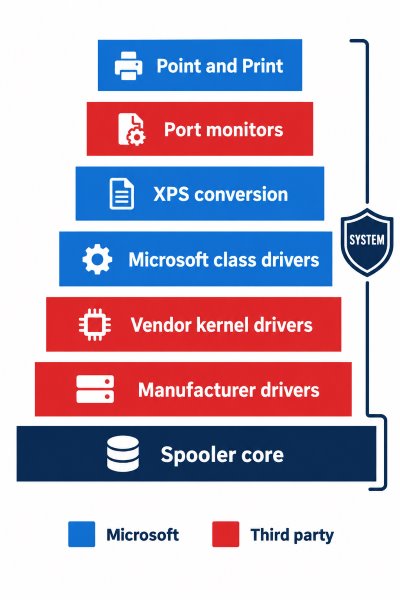
Three of these layers deserve a closer look, because they are the ones most RDP printing designs quietly multiply.
Manufacturer drivers are executable code, not configuration
A v3 printer driver is a set of DLLs written by the printer manufacturer and loaded by a SYSTEM process. In March 2025 Canon published a notice for an out-of-bounds flaw in the EMF Recode processing of its Generic Plus PCL6, UFR II, LIPS and PS drivers, rated CVSS 9.4, which could allow arbitrary code execution when a malicious application sends the print job. Microsoft's own offensive research team (MORSE) reported it. The fix had to come from Canon, and every machine holding that driver had to be updated separately.
Microsoft calls this dependency a core problem: abandoned drivers may never be fixed, and many old drivers are incompatible with exploit mitigations such as CFG, CET and ACG, so the print service cannot fully use them.
Printer software also installs kernel drivers
The printer driver is not always the only thing a manufacturer installs. SentinelLabs found CVE-2021-3438 in SSPORT.SYS, a kernel driver from 2005 bundled with HP, Samsung and Xerox printer software. It was installed simply by running the printer software, stayed loaded even with no printer attached, and had gone unnoticed for 16 years. A session host where someone once ran a vendor setup program to "just get the printer working" can carry components like this long after the printer is gone.
Driver isolation is a reliability feature, not a security boundary
Microsoft describes printer driver isolation as a reliability feature: drivers run outside the spooler process, so a crashing driver does not take printing down. It does not lower privileges. Published exploits for Canon and Ricoh drivers abuse PrintIsolationHost.exe precisely because it runs as NT AUTHORITY\SYSTEM and loads driver DLLs from folders a standard user could write to.
Why Print Stack Flaws Are Worse on a Session Host
Many Windows print stack advisories describe the attacker as "authorized". On a laptop, that is the person who owns it. On a terminal server it is every user with a session, including any account an attacker has phished. The precondition is satisfied by design.
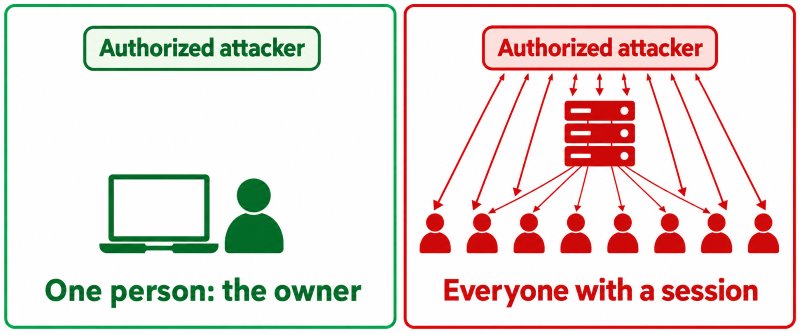
The July 2026 fix CVE-2026-58608, rated Critical, is a spooler race condition that lets an authorized attacker execute code over a network on Windows Server 2012 through 2025. September 2026 added two spooler elevation of privilege fixes, CVE-2026-69346 and CVE-2026-69364. None were reported as exploited, but on a session host the eligible attacker is anyone logged on.
Exploitation does happen. Microsoft disclosed in April 2024 that the Russian actor Forest Blizzard (APT28) had used a tool it calls GooseEgg to exploit the spooler flaw CVE-2022-38028 since at least June 2020 and possibly April 2019, gaining SYSTEM and stealing credentials. The patch had been available since October 2022. In 2021, PrintNightmare was serious enough that CISA issued Emergency Directive 21-04, citing active exploitation by multiple threat actors and ordering federal agencies to disable the spooler on domain controllers.
Session hosts also concentrate drivers. In our experience supporting thousands of RDS environments, the driver list on a long-lived host is usually much longer than the list of printers anyone still uses, because nobody removes a driver that "might be needed".
What Does Windows Protected Print Remove From the Print Stack?
Windows Protected Print is Microsoft's structural answer. It is available on Windows 11 version 24H2 and Windows Server 2025, it is opt-in today, and Microsoft's FAQ says it will become the default at a future date without naming one. Some vendor and reseller sites cite 2027, but Microsoft has not published that date. According to Microsoft's technical deep dive, this is what it changes, layer by layer:
| Print stack layer | With Windows Protected Print enabled |
|---|
| Third-party drivers | Not loaded; incompatible printers are uninstalled and their drivers removed from the driver store |
| Point and Print | Can never install a third-party driver, which also blocks fake printers offering malicious drivers |
| Port monitors and print providers | DLL port monitors no longer usable; module-loading APIs restricted so only Microsoft-signed binaries required for IPP load |
| Legacy configuration APIs | Restricted to values that make sense for IPP, limiting file system abuse |
| XPS conversion | Runs as the user instead of SYSTEM |
| Spooler worker | New restricted token without privileges such as SeTcbPrivilege, no longer at SYSTEM integrity level |
| Binary mitigations | CFG and CET, Arbitrary Code Guard, Redirection Guard, and blocked child process creation |
When Microsoft announced the mode in December 2023, its MORSE team said that across all MSRC cases linked to Windows printing, Protected Print mitigated over half. That also means a large share was not mitigated. Bugs in the spooler's own code, like the 2026 fixes above, still need monthly patching; Protected Print lowers their impact, it does not remove them.
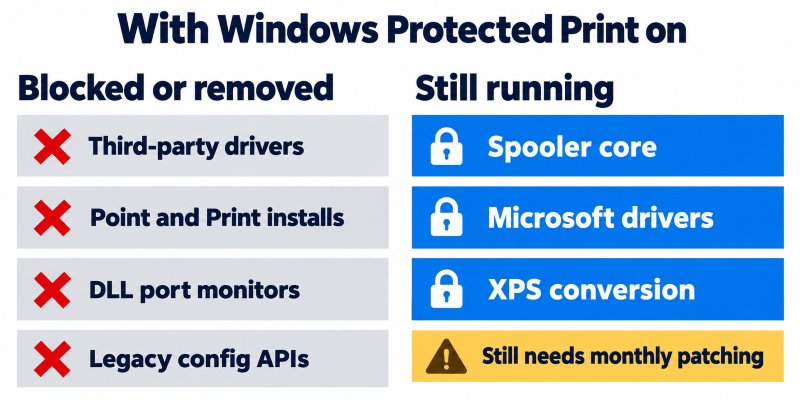
For session hosts the catch is compatibility. Protected Print works with Mopria-certified printers, which Microsoft says covers most new printers and over 120 million already sold. A printer on a user's home desk is visible to the session host only through RDP redirection, not over IPP, so the host cannot simply use the inbox driver for it. That gap is what the architecture choice below decides.
Where Does Driver Code Run in Each RDP Printing Architecture?
This is the comparison most RDP printing discussions skip. The question is not "is the product secure" but "whose code ends up inside the session host's print stack, and how many vendors' worth of it".
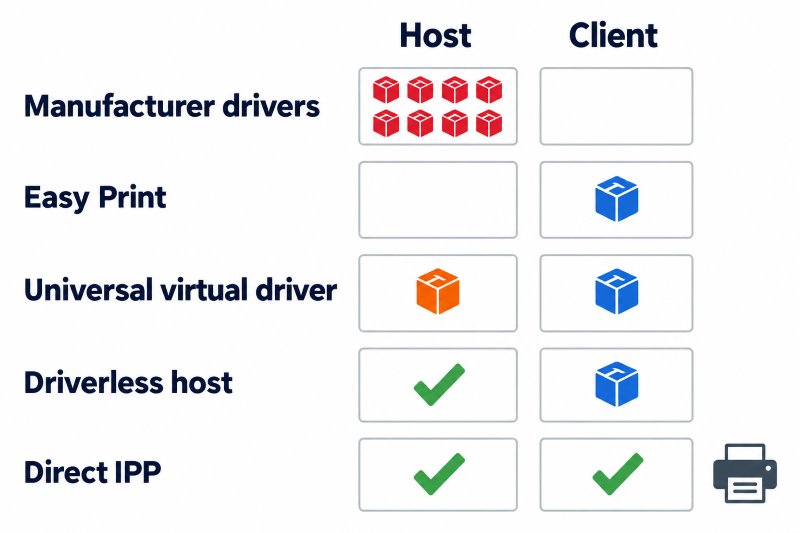
| Architecture | Third-party code in the host's print stack | Point and Print exposure on the host | Works on a host with Protected Print on | Where the real printer driver runs |
|---|
| Manufacturer drivers on the host | One driver package per printer model, often dozens of vendors | High: every new model needs a driver installed | No: drivers are removed | Session host |
| Remote Desktop Easy Print | None for the Easy Print driver itself (Microsoft code) | Low | Not confirmed in the Microsoft documentation we reviewed; test it | Client |
| Universal virtual driver on the host (TSPrint 3.x and similar products) | One vendor's virtual driver, often with its own port monitor | Low: no per-model drivers | No, if the product installs a third-party driver or DLL port monitor | Client |
| Driverless session host (TSPrint 4 IPP engine, in testing) | None: printers use the driver built into Windows | None for redirected printers | Yes, by design | Client |
| Direct IPP, Universal Print or cloud print | None on the host for IPP printers | None | Yes, for Mopria-certified printers that the host or service can reach | Printer, cloud service or client app, depending on the product |
A worked example: one driver flaw, two session hosts
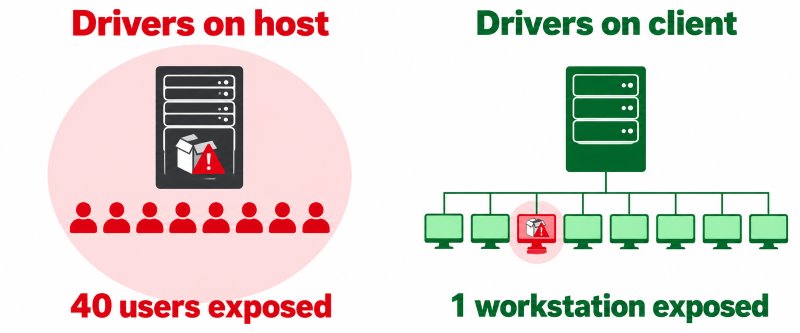
Take a hypothetical host with 40 users and 23 distinct client printer models, one of which uses a Canon Generic Plus driver affected by a flaw like CVE-2025-1268.
- Host A, manufacturer drivers on the host. The Canon driver renders jobs in a SYSTEM process on the shared host, where any of the 40 users could potentially send a crafted job through it. The host stays exposed until an admin spots the advisory and updates every host in the farm. Multiply that by 23 vendors' advisory feeds.
- Host B, driverless session host. The flaw is still real, but the vulnerable driver is present only on the endpoint where it is installed rather than on the shared session host used by all 40 users. It is fixed through normal endpoint patching.
That is the case for a driverless server architecture: the session host carries no printer drivers, while each physical printer's driver stays on the client. It does not make any single driver safer; it moves every driver off the machine where dozens of people share one SYSTEM-level print service.
What a driverless session host does not fix
Being honest about the limits matters more than the pitch:
- Spooler core bugs. The spooler still runs on the host, so fixes like
CVE-2026-58608 still have to be installed every month. - Microsoft's own drivers. Inbox drivers are not immune. In 2023 Microsoft shipped a series of remote code execution fixes for its own PostScript and PCL6 Class Printer Driver, such as
CVE-2023-24867. - The redirection product itself. Any third-party solution runs its own service on the host. That code sits outside the print stack, but it is still software to keep updated.
- The client. The real printer driver still renders the job on the user's PC. A single-user machine is a much smaller blast radius than a shared host, but client drivers still need updating, and enabling Protected Print on clients will remove manufacturer drivers there too.
When Is Native RDP Printing Enough, and When Do You Need More?
Not every environment needs a third-party product. This is how we would decide, based on over a decade of working with remote desktop printing:
| Your situation | Reasonable choice |
|---|
| Office printers are Mopria certified and reachable from the host network | Print directly over IPP or through Universal Print; no redirection product needed |
| Simple document printing, standard printers, hosts on Server 2019 or 2022 | Easy Print is often sufficient; keep manufacturer drivers off the host |
| Mixed, unmanaged home and branch printers | Driver-on-client redirection; avoid installing per-model drivers on hosts |
| Label and receipt printers needing raw ZPL, EPL or ESC/POS | A product with raw pass-through to the client; see our POS and label printing guide |
| You plan to enable Protected Print on session hosts | Only architectures with no third-party driver or DLL port monitor on the host; test Easy Print before relying on it |
On Azure Virtual Desktop, Microsoft added RAW printing for redirected printers as a public preview in August 2026, narrowing one Easy Print gap there. We compare the trade-offs in Easy Print vs third-party RDP printing solutions.
Where TSPrint 4 Fits in the Print Stack
TSPrint has always kept manufacturer drivers on the client, which removes the per-model driver sprawl from session hosts. But TSPrint 3.x belongs in the "universal virtual driver" row of the table above. It installs its own v3 print drivers on the host and its own port monitor, which Windows loads as a DLL. Those are exactly the components Windows Protected Print blocks, so on a host with the mode enabled, Windows removes TSPrint 3.x printers and drivers and it cannot print. If the mode is disabled later, TSPrint has to be reinstalled.
TSPrint 4, currently in testing, adds a choice of print engine at installation:
- Legacy: the classic TSPrint drivers with dynamic printer redirection, for hosts where Protected Print is off.
- IPP: an engine that is driverless on the session host. No print driver is installed on the host, only the TSPrint service and the usual TSPrint tools. Redirected printers appear to Windows as ordinary printers using the driver built into Windows, which is why Windows treats them as permitted with Protected Print on. The engine works whether the mode is enabled or not.
In the attack surface terms of this post, the IPP engine moves TSPrint from "one vendor's code in the print stack" to "no third-party code in the print stack". What remains on the host is the TSPrint service, outside the spooler, plus the Windows components Microsoft patches.
Some honest notes while testing continues:
- The IPP engine requires Windows Server 2022 or Windows 11 or newer. On older Windows, setup offers only Legacy.
- It needs TSPrint Client 4.0 or newer. Mac and Linux client support for it is still in development.
- Raw pass-through for label and receipt printers, and printing from DOS applications, work in Legacy today and are still being finished for the IPP engine.
- The IPP engine always sends PDF, while Legacy can use PDF, EMF or XPS to suit the network and server.
- Redirection is not a one-to-one copy: a printer is created in the session that matches the client printer's capabilities as closely as the standards-based path allows.
- Testing so far is on classic RDS, with Citrix and Azure Virtual Desktop testing in progress.
Other vendors are taking different routes. ThinPrint states that its on-premises product is compatible with Windows Ready Print and will support Protected Print once it becomes mandatory, and points customers who want the mode now to its cloud service ezeep. Tricerat's documentation shows ScrewDrivers installing its virtual driver DLLs in the Windows spool driver folder. Product positions are changing quickly, so check each vendor's current Protected Print statement rather than relying on any comparison, including this one.
TSPrint 4 brings more than an engine choice. We will share the rest closer to release.
Print Stack Hardening Checklist for RDP Session Hosts
Our August checklist covers the PrintNightmare registry values. This one covers the rest of the stack:
- Inventory third-party drivers, and remove the unused ones.
Get-PrinterDriver | Select-Object Name, Manufacturer, MajorVersion shows each driver and whether it is v3 or v4. - Inventory port monitors, print processors and providers. Check
HKLM\SYSTEM\CurrentControlSet\Control\Print\Monitors, ...\Print\Environments\Windows x64\Print Processors and ...\Print\Providers for anything not from Microsoft. - Look for kernel drivers left by printer software. Run
driverquery /v and review vendor .sys files in C:\Windows\System32\drivers. - Keep
RestrictDriverInstallationToAdministrators at 1. Microsoft's KB5005652 states that no combination of other mitigations is equivalent. - Subscribe to manufacturer security advisories for every driver you keep on a host, alongside Patch Tuesday.
- Pilot Protected Print on one Server 2025 host with real redirected printers and a rollback plan, because disabling it does not restore removed printers.
- Keep client printer drivers updated. In a driver-on-client design, the client is part of the print stack.
Frequently Asked Questions
No. The spooler is the SYSTEM process that hosts much of the stack, but vulnerabilities also come from manufacturer driver DLLs, kernel drivers bundled with printer software, Microsoft's own class drivers, XPS conversion, port monitors and the Point and Print delivery path. Examples include Canon's CVE-2025-1268 driver flaw and the SSPORT.SYS kernel driver bug CVE-2021-3438. Each layer has a different owner and patch schedule.
It protects against crashes, not exploitation. Microsoft describes driver isolation as a reliability feature that keeps a faulty driver from stopping the print service. The isolated process, PrintIsolationHost.exe, still runs as SYSTEM, and published exploits for Canon and Ricoh drivers rely on it. Enable it for stability, but do not count it as a security control.
No. When Microsoft announced the mode, its security researchers said it mitigated over half of the print-related cases reported to MSRC. It removes third-party drivers, blocks DLL port monitors and runs common spooler work with lower privileges, which reduces the impact of remaining bugs. Flaws in the spooler's own code still need monthly patches.
It is a large improvement in scale: one vendor's driver instead of one driver package per printer model, and no per-model Point and Print installs. It is still third-party code inside the print stack, though. On a host with Windows Protected Print enabled, Windows removes it like any other third-party driver, which is why TSPrint 3.x cannot print there.
The Windows print components themselves, through monthly updates, because spooler bugs such as the Critical July 2026 fix CVE-2026-58608 exist regardless of drivers. It also needs updates for the redirection product's own service. What it no longer needs is tracking security advisories for every printer manufacturer whose driver would otherwise sit on the host.
Yes, but the blast radius is typically smaller than when the same driver is installed on a shared session host. In driver-on-client designs, including Easy Print and TSPrint, the real driver renders the job on the user's PC. A vulnerable driver there exposes one single-user machine rather than a host shared by dozens of users. Keep client drivers updated through normal endpoint management, and remember that enabling Protected Print on clients also removes manufacturer drivers there.
Yes. In 2023 Microsoft fixed a series of remote code execution flaws in its PostScript and PCL6 Class Printer Driver, for example CVE-2023-24867. The difference is that Microsoft's drivers are patched through Windows Update on the same schedule as the rest of the OS, while manufacturer drivers depend on each vendor publishing and you deploying a fix.
Windows Protected Print is available on Windows 11 version 24H2 and Windows Server 2025, and is opt-in today. The TSPrint 4 IPP engine, currently in testing, does not depend on Protected Print: it runs on Windows Server 2022 or Windows 11 and newer, with or without the mode enabled. On older systems such as Server 2019 or Windows 10, TSPrint setup offers the Legacy engine only.
Summary
The Windows print stack on an RDP session host is a chain of layers, from the spooler core to manufacturer drivers, kernel components, XPS conversion, port monitors and Point and Print, and the shared print stack contains multiple privileged components that can be exposed to input from users with sessions. Windows Protected Print removes most of the third-party layers and lowers spooler privileges, but spooler bugs still require monthly patching. An architecture that is driverless on the session host keeps manufacturer and vendor driver code off the shared host, so a vulnerable driver is present only on the endpoint where it is installed. TSPrint 3.x already keeps printer drivers on the client, and the TSPrint 4 IPP engine, now in testing, is driverless on the session host, removing TSPrint's own driver from it as well.
You can download TSPrint and test it free for 25 days. The current download is TSPrint 3.x with the Legacy engine, suited to hosts where Protected Print is not enabled; we will announce TSPrint 4 on this blog when it is available. Licensing options are on the TSPrint purchase page.
Sources
Microsoft Learn pages show a revision date rather than a publication date, so all sources were reviewed on 13 October 2026 and are dated only where the item itself is dated.
- More information on Windows protected print mode for enterprises and developers, Microsoft Learn
- Overview of Windows protected print mode, Microsoft Learn
- Windows protected print mode FAQ, Microsoft Learn
- End of Servicing Plan for Third-Party Printer Drivers on Windows, Microsoft Learn
- Printer driver isolation, Microsoft Learn
- What's new in Azure Virtual Desktop, August 2026, Microsoft Learn
- KB5005652: Manage new Point and Print default driver installation behavior (CVE-2021-34481), Microsoft Support, August 2021
- CVE-2026-58608, Windows Print Spooler Remote Code Execution Vulnerability, Microsoft Security Response Center, 14 July 2026
- CVE-2026-69346, Windows Print Spooler Components Elevation of Privilege Vulnerability, Microsoft Security Response Center, 8 September 2026
- CVE-2026-69364, Windows Print Spooler Components Elevation of Privilege Vulnerability, Microsoft Security Response Center, 8 September 2026
- CVE-2023-24867, Microsoft PostScript and PCL6 Class Printer Driver Remote Code Execution Vulnerability, Microsoft Security Response Center, 2023
- Analyzing Forest Blizzard's custom post-compromise tool for exploiting CVE-2022-38028 to obtain credentials, Microsoft Threat Intelligence, 22 April 2024
- ED 21-04: Mitigate Windows Print Spooler Service Vulnerability, CISA, 13 July 2021
- Microsoft unveils new, more secure Windows Protected Print Mode, BleepingComputer, December 2023
- Service Notice: Vulnerability Remediation for Certain Printer Drivers, Canon U.S.A., 28 March 2025, updated 9 May 2025
- Critical Vulnerability Found in Canon Printer Drivers, SecurityWeek, 1 April 2025
- CVE-2021-3438: 16 Years In Hiding, Millions of Printers Worldwide Vulnerable, SentinelLabs, July 2021
- PrintDemon: Print Spooler Privilege Escalation, Persistence and Stealth (CVE-2020-1048), Windows Internals, May 2020
- Canon Driver Privilege Escalation, Rapid7 Metasploit module, August 2021
- Windows Ready Print and ThinPrint, ThinPrint
- PrintNightmare (CVE-2021-34527) Compatibility, Tricerat documentation


