Last updated: November 2026
By Terminalworks, Remote Desktop Printing Solutions Since 2014
On 1 July 2027, Microsoft stops accepting non-security updates to third-party printer drivers for Windows 11 and Windows Server 2025 and later. Installed drivers keep working and vendors can still ship installers, so nothing breaks that day. For RDS and Citrix admins, Microsoft-signed vendor drivers on newer session hosts stop gaining features, so inventory and reduce them now.
Below: what the deadline actually changes, which remote desktop printing paths on RDS, Citrix and Azure Virtual Desktop depend on the affected drivers, how Windows Server lifecycle dates intersect with it, an honest comparison of native and third-party options, and a dated checklist.
What Actually Changes on the July 2027 Printer Driver Deadline?
The date comes from Microsoft's end of servicing plan for third-party printer drivers, announced in September 2023 and rescheduled in May 2025. It is the last of three milestones, and the first two have already passed.
| Date | What Microsoft changed | What it means on a session host |
|---|
| 15 January 2026 | No new printer drivers published to Windows Update for Windows 11 and Server 2025 and later. All printer driver submissions are blocked by default and manually reviewed. | Drivers for Server 2025 hosts are signed only under exceptions. Updates may not add hardware IDs or functionality. |
| 1 July 2026 | Driver ranking prefers the Windows IPP inbox class driver, shipped as Windows Ready Print, announced 9 June 2026. | New queues for IPP-capable printers default to the Microsoft driver unless you change the setting or policy. Existing queues are untouched. |
| 1 July 2027 | Except for security fixes, third-party printer driver updates are no longer allowed. | Existing drivers stay installable. Through Microsoft's channel, vendor drivers get security fixes only. |
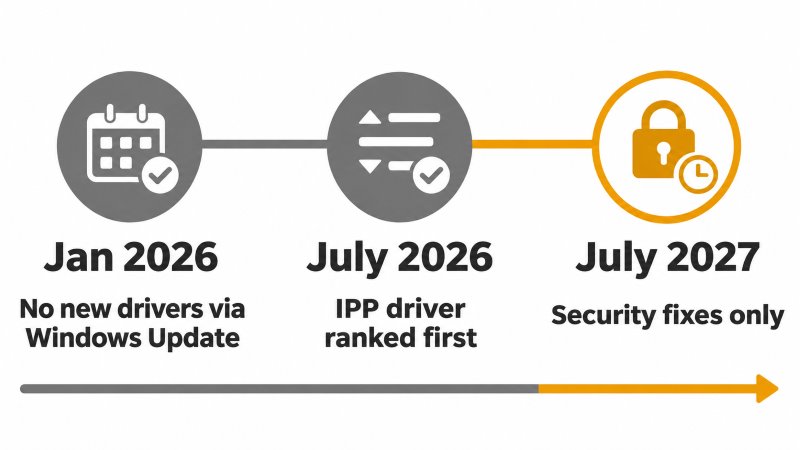
The scope is narrower than most headlines suggest. Microsoft applies the change to Windows 11 and later and Windows Server 2025 and later. Session hosts on Server 2019 or 2022 are outside it, and vendors may keep publishing drivers that target Windows 10 22H2 or Server 2022 and earlier, as long as the same package does not also target Windows 11 or Server 2025.
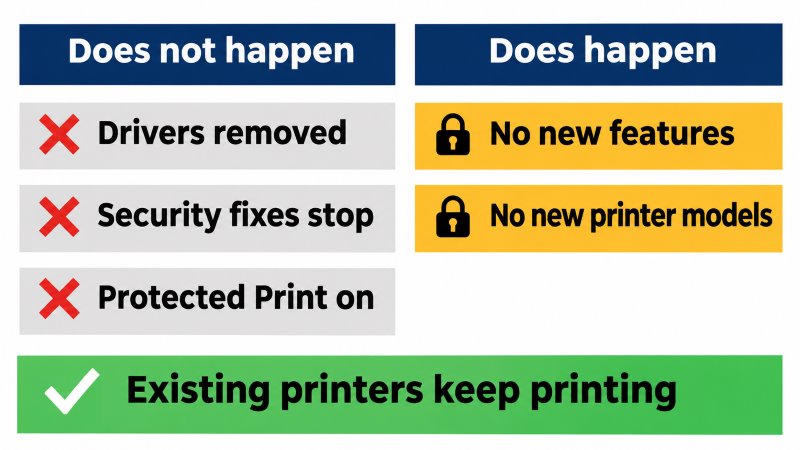
What the 2027 Deadline Does Not Do
- It does not remove drivers. Existing drivers remain installable, vendor installation packages remain allowed, and Microsoft has no plans to disable v3 and v4 driver features.
- It does not stop security fixes for the legacy driver platform while each Windows version is in its support lifecycle.
- It does not switch on Windows Protected Print. The Windows protected print mode FAQ says the mode will be enabled by default "at a future date" and names none. Some industry coverage pairs July 2027 with that default. The Microsoft documentation we reviewed does not.
Why New Printer Models Matter More Than the Date
Since 15 January 2026, an update to an existing driver package is signed only if it adds no new hardware IDs and no new functionality, and is also a security fix, a fax driver, an ARM64 build, or targets Server 2022 and earlier. So a vendor driver on a Server 2025 session host today will not learn to recognize next year's printer models through Microsoft's channel.
Native redirection matches client printers to server drivers by name. When a user connects with a model the host has no driver for, RDS falls back to Easy Print where it can or leaves the printer out of the session, and Citrix falls back to its Universal Print Driver under the default policy. A pattern we see repeatedly is a farm where Easy Print was disabled years ago to fix one problem printer, so every redirected printer quietly depends on vendor drivers installed on every host.
What Happens When Microsoft Rejects a Vendor's Driver?
Microsoft's documented fallback: the vendor signs the package with its own Authenticode certificate, you deploy that certificate to the Trusted Publishers store through Group Policy or Intune, and you install the driver manually, because Windows Update will not deliver it. Microsoft notes that ARM devices do not support deploying a certificate to that store. On session hosts that keep the post-PrintNightmare default limiting driver installation to administrators (KB5005652), manual installation is not new work. Managing vendor certificates is.
Which RDS and Citrix Printing Paths Does the 2027 Deadline Affect?
Exposure depends on how each printer reaches the session. In our experience supporting thousands of RDS environments, most farms run several of these paths at once.
| Printing path | Driver on the session host | Effect of the July 2027 deadline | With Windows Protected Print enabled |
|---|
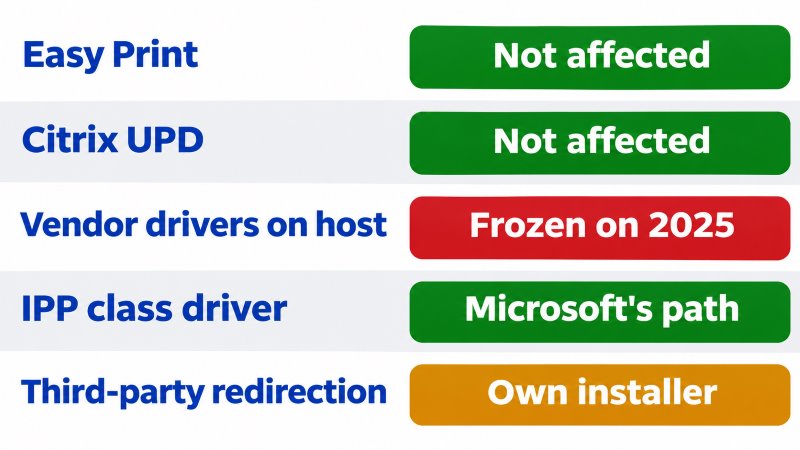
| RDS redirection with Easy Print | Microsoft Remote Desktop Easy Print | None directly | Not confirmed in the documentation we reviewed |
| RDS redirection with matched vendor drivers | One vendor v3 or v4 driver per model | Server 2025 hosts: security fixes only, no new models | Vendor drivers uninstalled and removed from the driver store |
| Network printers installed on the host | Vendor driver or Microsoft IPP class driver | Server 2025: new IPP-capable queues default to the class driver | Mopria certified printers over IPP only |
| Citrix auto-created client printers, default policy | Vendor driver if installed, else Citrix Universal Print Driver | Vendor drivers on newer VDAs stop evolving | Citrix states a VDA cannot be installed with the mode on |
| Citrix Universal Print Driver | Citrix Universal Printer (EMF) and Citrix XPS Universal Printer | Installed with the VDA, not via Windows Update | Same Citrix requirement |
| Azure Virtual Desktop and Windows 365 | Easy Print, used automatically | None directly | Not confirmed |
| Third-party redirection products | The product's own driver and components | Delivered by the product installer, not Windows Update | Blocked if the product installs its own driver, including TSPrint 3.x |
What Should Citrix Admins Check First?
Citrix's Universal print driver usage setting defaults to "Use universal printing only if requested driver is unavailable", so a model-specific driver wins whenever it is on the VDA. Citrix's printing best practices also note that from VDA 7.16, "Automatic installation of in-box printer drivers" has no effect on Windows 8 and later, because v3 inbox drivers are no longer included. Every model-specific driver on a modern VDA is therefore one somebody installed, and those are exactly the drivers the deadline locks on Server 2025 and Windows 11 multi-session images.
Review "Universal print driver usage" (consider "Use universal printing only" for document-only users) and "Printer driver mapping and compatibility". Citrix's 2607 LTSR installation guidance adds that the Print Spooler must be enabled and Windows Protected Print disabled for a VDA install to succeed. Our Citrix printing guide covers the rest.
Why Is Easy Print Not a Drop-In Replacement for Label and Receipt Printers?
Easy Print avoids server-side drivers by converting each GDI print job to XPS on the session host, sending the XPS file to the client and letting the client's local driver print it, as KB2462317 describes. That suits documents. It does not suit applications that write printer command languages themselves: Zebra's driver guidance says ZPL, EPL or CPCL generated by an application should bypass the printer driver through a generic text or raw driver so the commands arrive unaltered. One of the most common support tickets we receive after a session host rebuild is a label printer that worked through a vendor driver yesterday and prints blank or garbled labels through Easy Print today.
On Azure Virtual Desktop, Microsoft's RAW print support, in public preview since August 2026, sends RAW jobs instead of XPS when the host pool RDP property SmartRawPrinters:s:* (or a driver name prefix) is set. The RDP properties reference lists it for Azure Virtual Desktop only.
The exception list holds an irony. Devices that cannot support Mopria, which Microsoft describes as typically older mechanical designs or specialized devices, remain eligible for new driver signing in 2026 if the vendor supplies technical evidence. A Mopria-capable office printer cannot use that exception, so some specialty printer vendors may keep a signed driver path that office printer vendors lose. Approval is per submission, so ask your vendor. Our POS and label printing guide covers the specialty side.
Should You Keep Session Hosts on Windows Server 2022 for Now?
The 2027 deadline does not apply to Server 2022, and Windows Protected Print is not available on Server 2019 or 2022. That makes Server 2022 a legitimate bridge for farms whose terminal server printing still depends on vendor drivers, with a fixed end.
| Session host OS | Support ends | In the driver servicing scope? | Windows Protected Print available? |
|---|
| Windows Server 2016 | 12 January 2027 | No | No |
| Windows Server 2019 | 9 January 2029 | No | No |
| Windows Server 2022 | 14 October 2031 (mainstream ended 13 October 2026) | No | No |
| Windows Server 2025 | 14 November 2034 | Yes | Yes |
| Windows 11 Enterprise multi-session | Per Windows 11 version | Yes | Yes, from version 24H2 |
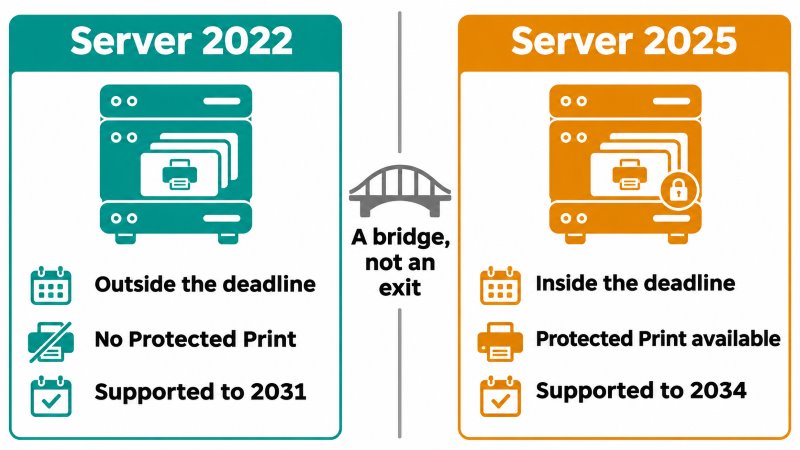
Windows Server 2016 reaches end of support on 12 January 2027, so 2016 farms must move before the driver deadline, and a move to Server 2025 lands inside the new rules immediately. Staying on 2022 buys time. It does not change Microsoft's direction.
When Is the Native Approach Enough, and When Is a Third-Party Tool the Better Option?
Based on over a decade of working with remote desktop printing, the deciding factors are the printer mix, where users connect from, and whether you plan to enable Windows Protected Print.
| Scenario | Reasonable choice | Why |
|---|
| Ordinary documents, managed Mopria certified printers, good network | Easy Print on RDS, Citrix Universal Print Driver on Citrix | No vendor drivers on hosts, nothing for the deadline to lock |
| Office network printers, users mostly on site | IPP class driver queues on the host, or Microsoft Universal Print | Matches Microsoft's direction and works under Protected Print for Mopria devices |
| Server 2022 farm with specialty printers, no near-term Protected Print plan | Keep vendor drivers, archive them, plan the exit | Outside the servicing scope, security updates until 2031 |
| Label printers on Azure Virtual Desktop | Test Microsoft's RAW print support | Native, but preview and AVD only |
| Unmanaged home printers, specialty printers on RDS or Citrix, Mac clients | Third-party redirection such as TSPrint | The device driver stays on the client |
| Server 2025 hosts that must run Protected Print soon | IPP class driver for network printers, plus redirection with a documented Protected Print compatible mode | Third-party session host drivers are blocked under the mode |
Where TSPrint Fits, and Where It Does Not
TSPrint creates the user's printers in the session with its own driver and prints each job on the client through the local printer's own driver, so no per-model vendor driver is needed on the host. That removes the category of drivers the deadline locks. TSPrint 3.x is installed by its own installer, which Microsoft continues to allow, so the Windows Update cutoff is not its constraint. Windows Protected Print is: TSPrint 3.x installs its own v3 drivers and port monitor on the host, which the mode blocks. TSPrint 4, currently in testing, adds a driverless IPP engine designed to work with the mode on or off, as described in our post on Windows Protected Print and remote desktop printing.
TSPrint is not the right answer everywhere. It needs a client on every endpoint, it is redirection rather than print management, and users printing plain documents to Mopria printers on a LAN are usually fine with Easy Print, as we explain in Microsoft Easy Print vs third-party RDP printing solutions.
Competitors face the same transition. ThinPrint says it will support Windows Protected Print once the mode becomes mandatory, and Tricerat notes that Windows Ready Print does not by itself simplify printing in Citrix, Horizon, AVD or RDS. For any product, including ScrewDrivers, ezeep, UniPrint or FabulaTech Printer for Remote Desktop, ask what it installs on the session host and what its documented Protected Print position is.
Your Pre-July 2027 Checklist for RDS and Citrix Session Hosts
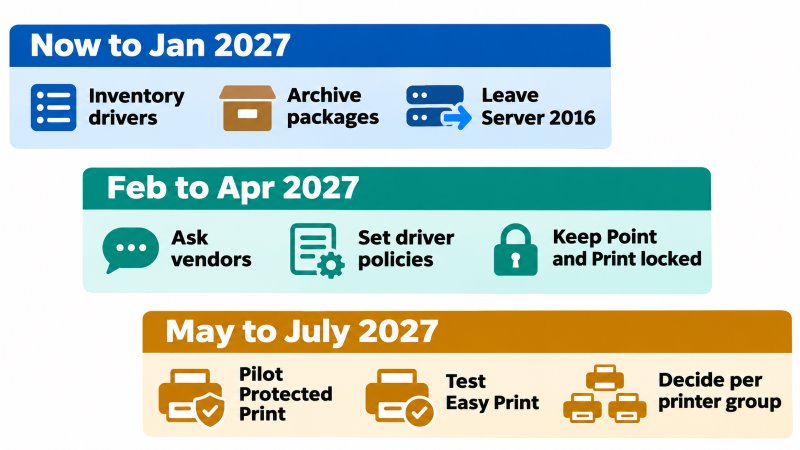
Now to January 2027
- Inventory drivers on every host and image.
Get-PrinterDriver | Select-Object Name, Manufacturer, MajorVersion, DriverVersion, InfPath shows v3 or v4 drivers by vendor. Get-Printer | Select-Object Name, DriverName, PortName during busy hours shows which redirected queues avoid Easy Print. - Archive the packages you depend on with
pnputil /export-driver * D:\DriverArchive, which exports every third-party package in the driver store. - Leave Windows Server 2016 before 12 January 2027, treating 2022 versus 2025 as a printing decision too.
- Classify each driver as Microsoft, Citrix or redirection product, vendor office or vendor specialty, and check office models against the Mopria certified products list.
February to April 2027
- Ask specialty printer vendors whether they will ship Server 2025 drivers after July 2027, and whether those will be Microsoft-signed or need a certificate you deploy.
- Set driver selection policies explicitly:
Computer Configuration > Administrative Templates > Printers > Configure Windows Ready Print driver ranking on Server 2025 hosts and images, "Use Remote Desktop Easy Print printer driver first" on RDS, and "Universal print driver usage" on Citrix. - Keep Point and Print hardened. Leave
RestrictDriverInstallationToAdministrators at 1 under HKLM\Software\Policies\Microsoft\Windows NT\Printers\PointAndPrint and pre-stage drivers in the image.
May to July 2027
- Pilot Windows Protected Print on one non-production Server 2025 host with real redirected printers. Enabling it uninstalls incompatible printers and deletes their drivers, and disabling it means reinstalling them manually. Check Citrix's guidance before trying it on a VDA.
- Test Easy Print under the mode. Microsoft notes the XPS Document Writer is removed when the mode is on, and Easy Print is built on the XPS print path.
- Decide, per printer population, whether a session host driver is needed at all. That decision also decides whether Protected Print is an option for you later.
Frequently Asked Questions
No. Microsoft states that existing drivers can still be installed after the end of servicing and that vendor installation packages remain allowed. What ends is Microsoft accepting non-security updates to third-party printer drivers for Windows 11 and Windows Server 2025 and later, so a printer that works on 30 June still works on 1 July.
No. The end of servicing covers Windows 11 and later and Windows Server 2025 and later, and Microsoft keeps a signing exception for drivers that target only Server 2022 or earlier. Windows Protected Print is not available on Server 2019 or 2022 either. Server 2022 receives security updates until 14 October 2031, but any new host built on Server 2025 falls inside the new rules.
Microsoft has not said so. Its FAQ says the mode will be enabled by default at a future date without naming one, and the end of servicing plan does not tie the July 2027 milestone to it. The deadline ends driver updates, while Protected Print removes third-party drivers, so pilot the mode on one host before any default arrives.
Yes, but not always through Microsoft. Security fixes remain allowed, and the documentation we reviewed does not say which of the other 2026 exceptions, such as devices that cannot support Mopria, continue after July 2027. For rejected submissions, Microsoft's documented path is a vendor-signed package, a certificate you deploy to the Trusted Publishers store, and manual installation.
No. The deadline targets third-party drivers, and Easy Print is Microsoft's own driver, used by default on RDS when "Use Remote Desktop Easy Print printer driver first" is not configured and automatically on Azure Virtual Desktop and Windows 365. Its behavior under Windows Protected Print is not confirmed in the documentation we reviewed, so test it before enabling the mode.
The Citrix universal drivers are installed with the VDA, not delivered through Windows Update, so the cutoff does not limit them. The real exposure is model-specific vendor drivers on VDAs, which Citrix's default policy prefers whenever they are installed. Citrix also states that a VDA cannot be installed while Windows Protected Print is enabled.
Possibly. Microsoft's 2026 exception list allows new drivers for devices that cannot support Mopria, case by case and with technical evidence, so the answer depends on each vendor and model. On Azure Virtual Desktop, Microsoft's RAW print support, still in preview, is a native option for label printers that need raw jobs.
Run Get-PrinterDriver | Select-Object Name, Manufacturer, MajorVersion in PowerShell. MajorVersion shows 3 or 4 for the driver model and Manufacturer separates Microsoft drivers from vendor ones. Repeat it on every golden image, because images are where forgotten drivers usually live.
TSPrint 3.x is installed by its own installer, not through Windows Update, so the cutoff does not remove or block it. Windows Protected Print does block it, because TSPrint 3.x installs its own print drivers and port monitor on the session host. TSPrint 4, currently in testing, adds a driverless IPP engine designed for hosts with the mode on or off.
Summary
The July 2027 printer driver deadline ends non-security updates to Microsoft-signed third-party printer drivers on Windows 11 and Windows Server 2025, but it removes nothing and does not switch on Windows Protected Print. Its real effect on RDS and Citrix session hosts is that vendor drivers stop gaining features and new models, pushing redirected printers toward Easy Print, the Citrix Universal Print Driver, the IPP class driver, or redirection that keeps device drivers on the client. Inventory and archive drivers now, leave Server 2016 before January, and pilot Protected Print on one host before you need it.
To test client-side driver printing in your own environment, download TSPrint with a free 25-day trial, or review licensing on the TSPrint purchase page. The current download is TSPrint 3.x, for hosts where Windows Protected Print is off. TSPrint 4 brings more than a new print engine, and we will share the rest closer to release.
Sources
Microsoft Learn and Citrix documentation pages carry a revision date rather than a publication date, so they are listed without dates and were reviewed on 4 November 2026. Items with their own publication date show it.
- End of Servicing Plan for Third-Party Printer Drivers on Windows, Microsoft Learn
- Legacy printer driver submission process, Microsoft Learn
- Introducing Windows Ready Print and Modernized Driver Selection, Microsoft Tech Community, 9 June 2026
- Discover Windows Ready Print, Microsoft Learn
- Overview of Windows protected print mode, Microsoft Learn
- Windows protected print mode FAQ, Microsoft Learn
- Printer redirection does not work in Remote Desktop Services, Microsoft Learn
- KB2462317, Easy Print conversion of GDI print jobs to XPS, Microsoft Support
- KB5005652, Manage new Point and Print default driver installation behavior (CVE-2021-34481), Microsoft Support
- Configure printer redirection over the Remote Desktop Protocol, Microsoft Learn
- Supported RDP properties, Microsoft Learn
- What's new in Azure Virtual Desktop, Microsoft Learn
- PnPUtil command syntax, Microsoft Learn
- Planning ahead for Windows Server 2016 end of support, Microsoft Windows Server Blog, 25 February 2026
- Lifecycle pages for Windows Server 2019, Windows Server 2022 and Windows Server 2025, Microsoft Learn
- Prepare to install, Citrix Virtual Apps and Desktops 2607 LTSR, Citrix Product Documentation
- Drivers policy settings, Citrix Product Documentation
- Printing best practices, security considerations, and default operations, Citrix Product Documentation
- Print, Citrix Product Documentation
- Find or Locate the ZDesigner Printer Driver on the Website, Zebra Support
- Mopria certified products, Mopria Alliance
- Windows Ready Print and ThinPrint: What IT Decision-Makers Need to Know, ThinPrint
- Windows Ready Print Is Here: What It Changes and What Protected Print Already Changed, Tricerat


