Last updated: November 2026
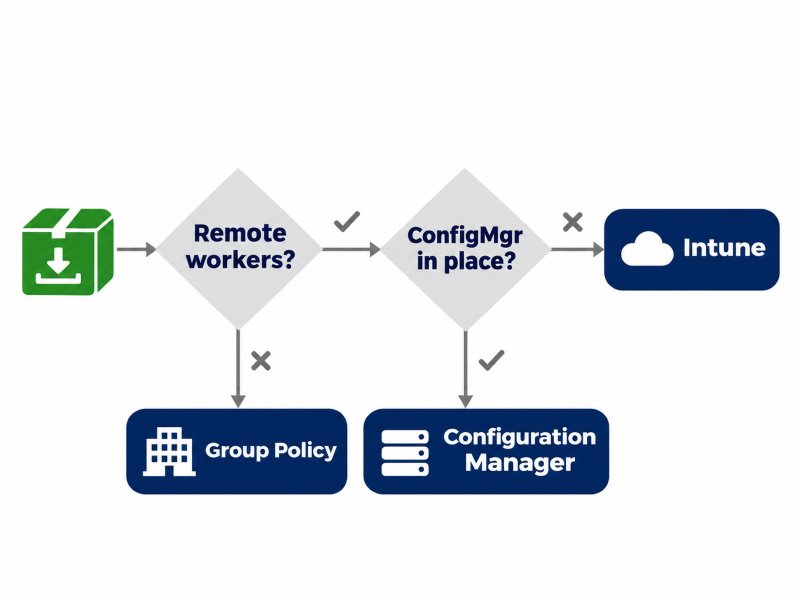
To deploy TSPrint at scale, install TSPrint Server silently on each session host (no reboot needed) and push TSPrint Client to every endpoint with the MSI package, using msiexec /i TSPrintMSI.msi /qn through Group Policy, Intune or Configuration Manager. Clients are not licensed separately, need no open firewall ports, and update themselves when they connect to an upgraded server.
Below: the architecture and licensing that shape a large rollout, exact silent install commands, deployment with Group Policy, Intune and Configuration Manager, session host images, a staged rollout plan, the Windows Protected Print trap, and when native RDP printing is enough.
What Do You Need to Install to Deploy TSPrint?
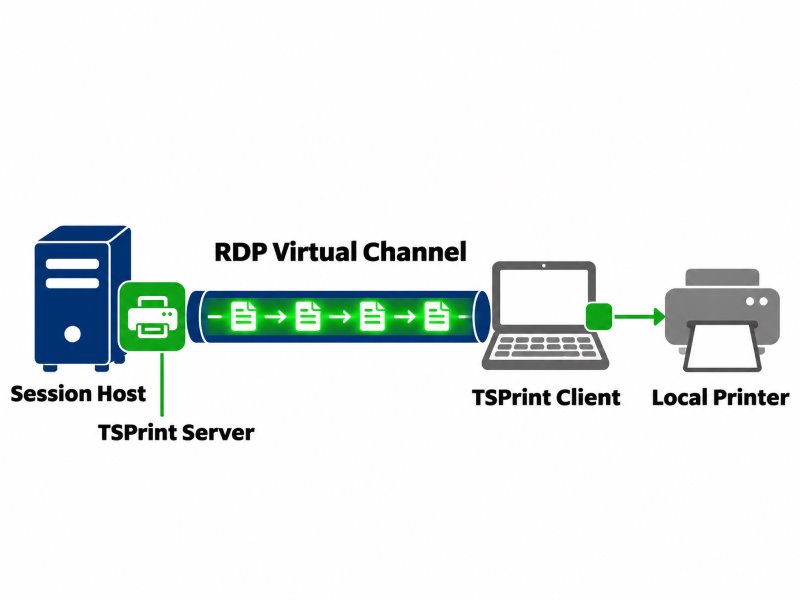
TSPrint has two parts. TSPrint Server runs where the remote session lives: an RDS session host, an Azure Virtual Desktop or Windows 365 VM, or a Citrix server. It installs one set of virtual printers (TSPrint Default, TSPrint Printer, TSPrint PDF and printers created by Dynamic Redirection), so you never stage a manufacturer driver for every printer model your users own. TSPrint Client runs on every device users connect from and hands each job to the real local printer, which prints with its own driver.
The client is required because of how the job travels. TSPrint sends print data over Microsoft virtual channels inside the existing RDP connection, which is why no port has to be opened. A virtual channel needs an endpoint on both sides: the server component writes the job into the channel, and the client component reads it and passes it to the local spooler.
Licensing shapes the whole plan. TSPrint is licensed per server with a perpetual license, and client installations are not licensed separately. The Per User edition ($79 per user) counts concurrently connected users on the licensed host; the Unlimited edition costs $399 per server. At November 2026 list prices, Unlimited is cheaper from the sixth concurrent user on a host (6 × $79 = $474). Rolling out to 500 or 50,000 endpoints does not change your license count. The number of session hosts does.
| Component |
Where it runs |
Installer |
Licensed? |
| TSPrint Server 3.2.4.34 |
Each session host or VDI image |
TSPrint_server.exe (22.95 MB, Inno Setup) |
Yes, per server |
| TSPrint Client 3.2.4.34 |
Every Windows endpoint, x64 and ARM64 |
TSPrint_client.exe (22.17 MB) or TSPrintMSI.msi (39.9 MB) |
No |
| Alcedo RDP |
Apple silicon Macs and Linux endpoints |
Mac App Store; .deb, .rpm or AppImage |
No |
What Are the TSPrint Silent Install Commands?
TSPrint Server
The server installer is an Inno Setup EXE. Run it elevated:
TSPrint_server.exe /VERYSILENT /SUPPRESSMSGBOXES /NORESTART /LOG="C:\Windows\Temp\TSPrintServer.log"
Per the Inno Setup documentation, /VERYSILENT hides the wizard and progress window, /SUPPRESSMSGBOXES answers message boxes with their default, and /LOG="file" writes a log to a fixed path. No server reboot is required. To upgrade, install the new version over the old one, which keeps the current license in place. If your scripts target an older build, note that 3.2.4.34 (June 2026) includes a fix for TSPrint Server silent installation.
TSPrint Client: EXE or MSI?
Both client installers contain the x64 and native ARM64 binaries. The MSI is built for Group Policy, Configuration Manager and other deployment tools, and it is the right choice for anything that tracks software by MSI product code.
One timing rule matters at scale: our usage guide says to log off from any remote session completely before installing the client. The RDP client loads its virtual channel plugins when it starts, so a session that is already open will not use a freshly installed client. Schedule installs at device startup or in a maintenance window.
| Task |
Command |
| Server install |
TSPrint_server.exe /VERYSILENT /SUPPRESSMSGBOXES /NORESTART |
| Client install (MSI) |
msiexec /i TSPrintMSI.msi /qn /norestart /l*v C:\Windows\Temp\TSPrintClient.log |
| Client install (EXE) |
TSPrint_client.exe /VERYSILENT /SUPPRESSMSGBOXES /NORESTART |
| Client uninstall (MSI) |
msiexec /x TSPrintMSI.msi /qn |
A warning about Chocolatey: of the two community-maintained packages, tsprint is still at version 2.0.0.8 from December 2014, while tsprintclient downloads the current installer from our site. Internalize the package and pin the version you tested.
How Do You Deploy the TSPrint Client with Group Policy?
Group Policy Software Installation (GPSI) can only assign Windows Installer packages, which is one reason the MSI exists:
- Copy
TSPrintMSI.msi to a share and give Domain Computers read access. The computer account installs the package at startup.
- Create a GPO linked to the OU that holds your endpoint computers.
- Under
Computer Configuration > Policies > Software Settings > Software installation, add a package by UNC path (never a mapped drive) and choose Assigned.
- Restart a pilot machine and confirm with
gpresult /r and the Application event log.
Expect more than one restart. Software Installation requires synchronous processing, and with Fast Logon Optimization (the default) policy applies asynchronously, so it can take several restarts or sign-ins before the package installs. The policy Always wait for the network at computer startup and logon forces synchronous processing, but Microsoft warns against enabling it globally because it delays startup and sign-in.
That timing is where GPSI breaks at scale. Software Installation runs only at computer startup and user sign-in, so a laptop that boots at home never processes it until it starts on the corporate network or on a VPN that connects before sign-in, and there is no central success report. A Microsoft engineer writing on enterprise boot performance recommended avoiding GPSI in favor of tools like Configuration Manager. In our experience, GPSI works for office desktops at one or two sites; fleets with remote workers belong in Intune or Configuration Manager. Also leave Uninstall this application when it falls out of the scope of management off, or moving a computer to another OU removes TSPrint.
How Do You Deploy the TSPrint Client with Microsoft Intune?
Win32 App or Line-of-Business App?
An Intune line-of-business (LOB) app accepts only one command-line argument, and Microsoft notes that Windows Autopilot does not support mixing Win32 and LOB apps (Autopilot device preparation does). Most tenants already deploy Win32 apps, so package TSPrint as a Win32 app.
Packaging and App Settings
- Wrap the MSI with the Win32 Content Prep Tool:
IntuneWinAppUtil.exe -c C:\Pkg\TSPrint -s TSPrintMSI.msi -o C:\Pkg\Out
- Install command:
msiexec /i TSPrintMSI.msi /qn /norestart
- Uninstall command:
msiexec /x {ProductCode} /qn, using the product code from your test install.
- Install behavior: System.
- Requirements: select both x64 and ARM64. Since June 2025, Intune targets ARM64 separately, and selecting x64 alone no longer reaches ARM64 devices.
- Assign as Required to device groups, pilot group first.
Use a Detection Rule That Survives Self-Updates
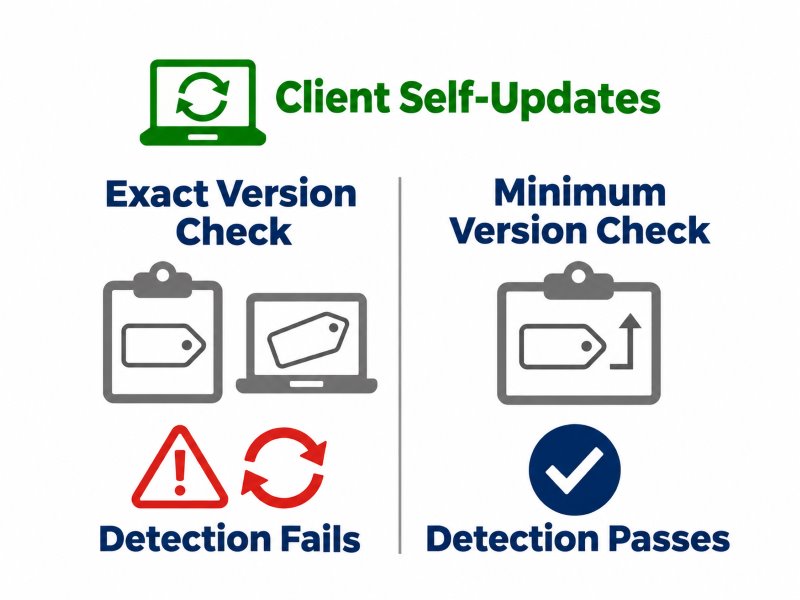
This is the setting most worth getting right. Since TSPrint 3.0, clients update themselves the next time they sign in to an upgraded server. If your detection rule checks the MSI product code with MSI product version check set to Yes, a self-updated client can fail detection, and Intune reports an error or tries to reinstall the older package. Detect on the TSPrint client executable instead, using String (version) with Greater than or equal to the version you packaged, and confirm on a pilot device that a self-updated client still passes.
Plan the Bandwidth
At 39.9 MB per device, 5,000 endpoints pull roughly 200 GB. Intune Win32 content works with Delivery Optimization, and Microsoft Connected Cache on Configuration Manager distribution points can cache it. Turn on peer caching for branch offices before widening the assignment.
What About Configuration Manager, Winget and RMM Tools?
In Configuration Manager, create an application with a Windows Installer deployment type and the same version-tolerant detection logic. The server installer is supported for SCCM deployment; use a script deployment type with the silent switches above. Microsoft documents a case where existing applications are not deployed to ARM64 devices because ARM64 is not automatically added to their supported operating systems, so add it to the requirements explicitly.
For RMM platforms, push the EXE with the Inno Setup switches and treat exit code 0 as success. For smaller fleets, the winget IDs TerminalWorks.TSPrintClient and TerminalWorks.TSPrintServer track the current release (3.2.4.34 at the time of writing), for example winget install --id TerminalWorks.TSPrintClient --exact --silent.
How Should You Deploy TSPrint Server Across a Session Host Fleet?
Add the silent server install to your image pipeline (Azure VM Image Builder, Packer, MDT or a Citrix golden image), then configure printing on the server once. This is how thousands of endpoints are controlled without touching them:
- Dynamic Redirection: choose Use Client Settings (the default), Redirect Default Printer or Redirect All Printers in Server Options. A host-level choice gives every user the same behavior regardless of client settings.
- Default printer for all users: pick the session default, or None to let Windows decide.
- Installed printers: enable only the virtual printers you support. TSPrint PDF can be restricted to approved save and send locations.
- Printer Manager: create printers assigned to AD users or groups, such as a Windows Driver printer for a warehouse group using Dymo label software.
Turn off native printer redirection on the hosts, or users see every printer twice: enable Computer Configuration > Administrative Templates > Windows Components > Remote Desktop Services > Remote Desktop Session Host > Printer Redirection > Do not allow client printer redirection, or set redirectprinters:i:0 on Azure Virtual Desktop host pools. Duplicate printers and unexpected default printer changes are two of the most common post-rollout questions in our support queue, and both are fixed on the host.
Plan licensing before you automate rebuilds. Each TSPrint Server installation generates its own Hardware ID, and the license file is generated for that ID and loaded through License Registration. If your host pools are rebuilt from an image on a schedule, contact our support team before rollout so license handling fits your rebuild cycle.
The Windows Protected Print Trap
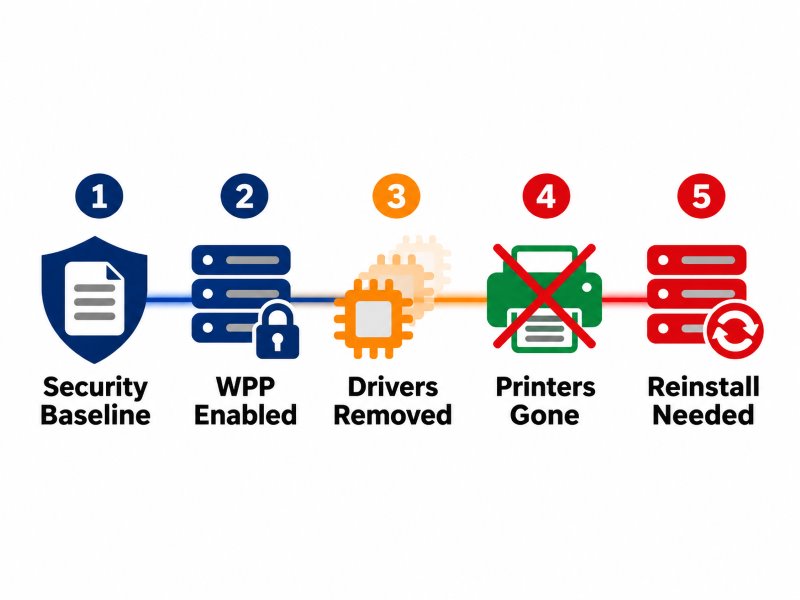
Windows Protected Print mode (WPP) is available on Windows 11 24H2 and Windows Server 2025. When it is turned on, printers that use third-party drivers are uninstalled and their drivers are deleted from the driver store. TSPrint 3.x installs its own printer drivers and port monitor on the session host, so a host that receives WPP loses its TSPrint printers, and TSPrint Server has to be reinstalled after WPP is turned off.
The risk at scale is accidental assignment. WPP is set through Computer Configuration > Administrative Templates > Printers > Configure Windows protected print or the Intune setting ./Device/Vendor/MSFT/Policy/Config/Printers/ConfigureWindowsProtectedPrint, and the CIS benchmarks for Windows 11 Enterprise and Windows Server 2025 list it as Level 2 recommendation 18.7.9. A security baseline assigned to All Devices can reach Windows 11 multi-session AVD hosts on 24H2. Exclude session hosts running TSPrint 3.x from WPP policies and document the CIS exception. TSPrint 4, currently in testing, is designed to address this; we will publish deployment guidance when it ships.
How Do You Roll Out TSPrint to Thousands of Endpoints?
Based on over a decade of working with remote desktop printing, smooth rollouts upgrade servers first and move endpoints in rings:
| Ring |
Scope |
Duration |
Exit criteria |
| 0: IT |
10 to 25 devices, one test host |
3 to 5 days |
Exit code 0, detection passes, test pages from laser, label and receipt printers |
| 1: Pilot |
About 2% of endpoints, one site per printer profile |
1 week |
No rise in print tickets; client self-update verified |
| 2: Broad |
About 25% |
1 week |
Install success above 98%; failures explained |
| 3: Full |
Remaining endpoints |
Ongoing |
Old printing method retired |
Mixed versions are safe during the transition: all TSPrint versions are compatible with each other, and older clients only lack newer features. Test every printer class you actually run, especially Zebra label printers, Dymo label software and Epson receipt printers at retail counters or healthcare registration desks.
- Windows on ARM: the native ARM64 client arrived in 3.2.4.34 (June 2026), so Copilot+ PCs no longer depend on emulation.
- Mac and Linux: Alcedo RDP, our RDP client with built-in TSPrint support, covers macOS 12.4 or later on Apple silicon and Linux on x86_64 or ARM64, with TSPrint Server 3.2.4.34 or later on the host. Mac App Store apps are normally assigned through Apple Business Manager's Apps and Books, so confirm Alcedo RDP appears in your catalog.
- Thin clients: on Windows Embedded or IoT devices with a write filter, disable the filter or use servicing mode during install, or the client disappears at the next reboot.
Native RDP Printing vs TSPrint at Scale: When Is Each the Right Choice?
| Factor |
Native redirection (Easy Print) |
TSPrint |
Other third-party tools |
| On endpoints |
Nothing extra |
TSPrint Client, or Alcedo RDP on Mac and Linux |
Vendor client or agent |
| On session hosts |
Easy Print, or matching manufacturer drivers |
One TSPrint driver set and service |
Vendor engine and drivers |
| Licensing basis |
Included with your RDS or AVD access rights |
Per session host; clients not licensed |
Varies by vendor |
| Central configuration |
Group Policy and RDP properties |
Server Options per host |
ADMX templates or MSI properties |
| Label and RAW printing |
XPS path; AVD RAW print support in public preview since August 2026 |
Windows Driver printers in Printer Manager |
Varies by vendor |
When Native Printing Is Enough
If users print mostly office documents to a few modern printers and every endpoint runs Windows, native redirection costs nothing to deploy. On Azure Virtual Desktop, label printer users can test RAW print support through the host pool RDP property SmartRawPrinters, which Microsoft lists as public preview as of August 2026. If you need print accounting or secure release, a print management platform fits better than any redirection tool.
When TSPrint Is the Better Option
TSPrint pays off with mixed endpoint fleets (x64, ARM64, Mac, Linux), many printer brands, and label or receipt printers. It also removes driver staging from hosts: since the August 10, 2021 PrintNightmare hardening (KB5005652), only administrators can install drivers through Point and Print, so native redirection with manufacturer drivers means pre-installing drivers on every host. TSPrint is not the right fit today if your session hosts must enforce Windows Protected Print.
How Competitors Handle Mass Deployment
ThinPrint Client Windows deploys as an MSI with preconfiguration through transforms and ADMX templates for central settings. Tricerat ScrewDrivers documents MSI properties that write client settings to the registry. ezeep ships EXE setups from which you extract an MSI for Group Policy or Intune. FabulaTech Printer for Remote Desktop uses a workstation MSI that takes license key and license server properties. The practical difference is where decisions live: ThinPrint and ScrewDrivers invest in client-side policy, while TSPrint keeps the client close to configuration-free and moves printing decisions to the session host.
Frequently Asked Questions
Yes. The TSPrint Client is available as a 39.9 MB MSI that includes x64 and native ARM64 binaries and is intended for Group Policy, Configuration Manager and other deployment tools. Install it silently with msiexec /i TSPrintMSI.msi /qn /norestart. TSPrint Server ships as an Inno Setup EXE that installs silently with /VERYSILENT /SUPPRESSMSGBOXES /NORESTART and supports SCCM deployment.
No. TSPrint is licensed per server, and client installations are not licensed separately. The Per User edition ($79 per user) counts concurrently connected users on the licensed host, while the Unlimited edition ($399 per server) has no user limit. At those prices, Unlimited is cheaper once a host has six or more concurrent users.
TSPrint Server does not require a server reboot. For the client, pass /norestart (MSI) or /NORESTART (EXE) so your deployment tool controls restarts. What matters more is that users are fully logged off from remote sessions during the client install, because an RDP client that is already running will not load the new plugin.
Since TSPrint 3.0, clients update automatically the next time they sign in to a session host running a newer TSPrint Server. You upgrade servers by installing the new version over the existing one, and endpoints follow. All TSPrint versions are compatible with each other, so mixed versions during the transition are safe, as long as your detection rule accepts newer versions.
Yes. TSPrint 3.2.4.34 (June 2026) added a native ARM64 client, and both the EXE and MSI include it. In the Intune Win32 app, select both x64 and ARM64 under operating system architecture, because selecting x64 alone has not targeted ARM64 devices since June 2025.
No. TSPrint uses Microsoft virtual channels, so print data travels inside the RDP connection you already have, along whatever path that connection takes. That makes mass deployment simpler, because there are no per-site firewall changes to coordinate.
In most deployments, yes, or users see each local printer twice in the session. Enable Do not allow client printer redirection under the Remote Desktop Session Host Printer Redirection policies, or set redirectprinters:i:0 on Azure Virtual Desktop host pools. If you migrate gradually, keep native redirection only on hosts that still serve users without the TSPrint client.
On session hosts running TSPrint 3.x, yes. Enabling Windows Protected Print uninstalls printers that use third-party drivers and deletes those drivers, including the TSPrint printers, and TSPrint Server must be reinstalled after WPP is turned off. Exclude session hosts from WPP policies and from CIS recommendation 18.7.9; TSPrint 4, currently in testing, is designed to address this.
Summary
Deploying TSPrint at scale comes down to three steps: install TSPrint Server silently in your session host build, push the TSPrint Client MSI through Group Policy, Intune or Configuration Manager with a detection rule that accepts newer versions, and make printing decisions in Server Options instead of on endpoints. Because clients are not licensed and update themselves from upgraded servers, endpoint count stops driving cost and maintenance. Before rollout, keep Windows Protected Print off session hosts that run TSPrint 3.x. You can test the complete workflow with a full 25-day trial.
Download TSPrint (25-day free trial) | Purchase TSPrint licenses
Sources
Microsoft Learn and Terminalworks product pages are revised continuously and are listed without dates; all sources were reviewed on 25 November 2026.
- Terminalworks: TSPrint downloads, system requirements and release history
- Terminalworks: TSPrint licensing and pricing
- Terminalworks: TSPrint Usage Guide (PDF)
- Terminalworks: TSPrint support FAQ
- Terminalworks: Hardware ID
- Terminalworks: TSPrint 3.0, What's New (1 February 2017)
- Terminalworks: TSPrint with a Whole New Look (10 February 2021)
- Inno Setup: Setup Command Line Parameters
- Windows Package Manager: TerminalWorks.TSPrintClient 3.2.4.34 manifest
- Chocolatey: tsprint package and tsprintclient package
- Microsoft Learn: Win32 app management in Microsoft Intune
- Microsoft Learn: Add, assign, and monitor a Win32 app in Microsoft Intune
- Microsoft Learn: Add a Windows line-of-business app to Microsoft Intune
- Microsoft Learn: What's new in Microsoft Intune, ARM64 support for Win32 apps (week of 9 June 2025)
- Microsoft: Understand the Effect of Fast Logon Optimization and Fast Startup on Group Policy
- Microsoft Learn: Diagnose discovery, connectivity, timing, and performance (Group Policy)
- Microsoft blog archive: Windows Enterprise Client Boot and Logon Optimization, Part 18, Group Policy
- Microsoft Learn: Applications aren't deployed to Windows 10 ARM64 devices in Configuration Manager
- Microsoft Learn: Overview of Windows protected print mode
- Microsoft Learn: Windows protected print mode for enterprises
- Microsoft Learn: End of servicing plan for third-party printer drivers on Windows
- Tom's Hardware: Microsoft clarifies Windows 11 printer driver policy
- Tenable: CIS Microsoft Windows 11 Enterprise v5.0.1 L2, 18.7.9 Configure Windows protected print
- Tenable: CIS Microsoft Windows Server 2025 v2.0.0 L2 MS, 18.7.9 Configure Windows protected print
- Microsoft Support: KB5005652, Point and Print default driver installation behavior (updates from 10 August 2021)
- Microsoft Learn: Configure printer redirection over the Remote Desktop Protocol
- Microsoft Learn: What's new in Azure Virtual Desktop (RAW print support, August 2026)
- ThinPrint: Unattended installation of ThinPrint Client Windows
- ThinPrint: ThinPrint Client GPO
- Tricerat: Silent Install Switches (v7.0 or newer)
- Tricerat: Installation Guides
- ezeep: Unattended installation
- FabulaTech: Printer for Remote Desktop Workstation, mass deployment and pre-configuration


